© Boule Medical AB, March 2018. Article no. 1504496 Page 53
7. Menu Structure and Advanced Setup
Advanced Parameter Setup
Advanced Parameter Setup
Initial advanced setup of the analyzer has been factory set to default values. However, other operator
denable formats may be preferred. Details on how to install and congure these parameter are
provided in this section. See gure 81–gure 84 for guidance to specic menus.
Quick Functions
In this screen, a set of Quick Function buttons have been selected for the user to be able to select
common occurring functions quickly. Simply select the required function button and the action will
automatically begin.
Setup Menus
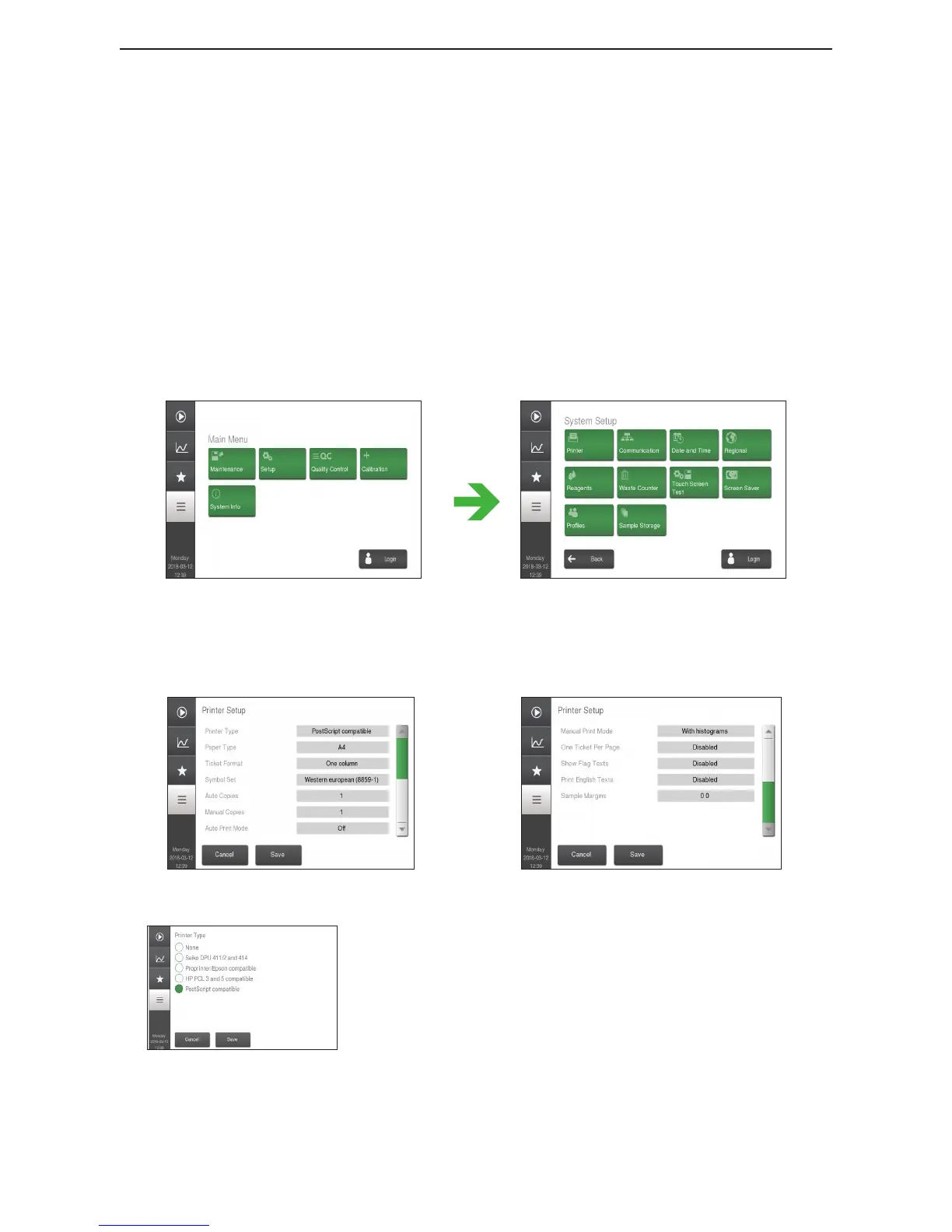
Figure 76: Main Menu Figure 77: Setup Menu
X Printer Setup
In the Printer Setup menu the user is able to further dene print format settings:
Figure 78: Printer Menu A
Figure 79: Printer Menu B
Figure 80: Printer Type
Pr inter Ty pe
Printer Type aects available selections for Paper Type,
Ticket Format, Symbol Set, Auto Copies and Manual
Copies. When changing Printer Type these settings could be
changed automatically to valid selections.
To change the setting, select the circle next to the printer
type, press Accept, and then Save.



 To Next Page