Page 40 © Boule Medical AB, March 2018. Article no. 1504496
5. Quality Control
Quality Assurance Functions
Control and Calibrator Search Function
The operator can search for previous control and calibrator analyses, view statistics, and print/send
QC samples and summary reports.
X QC Results and Search Function
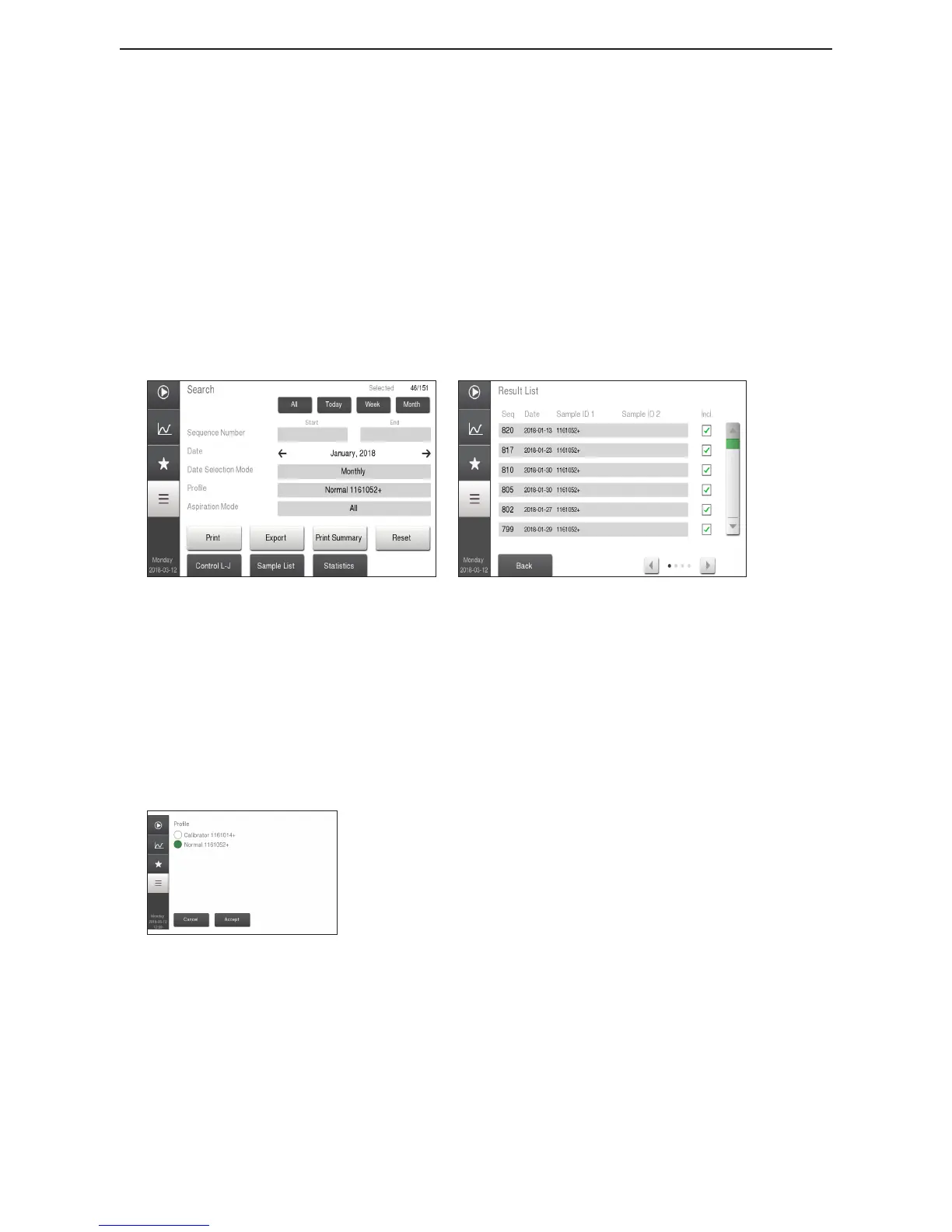
1 Enter QC Search Mode Go to Main Menu and select Quality Control Menu.
Select Control L-J and then Search.
2 View Results To view a specic QC sample result, select Sample List, and
then press on eld with desired sample result.
Figure 54: Search Menu
Figure 55: Sample List
3 Quick View of Results Quick View buttons can be used to group QC samples into
specic time periods.
All
Tod ay
Week
Month
4 QC Search Function
Figure 56: Prole selection
In Search mode the operator can search for QC samples using
specic search criteria.
Select the Search eld, in lower right-hand corner.
Press the eld to the right of the following criteria to narrow
search and then press Accept to view search criteria.
− Start Sequence number – End Sequence number
− Date (Either Start Date – End Date or Month/Year)
− Date Selection – Choose Continuous or Monthly
− Prole (Selecting Prole allows the user to search by
Lot number.)
− Aspiration Mode
Press Reset button to return to default search criteria.
Press Sample List button to return to list.



 To Next Page