CFI EXTEL WESV 82500 - 12/2011 - V1
*%
CFI EXTEL WESV 82500 - 12/2011 - V1
*%
1 SAFETY INSTRUCTIONS .................p.3
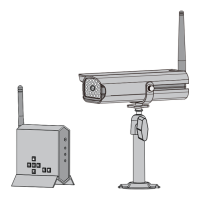
2 COMPOSITION OF THE KIT ...........p.4
3 TECHNICAL CHARACTERISTICS ....
.....................................................................p.4
a. Monitor (SVMN 82500)
b. Camera (SVCM 82501)
4 INSTALLING THE CAMERA ............p.5
a. Description of the camera
b. Installing the camera
c. Fixing the camera bracket
d. Connecting the camera
e. Infrared lighting system
f. Additional cameras
g. Pairing of the camera(s)
5 INSTALLING THE MONITOR ....... p.8
6 FUNCTION AND USE OF THE KIT
....................................................... p.9
a. Commissioning
b. Connecting the cameras
c. Associate the camera to the monitor
d. Display of the camera(s)
e. Setting the sound level
f. Scan Time or QUAD function
g. Setting screen
h. Zoom function
i. Quality of the signal
j. Using the remote control unit
7 DISPLAY ON OTHER PERIPHERAL
(TV OR PC)
......................................... p.14
a. Connecting the monitor of the kit to a TV
b. Connecting the monitor of the kit to a PC
8 USING THE KIT WITH A PC ....... p.15
a. Installing the software with the cd-
rom supplied “GUARDING HOME
EDITION”
b. Connecting the monitor
c. Presentation of the software “Enreg.
protection”
I - INDICATOR OF CAMERA CONNECTION AND
SOUND
II - SAFETY SETTINGS
a. Motion detection
b. Programming record events
c. Programming recording directory
III - VIDEO CAPTURE
IV - TAKING PICTURES
V - LIST EVENTS
VI - CONFIGURATION OF THE DISPLAY
a. Device: non used
b. Display
c. Language
VII - ABOUT? SOFTWARE VERSION
VIII - ZOOM / DIRECTION CONTROL PANEL
9 MAINTENANCE ..............................p.25
10 TROUBLESHOOTING ..................p.25
11 SAFETY INSTRUCTIONS ..............p.26
12 FCC/CE WARNING ........................... p.27
1. SAFETY INSTRUCTIONS
Important !
• Please read the user manual thoroughly before installing or using this product.
• If you install this product for other people, please give the manual or a copy to the end user.
Warning :
• The different elements can only be dismantled by an authorised technician.
Safety instructions :
• To safely use this system, it is essential the fitters, users and technicians follow the safety
procedures described in this manual.
• Specific warnings and caution symbols are indicated on the elements if necessary.
Even if they are digital, the cameras are subject to interference of wireless phones,
microwave ovens and other wireless appliances operating on 2.4 GHz (WIFI for
example).
Keep the system at more than 3 m of the appliances during installation and use.
IMPORTANT
The user of this product is responsible and must check that it will be
used in accordance with the law applicable the video surveillance in
the country of use.
(In France: Ask the prefecture of your department
Outside France: Ask the authorities competent in the field of video
surveillance product use (Public Freedom Department, General
Regulation Department…)
MINIMUM REQUIREMENTS
Processor at least 1 GHz
Windows XP SP 1 - SP2 / Windows Vista / Windows 7
1 GB RAM recommended
1 GB hard disk free space
Colour monitor with 16-bit video card minimum
Monitor resolution 1024x768 min 96 dpi
Graphics card compatible with Microsoft Direct X9 or higher
CD-ROM driver for installing the software
One free USB port (1.1 or higher)
Software only compatible with this kit.
SUMMARY



 To Next Page