CFI EXTEL WESV 82500 - 12/2011 - V1
*%
CFI EXTEL WESV 82500 - 12/2011 - V1
*%
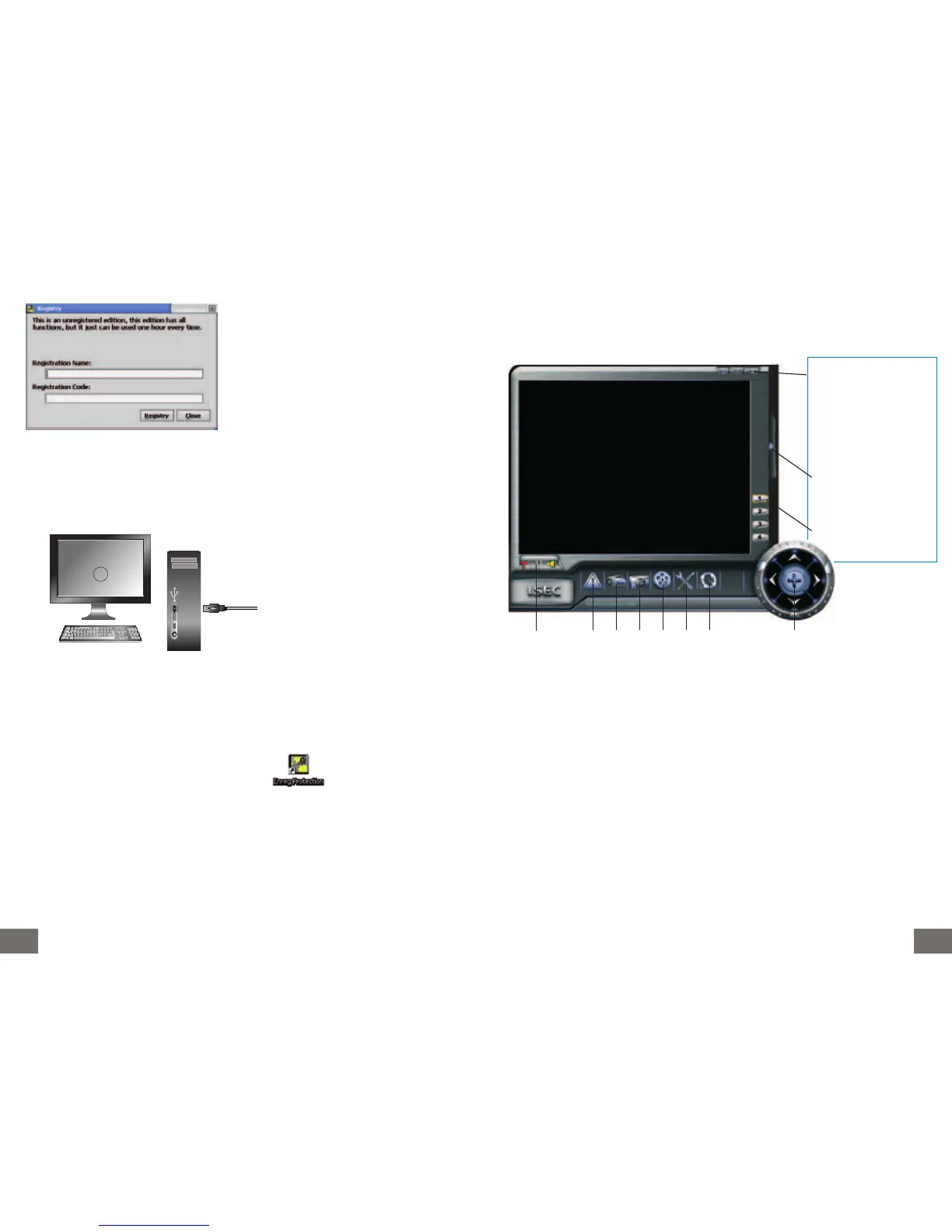
c. Presentation of the software “ENREG PROTECTION”
1. Indicator of camera connection and sound
2. Safety settings
3. Video capture
4. Taking a picture
5. List of events
6. Configuration of the display
7. About? Software version – Cap – Licence registration
8. Zoom/Direction control panel
F Insert the program on
the bar at the left lower
corner
- Reduce the program on
the task bar
x Close the program
Extension menus
Indicator of the cameras
1 2 3 4 5 6 7 8
b. Connecting the monitor
Registration of software licence :
During the installation, register the name and
the code indicated on the jacket of the sup-
plied CD-ROM, respect imperatively lower-
case and capital and the code syntax:
xx-xxxx-xxxx-xxxx-xxxx-xxxx-xxxx
Connect the USB cable (supplied with the kit) to the relevant plug at the back of the moni-
tor and to a USB port available on a PC.
Once connected a message appears at the left lower corner of the monitor indicating that
the material is ready to be used. Double click the icon which appeared on your
desktop.
2



 To Next Page