AvediaStream e2535/e3635 and e2655/e3655 Encoders V1.1
50 Administrator’s Guide
4. Click the Apply button.
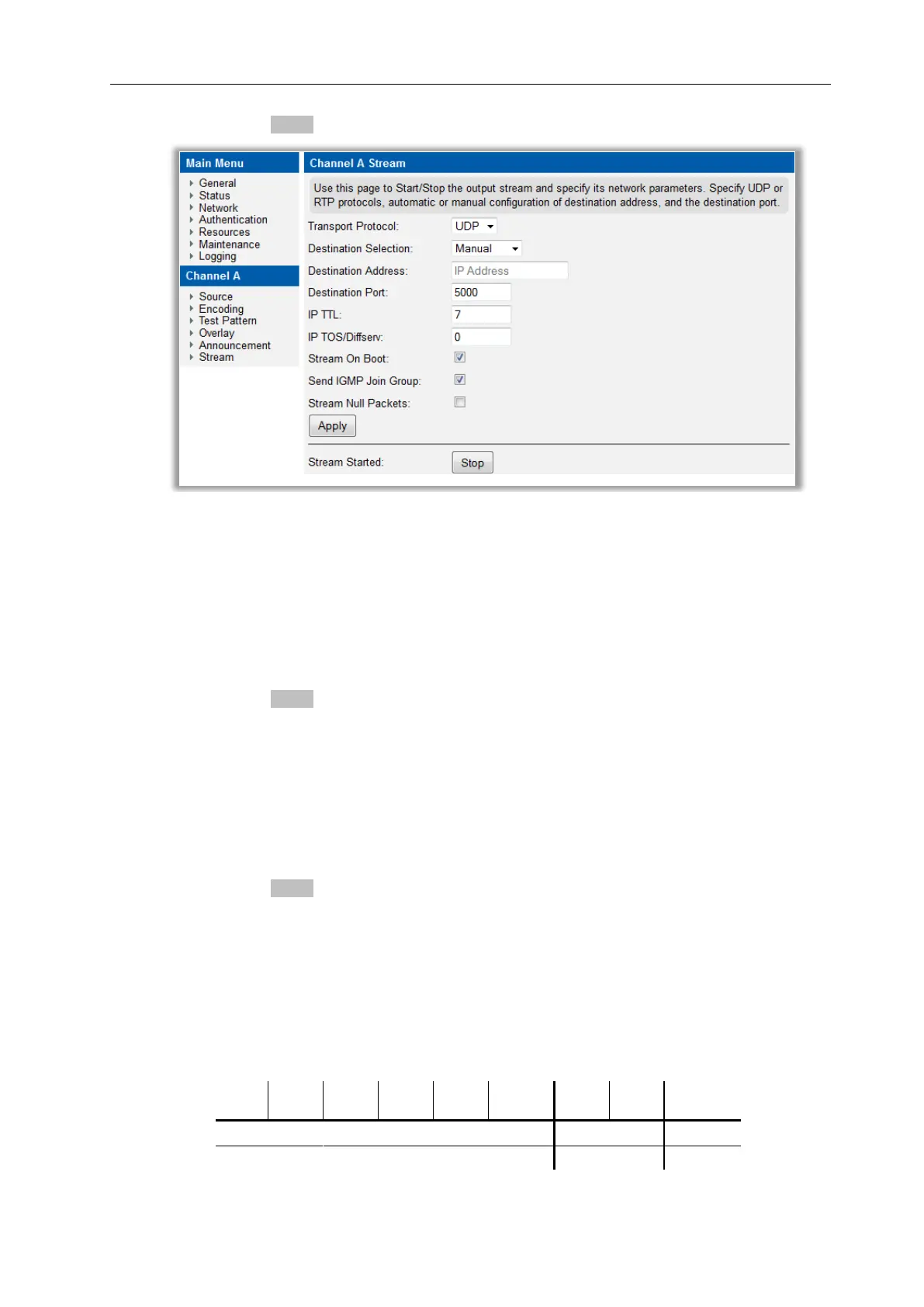
Figure 25 AvediaStream Encoder – Manual Stream Address
Port
By default, the stream is sent to the UDP port 5000. The port can be altered as required.
To specify the port:
1. Click Stream.
2. Enter a value in the Destination Port box.
3. Click the Apply button.
IP TTL
By default, the stream is transmitted with an IP TTL of 7. The TTL can be set to any value
between 0 and 255 to allow operation across different network topologies.
To specify the IP TTL:
1. Click Stream.
2. Enter a value between 0 and 255 in the IP TTL box.
3. Click the Apply button.
IP TOS/Diffserv
You can set the value of the TOS byte in the IP header. By default, the stream is sent with an
IP TOS value of 1. Note that the value can be set between 0 and 255. To configure only a
Differentiated Services Code Point (DSCP), only the upper 6 bits are required, with the 2 lower
Explicit Congestion Notification bits (ECN) set to zero.
Table 4 TOS Byte



 To Next Page