THE REMOTE CONTROL
19
ENGLISH
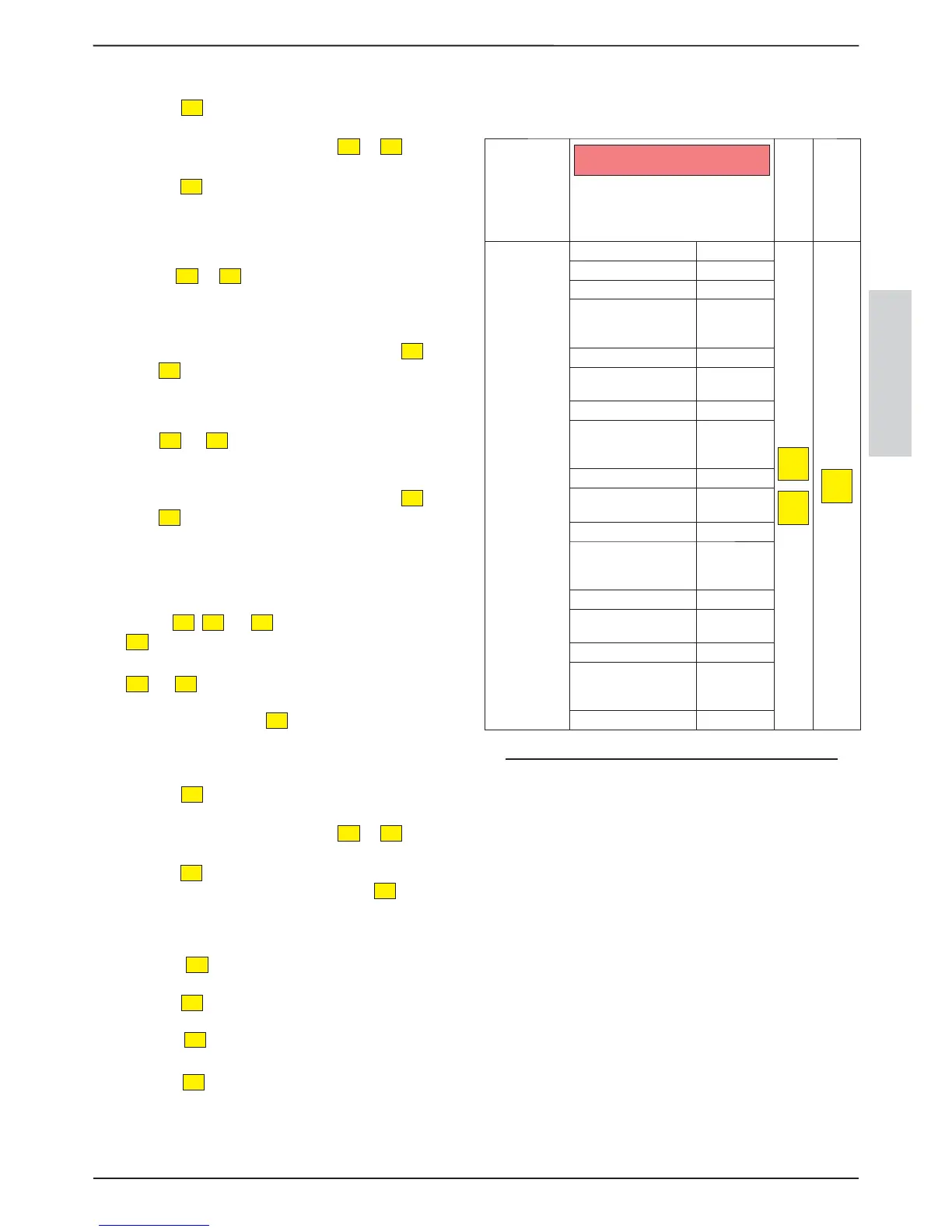
SETTING THE TEMPERATURE FOR THE FIRST TIME SPAN
press the
P5
key, SET PROG1 will appear followed by a
temperature
regulate the temperature using the
P2
or
P3
keys, SET
PRG1 will appear followed by the temperature set
press the
P5
key to pass to the second time span
At this point, the second time span must be programmed
SETTING SECOND TIME SPAN SWITCH-ON TIME
Use the
P2
or
P3
buttons to set the time “15:00”, which
corresponds to the switch-on time of the 2nd time span. The
START PRG2 scrolling text will appear followed by the time
set
To con rm and continue programming, press the
P5
button.
Press the
P4
button to go back to the previous parameter.
SETTING SECOND TIME SPAN SWITCH-OFF TIME
Use the
P2
or
P3
buttons to set the time “22:00”, which
corresponds to the switch-o time of the 2nd time span. The
STOP PRG2 text will appear followed by the time set
To con rm and continue programming, press the
P5
button.
Press the
P4
button to go back to the previous parameter.
ACTIVATION OF THE TIME SPAN FOR SELECTED DAYS AS PER
EXAMPLE
Activate the second time span for Saturday and Sunday. To do
this use the
P2
,
P3
and
P5
keys in the following way:
P5
key - scrolls the various days, the scrolling text will appear
with the day of the week, followed by OFF
P2
and
P3
key- enables/disables (ON/OFF) the 2nd time
period for that day
to change day, press the
P5
key
SETTING THE TEMPERATURE FOR THE SECOND TIME SPAN
press the
P5
key, SET PROG2 will appear followed by a
temperature
regulate the temperature using the
P2
or
P3
keys, SET
PRG2 will appear followed by the temperature set
press the
P5
key to pass to the second time span
Exit programming completely by pressing the
P1
key several
times.
DEACTIVATION OF THE CHRONO
Press the
P5
key for three seconds, SET CLOCK will
appear
Press the
P3
key once, SET CHRONO scrolling text will
appear
Press the
P5
key once, ENABLE CHRONO and ON
scrolling text will appear
Press the
P3
key once, ENABLE CHRONO and OFF
scrolling text will appear
The manual controls, from the display or remote control, always
remain priority with respect to programming.
CHRONO MENU TABLE 12.2.3.
The following table gives all weekly programmer function
parameters.
MENU
D1
VALU E
ADJUSTMENT
CONFIRMATION
KEY
SET
CHRONO
ENABLE CHRONO OFF
P2
P3
P5
START PRG1 OFF 00:00
STOP PRG1 OFF 00:00
MONDAY PRG1
OFF ...SUNDAY
PRG1 OFF
ON/OFF
SET PRG1 07 35
START PRG2
00:10
OFF 00:00
STOP PRG2 00:10 OFF 00:00
MONDAY PRG2
OFF ...SUNDAY
PRG2 OFF
ON/OFF
SET PRG2 07 35
START PRG3
00:10
OFF 00:00
STOP PRG3 00:10 OFF 00:00
MONDAY PRG3
OFF ...SUNDAY
PRG3 OFF
ON/OFF
SET PRG3 07 35
START PRG4
00:10
OFF 00:00
STOP PRG4 00:10 OFF 00:00
MONDAY PRG4
OFF ...SUNDAY
PRG4 OFF
ON/OFF
SET PRG4 07 35


 To Next Page