FX16 Master Controller Technical Bulletin
38
The integral display page reports on its rows:
• first row: Company name
• second row: Device name and Firmware version
• third row: Used to indicate the FX16 Status (for example, running
mode or stopping mode) or error codes.
• fourth row: Displays scrolling dots (for example, ….).
FX16 Master Controller Status
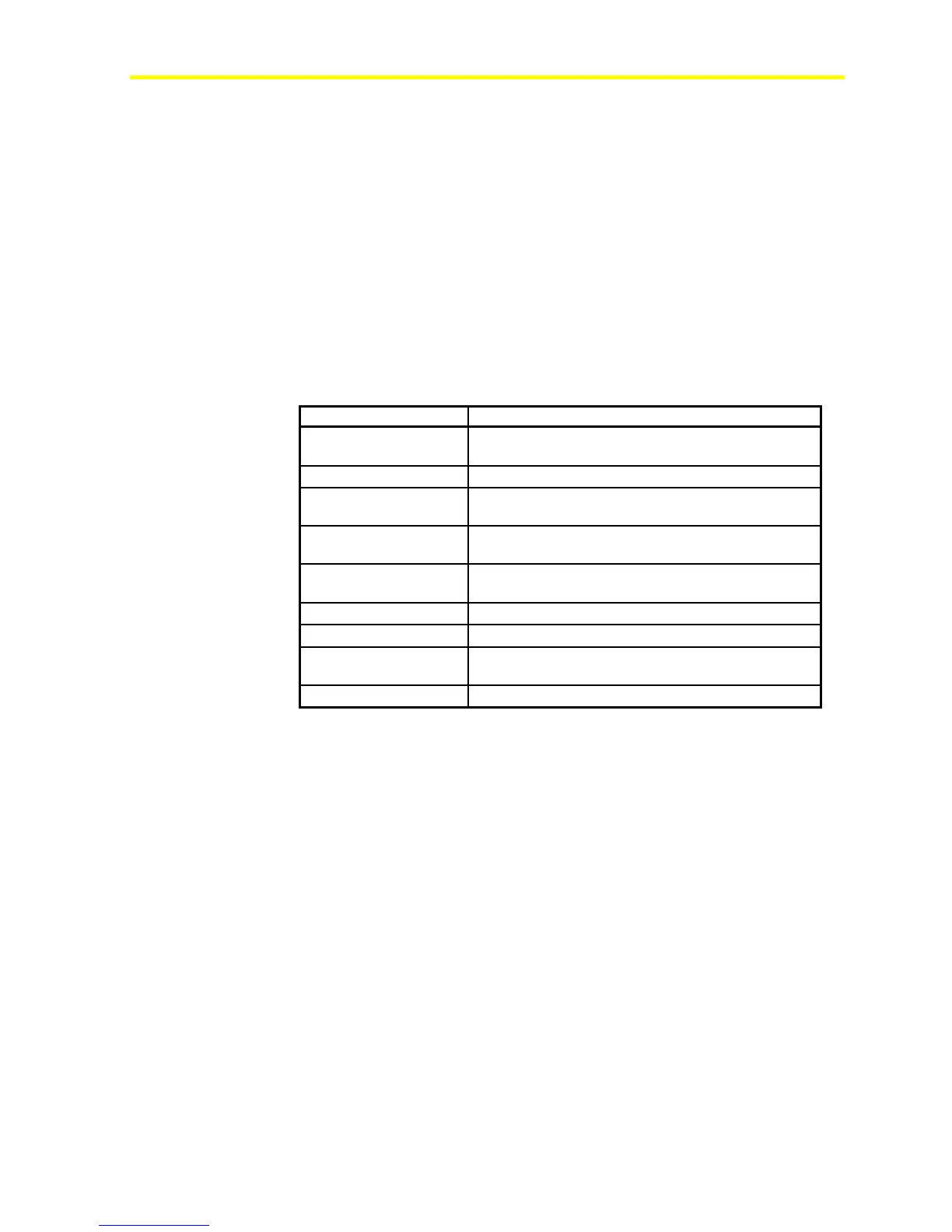
During operation, the Integral MUI shows the status of the FX16 Master
Controller on the 3rd row. See Table 9.
Table 9: Controller Status
Controller Status Description
Without the application
Waiting for a new application. No valid application was
found.
Initializing
Initializing internal structures
Stopping
Executing operations that puts the FX16 Master
Controller in idle state
Downloading
Receiving data (application or firmware) from the
communication interface (LON, N2 Open)
Polling Key
Found the programming key on the local port and is
waiting for key commands
Key Read
Uploading an application from the programming key
Key Write
Downloading its application to the programming key
Polling
Polling the local bus to detect FX Slave controllers or
Expansion Modules
Running
Running properly
On the third row of the integral display page, Error codes or diagnostic
messages appear when the FX16 detects abnormal conditions within the
system.



 To Next Page