(3) Open the Set Password Level menu. This has options for the Main
Screen and each of the menus. You can set “On” or “Off” for each
option available in the menu. “Off” doesn’t have password protection.
(4) Enter maintain password for maintenance authority.
(5) Enter a new maintain password to change maintain password.
(6) Clear password to the lowest authority.
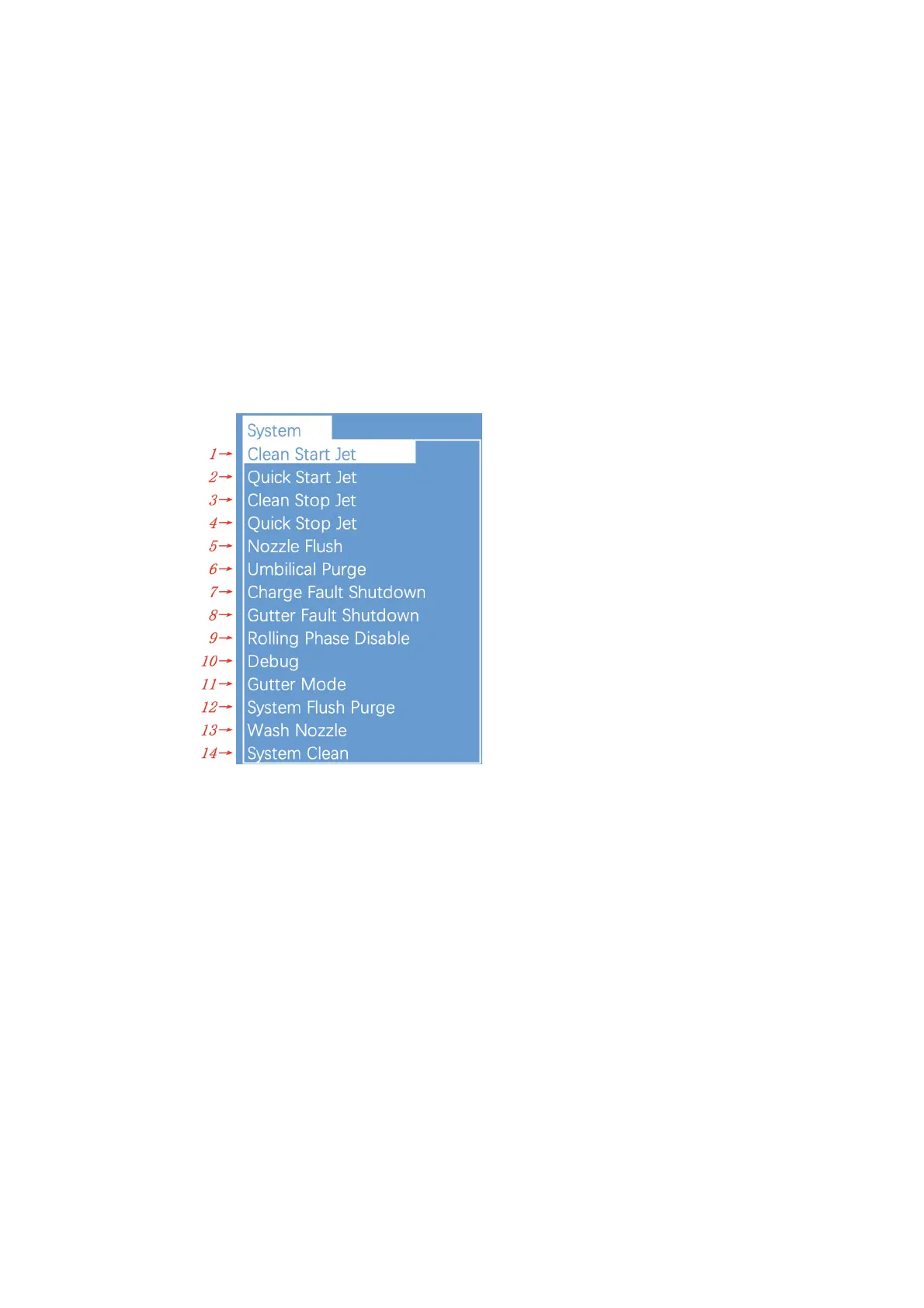
2.8.6. System
(1) Start the ink jet
(2) Quick start the ink jet without a flushing sequence.
(3) Stop the ink jet. Clean the nozzle and related tubes.
(4) Quick stop the ink jet without a flushing sequence.
(5) Clean nozzle with solvent manually
(6) Clean the umbilical. It can be used to install the inkjet printer to
exhaust air.
(7) This Function can turn off the automatic stopping jet when charge
fault.
(8) This Function can turn off the automatic stopping jet when gutter fault.
(9) Disable/Enable rolling phase.


 To Next Page
 Loading...