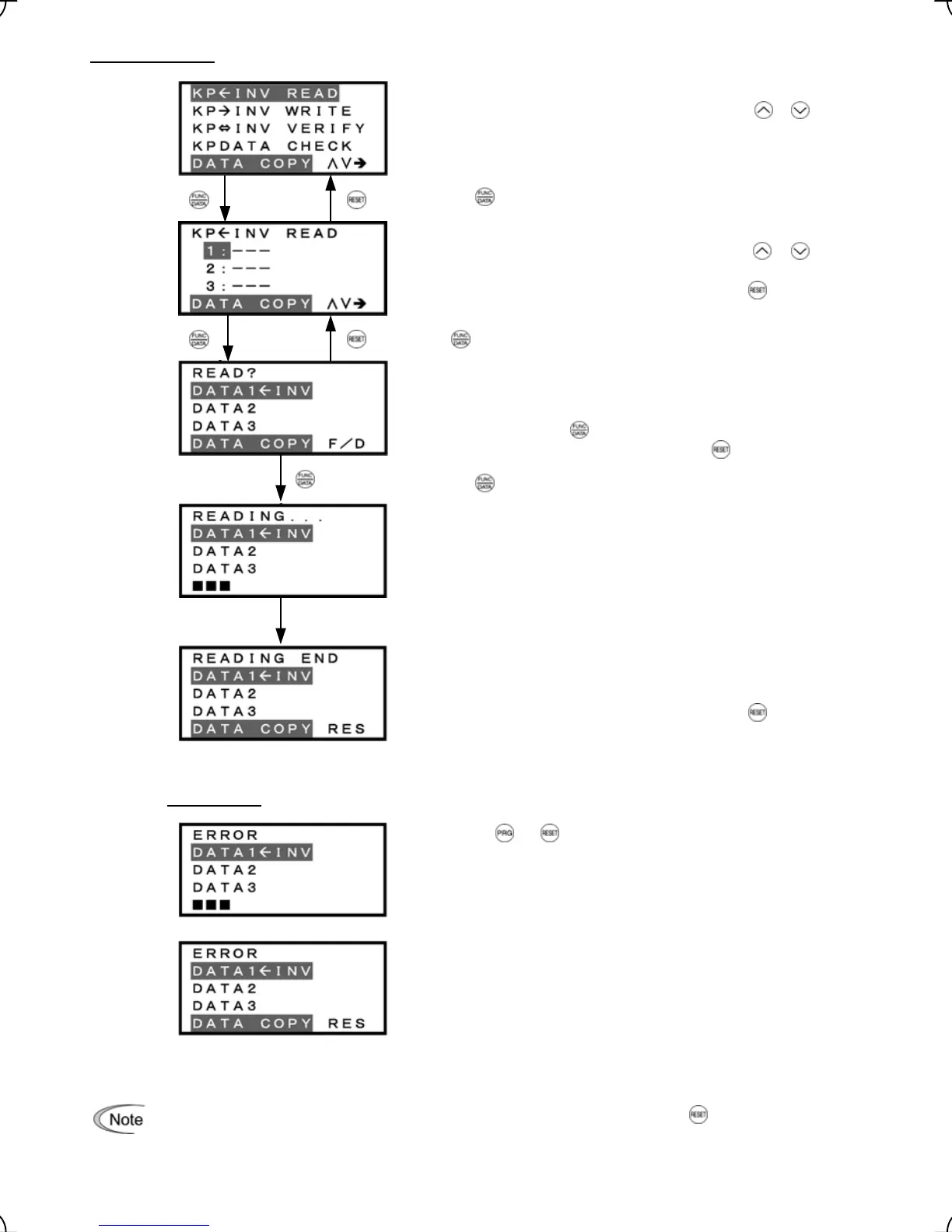
2) Read Operation
List of data copy operations
Select the target operation by moving the cursor with
/
keys.
Data selection screen
Select the target data by moving the cursor with
/
keys.
To go back to List of data copy operations, press the key.
Confirmation screen
If "Read" is actually performed, the data read out from the
inverter will overwrite the data held in this memory area in the
keypad. If OK, press the
key.
To go back to Data selection screen, press the
key.
"In progress" screen
A bar indicating progress appears in the bottom.
Completion screen
This screen indicates that Read operation has completed
successfully.
To go back to List of data copy operations, press the
key.
Error screens
Pressing the or key during Read operation aborts the
operation under way and displays this error.
(Note)
Once
aborted, all the data held in the keypad’s memory would be
deleted.
If a communication error is detected between the keypad and
the inverter, this error screen will appear.
Figure 3.19 Screen Transition for "READ"
If an ERROR screen or ERROR Ver. screen appears during operation, press the key to reset the
error condition. When Reset is complete, the screen will go back to List of data copy operations.
If a communications error occurs between the keypad and inverter during Read operation, all the data
held in the keypad’s memory will be deleted.
Press the key to establish the target operation.
Press key to establish the target data.
Press the key to start Read operation.
Upon completion, Completion screen automatically appears.
3-29



 To Next Page