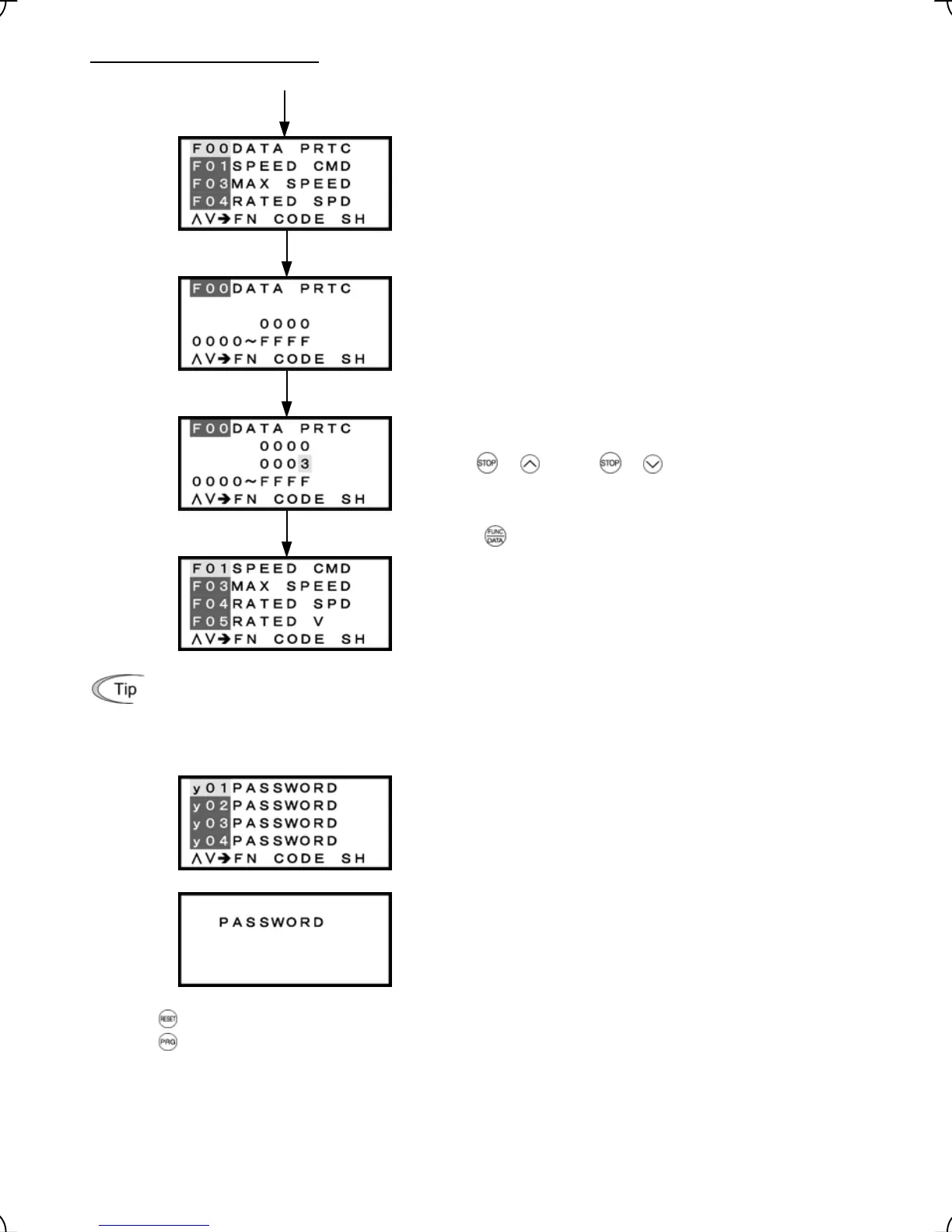
Enabling the password protection
Enter a password with the procedure given on the previous page.
Select F00 from Menu #1 "Data Setting."
Enter a password except the one preset with H99, to F00.
To change the F00 data (Data Protection), simultaneous
keying of
+ keys or + keys is required.
Press the key to establish your password entry.
The screen returns to the DATA SET one. The password
protection is enabled.
Other ways to enable password protection:
In addition to the above procedure, turn the inverter power off or leave the inverter with the password
temporarily canceled for at least four hours and then switch the inverter to Running mode or Menu.
Enabling the password protection displays "PASSWORD"
for all function codes except F00 and H03 on the DATA
CHECK screen.
Selecting any function code except F00 and H03 with the
password protection being enabled display "PASWORD."
Press the
key to return to the DATA CHECK screen.
Press the
key to return to Running mode.
Figure 3.36 Screen Transition for Setting Password Protection
3-45



 To Next Page