Chapter 8 Options
PAGE 8-6
Formatting the Memory Card
All data stored in the memory card can be erased by an operation from the indicator.
Do not extract the memory card during formatting of the memory card.
The card may become damaged and become incapable of use.
●Memory Card Formatting Procedure
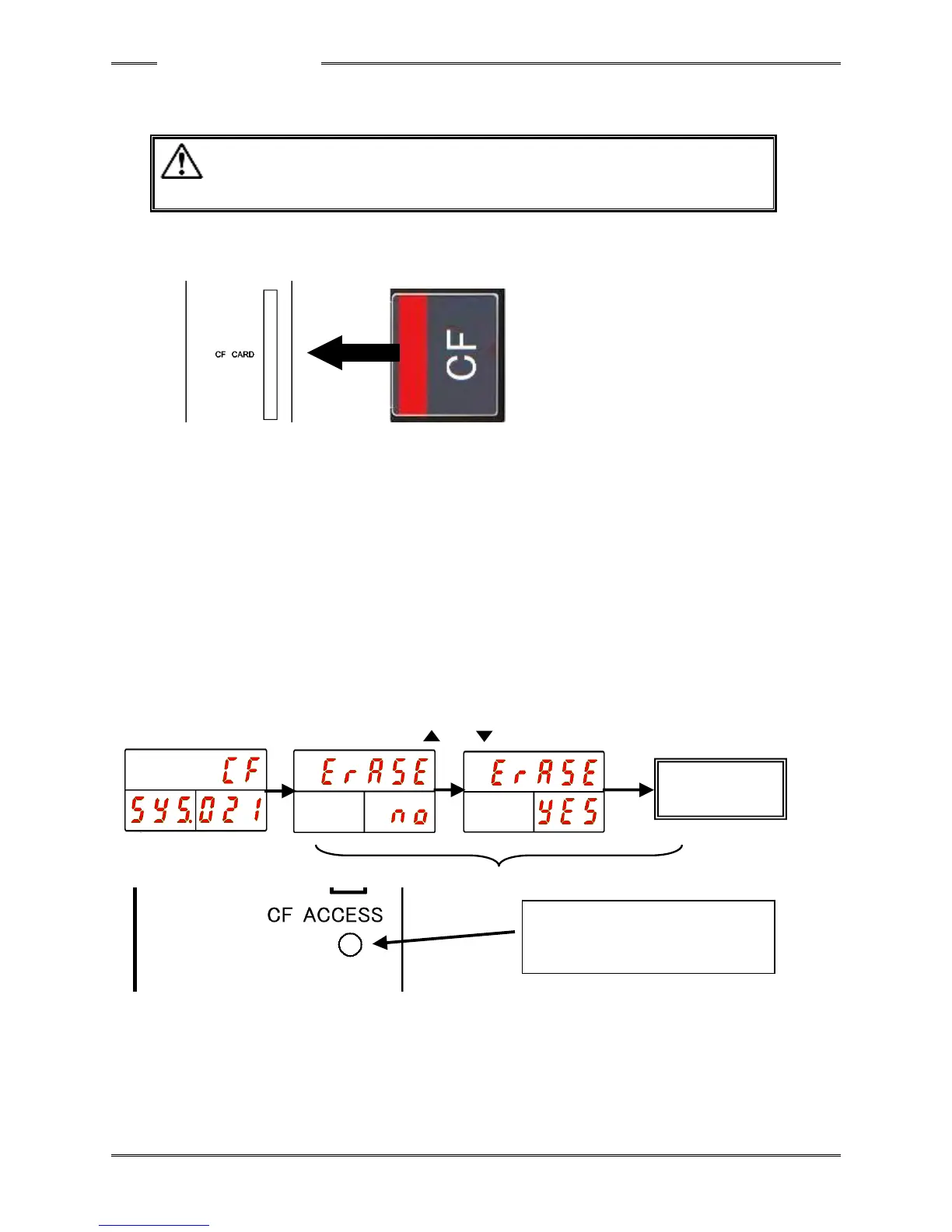
Procedure 1. Insert the memory card in the memory card slot (CF CARD) of the controller in the
state where the power of the controller is OFF.
Procedure 2. Operate the arrow switches to make “SYS” be indicated at the WORK indication part
and “021” (for “Erase Record”) be indicated at the COUNT/D-No. indication part.
Procedure 3. Long-press the PROGRAM switch on the controller Front Panel.
Set the PLC I/O input signal “BYPASS” to “ON” to put the controller in the BYPASS
mode and then press the [SET] switch.
Procedure 4. Press the “▲” or “▼” switches to select “CF” as the type of data to be erased at the
upper stage of the indicator and then press the [SET] switch.
Procedure 5. Within 2 seconds, press the“▲” and “▼” switches to change “Erase NO” to “Erase
YES” and within 2 seconds thereafter, press the [SET] switch.
Procedure 6. When the formatting is started, “Erase” at the upper stage of indicator flashes and the
lighting of the ACCESS LED in green is started. If the formatting fails, the ACCESS
LED lights up in red.



 To Next Page