58
The headset
The headset connects the fork to the frame, but allows it to move freely. It must
afford virtually no resistance to turning if the bike is to run straight, stabilizing itself
as it travels. Shocks caused by uneven road surfaces expose the headset to con-
siderable levels of stress. In this way it can become loose and go out of correct
adjustment.
Riding the bike with a loose headset increases the stress on fork and
bearings. This can lead to damage to the fork, resulting in very serious
consequences!
Checking and adjusting
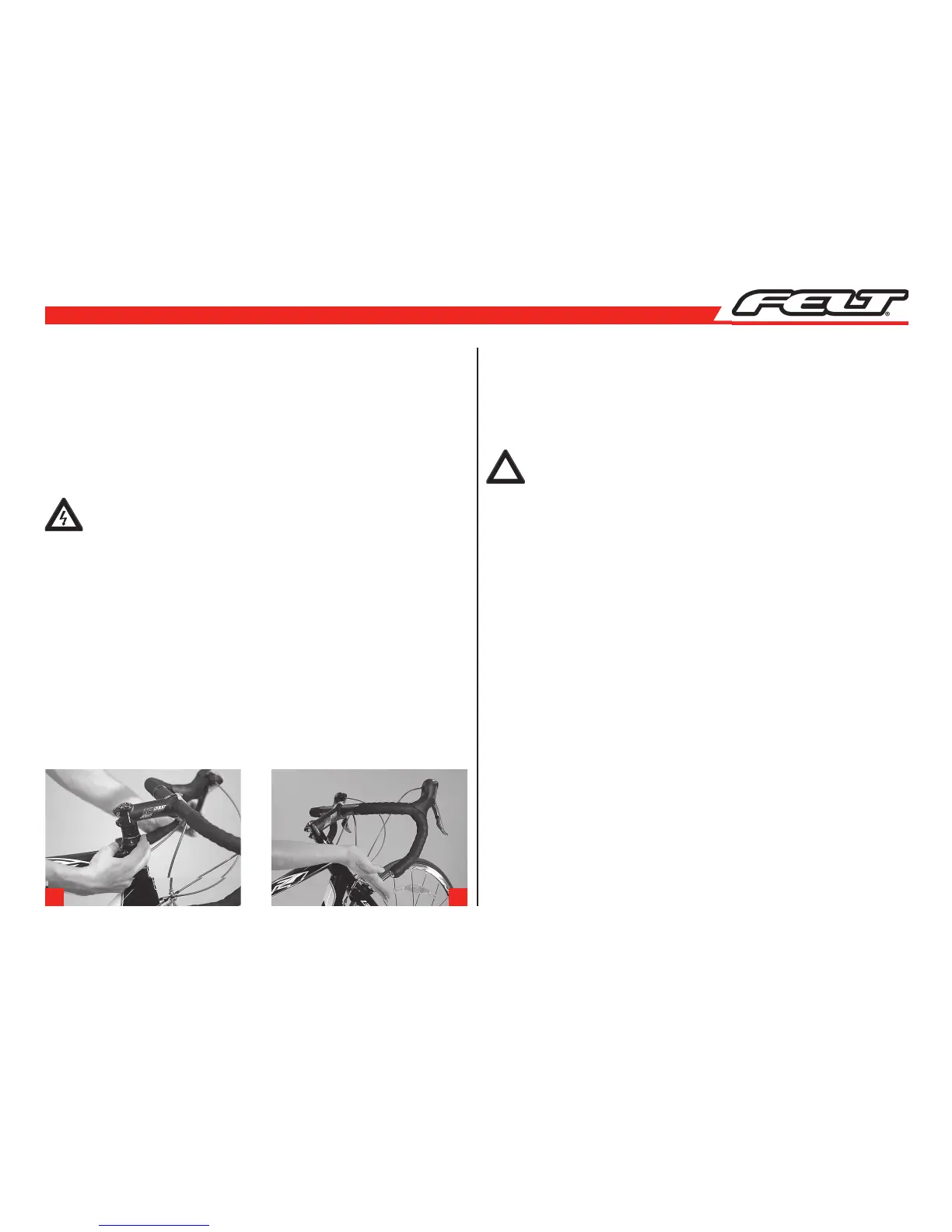
Check the headset for play by placing your fingers around the upper headset cup
and the upper bearing cap (a).
Pull the front brake with your other hand and push the bike firmly back and forth
with the wheel remaining on the ground. If the bearings have play, you will feel the
upper headset cup moving relative to the upper bearing cap – visible as a small gap
in between the cup and the cap.
To check if the bearing runs smoothly, lift the frame up until the front wheel no
longer touches the ground. Turn the handlebars from the left to the right. The
handle bars should turn very easily from far left to far right without feeling rough-
ness or tightness at any point. Turning the bars should require only a very light tap
on the grips (b).
Adjusting the headset requires a certain amount of experience and
should therefore be left to your local FELT dealer. If you want to adjust a
conventional headset you will need special tools. If you nevertheless want
to try adjusting it yourself, please read the operating instructions of the
manufacturer carefully before you do!
!!
a b



 To Next Page