-33-
Maximum 4 monitors can be connected in one apartment, one master monitor together with 3
slave monitors, so you should set the address correctly.(Note:must have one monitor to be set
as a master monitor)
• Select Master/Slave Setting item,touch
/ icon to scroll to next item,settings will perform
immediately.
Setting master/slave monitor
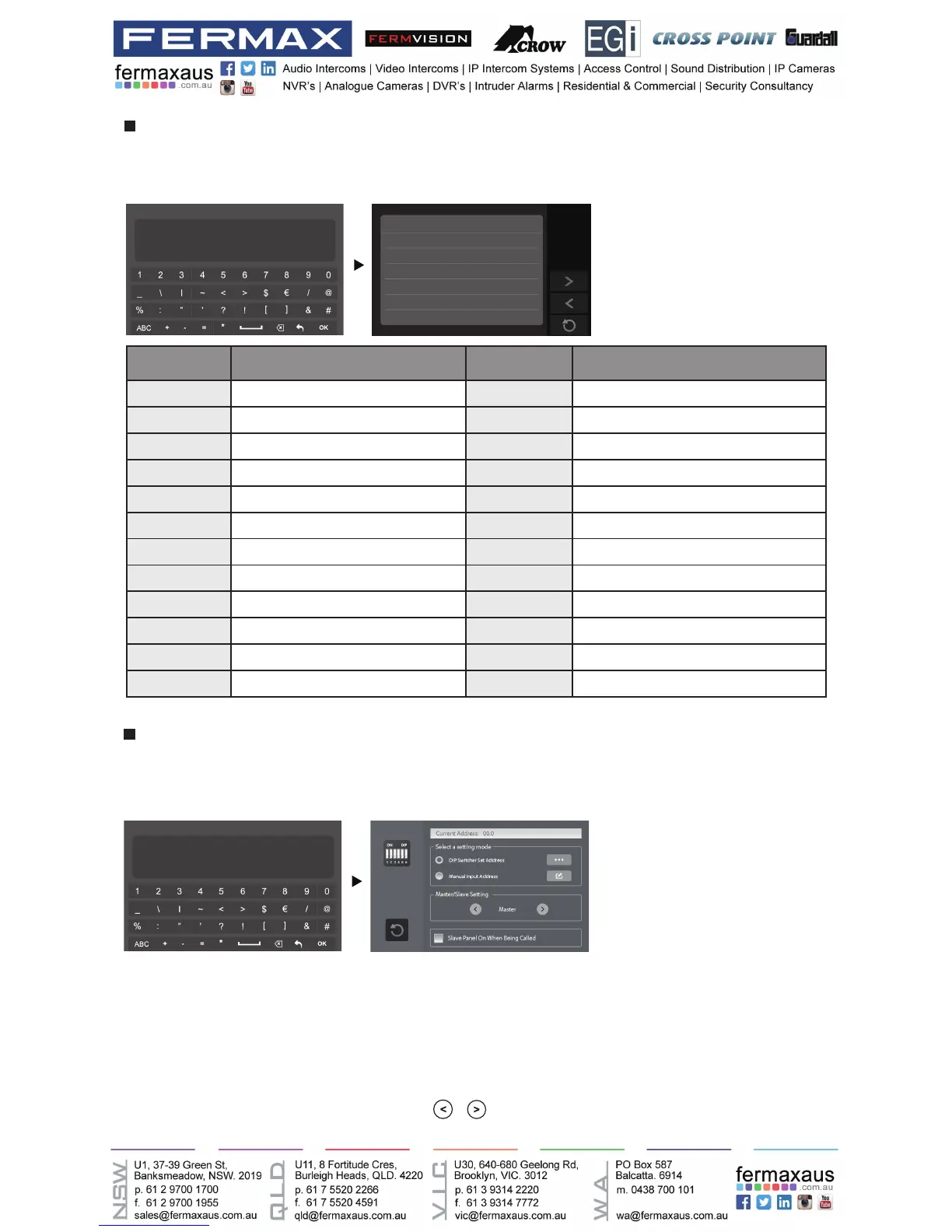
Input the key “@ and ok” to open Address Setting menu.
Refer to the followings:
Entering Address setting page
INSTALLER SETUP
123
_
? + OK: Help Menu
@ + OK: Address Setting Menu
Input the key “? and ok” to open Help instructions menu.
Refer to the followings:
Entering Help page
Help 01/04
2412:Reset to Default Setting
2499:Format Memory
2810:MCU Code Update
2811:TFT,UI Code Update
2812:Consumer Tune Update
2813:Format SD Card
INSTALLER SETUP
123
_
? + OK: Help Menu
@ + OK: Address Setting Menu
Code Setting Item Code Setting Item
2412 Reset to Default Setting 8018-8020 Video Display Standard
2499 Format Memory 8040-8050 LED Color Setting For Calling
2810 MCU Code Update 8051-8055 LED Color Setting For Standby
2811 TFT,UI Code Update 8300-8301 Auto Rec ON/OFF
2812 Consumer Tune Update 8302-8303 Manual Rec ON/OFF
2813 Format SD Card 8401-8499 Unlock Time
2910 Broadcast Namelist 9006-9007 Unlock Alert Disable/Enable
8004-8005 Guard Unit Enable 9008-9010 Tune Source For Default/Custom
8008-8009 Date Format 9011-9012 NameList First Name.”00/01”
8010-8011 Unlock Mode:Close/Open 9017-9019 Touch Key Sensitivity Adjust
8012-8013 Time Format:12 hour/24 hour 9020-9021 Hearing Aid Function On/Off
8016-8017 Bypass Enable/Disable 9030-9039 Fish Eye Control











 To Next Page