Page 17
SMILE Monitor
3.2 AUDIO SETTINGS
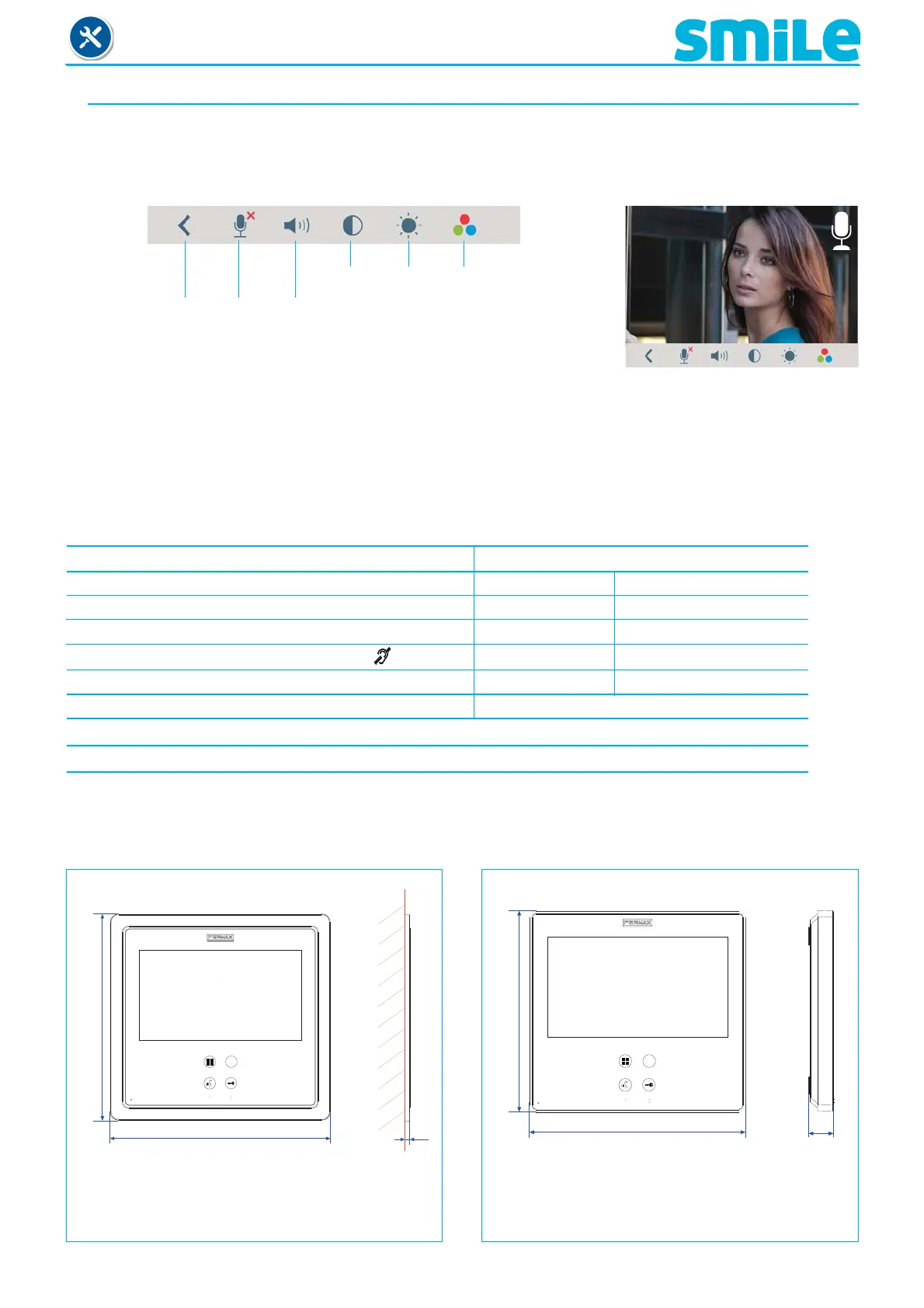
While the audio channel is open the audio´s volume can be regulated via a contextual menu on the
screen (along with the informative videos in the previous chapter). With a short press of the menu button
it appears to select the audio and video settings.
Mute: function eliminate the noise (output). When activated,
the icon will disappear from the upper right of the
screen.
Note:
- The display of the settings menu can be set by time (60 seconds) or manually via the menu.
Contrast Brightness
Colour
Exit
Adjustments
audio volume
Mute
4. TECHNICAL CHARACTERISTICS
Power supply 18 Vdc
Consumption home automation mode
standby 45 mA 190 mA
audio + video 720 mA 870 mA
audio + video with inductive loop 1050 mA
in menu 450 mA 570 mA
Operating temperature -5, +40 °C
Humidity 5% - 95%
7” touch screen
5. MONITOR SIZE
Measurement in mm.
4,5
196
209
FLUSH-MOUNTED
185
172
21
SURFACE
Note:
- Does not require decorative frame, (see
installation).
Dimensions of fl ush-mounted Fermax box ref. 6551:
186 x 198 x 46 mm (Height x Width x Depth.)












 To Next Page