Page 3
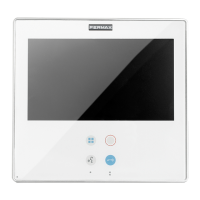
SMILE Monitor
CONTROL BUTTONS (capacitive buttons) ..............................................................................4
1.1 TOUCH SCREEN 7’’, BROWSE BUTTONS AND LED ..................................................................4
1.2 STRUCTURE AND LAYOUT OF FUNCTIONS ..............................................................................5
1.3.SHORTCUT BUTTONS .................................................................................................................6
1.4 ENABLE FUNCTIONS ....................................................................................................................6
1.5 SAVING AFTER CHANGING SCREENS OR RESET ....................................................................6
1.6 MENU BUTTON FUNCTIONS TABLE BY TIME PRESSED ..........................................................6
FUNCTIONS AVAILABLE ON THE MONITOR ...........................................................................7
2.1 DO NOT DISTURB (Cancel ring tone) ............................................................................................7
2.2 CALL GUARD UNIT ........................................................................................................................7
2.3. AUTO-START .................................................................................................................................8
2.4 DOORMATIC MODE.......................................................................................................................8
2.5 F1 FUNCTION ...............................................................................................................................9
2.6 F2 FUNCTION ................................................................................................................................9
2.7 CONFIGURATION MENU...............................................................................................................9
2.7.1 Ring tones ..........................................................................................................................10
2.7.2 Installer Menu .....................................................................................................................10
a) Accessing programming .................................................................................................10
a1) Programming from: Monitor / Panel ........................................................................11
a2) Programming the call capture from: Monitor / Panel ..............................................11
a3) Programming installer code ....................................................................................12
b) Conversation Mode ........................................................................................................12
c) Confi g. func. assigned by the menu, shortcut or wildcard buttons .................................13
c1) Do not disturb mode (see chapter 2.1). ..................................................................13
c2) Call to guard unit, (see chapter 2.2). ......................................................................13
c3) Auto-start, (see chapter 2.3). ..................................................................................13
c4) Doormatic mode (see chapter 2.4). ........................................................................13
c5) F1 Function, (see chapter 2.5). ...............................................................................13
c6) F2 Function, (see chapter 2.6). ...............................................................................13
c7) Activation of the aerial camera (CCTV) ..................................................................14
c8) Panic call, (see chapter 2.5 F1 function). ...............................................................14
c9) Elevator control (activating the sensor). .................................................................14
c10) Call capture (see chapter 2.7.2 / a) Access to programming). .............................14
c11) Automation (available depending on the model). .................................................14
d) Parameter confi guration. ................................................................................................15
f1) Activation F2 with door opening ...............................................................................15
d2) Call identifi cation (panel number). ..........................................................................15
d3) Inductive loop. ........................................................................................................15
d4) Activation of the aerial camera (CCTV) with doorbell. ............................................15
d5) Activation of auxiliary devices with do not disturb mode. ........................................16
e) Reset ............................................................................................................................16
f) Help ................................................................................................................................16
3. MONITOR SETTINGS: VIDEO AND AUDIO ..........................................................................16
3.1. VIDEO SETTINGS: Brightness - Contrast - Colour .....................................................................16
3.2 AUDIO SETTINGS ........................................................................................................................17
4. TECHNICAL CHARACTERISTICS ........................................................................................17
5. MONITOR SIZE .......................................................................................................................17
6. INSTALLING THE MONITOR .................................................................................................18
6.1 EMBEDDED ..................................................................................................................................18
6.2 SURFACE ..............................................................................................................................18
6.3 CONNECTIONS ...........................................................................................................................19
INDEX












 To Next Page