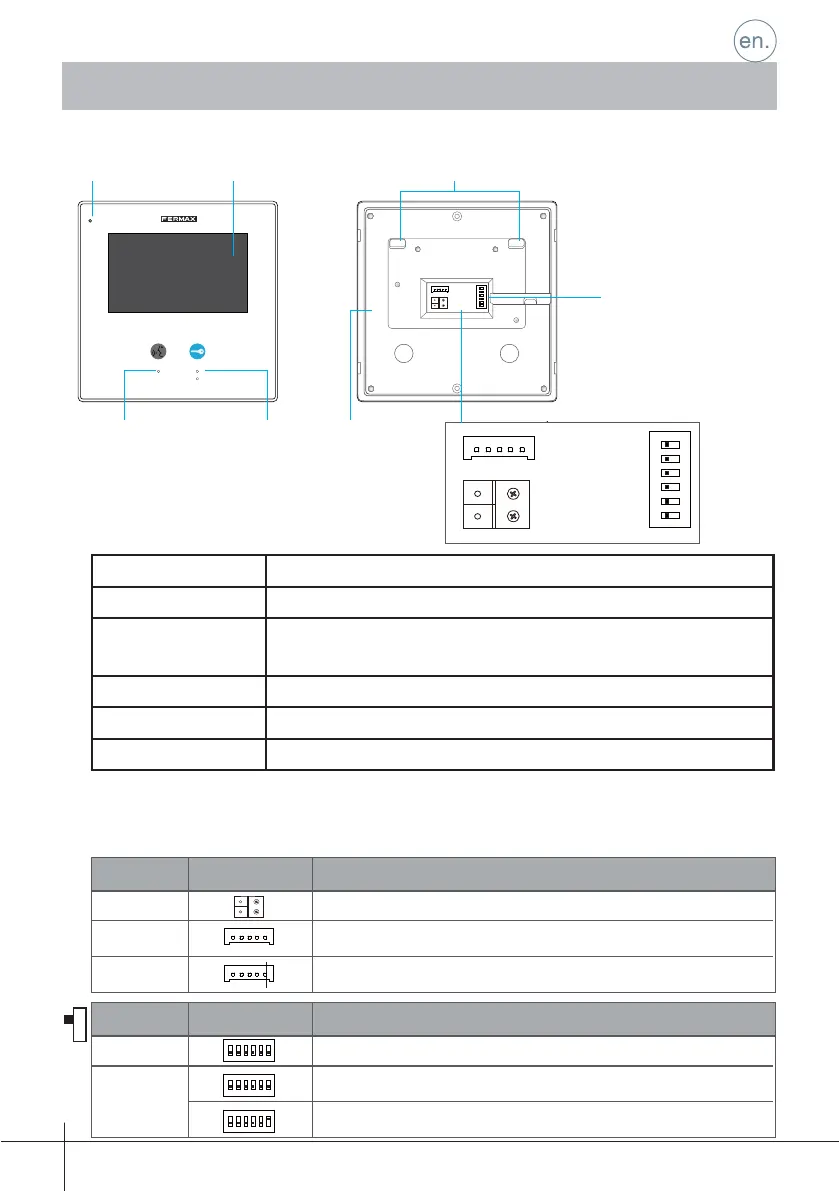
LCD touch screen Display the visitors' image
Unlock button Press to release the door
Talk/On button Press to communicate hands free with visitor
Press to view the outdoor condition in standby mode
Microphone Receive voice from the user
Connection port Bus terminal, Doorbell button terminal, DIP Switches
Speaker Send out voice from the visitor
1.2 Functions
-1-
1.3 Connection port
1. Monitor
COD. 970022b V01_17
12
sw+sw-RINGGNDNC
3
ON
BUS
DIP
456
LCD Screen Mounting hookMicrophone
Talk/On button Unlock button
Connection port
Speaker
12
3
ON
Bit
DIP1&2
Reserved. left to default.
Set to OFF. When the monitor is in the middle of the line in daisy chain connection.
Bit State Description
DIP3
12
3
ON
12
3
ON
Set to ON. When the montior is at the end of the line or connected to a DBC4S.
Monitor address.Set at the factory.
Set to ON. Monitor installed at the end of the installation (last).
Set to OFF. Monitor installed in intermediate position.
12
3
ON
Bit
DIP1&2
Reserved. left to default.
Set to OFF. When the monitor is in the middle of the line in daisy chain connection.
Bit State Description
DIP3
12
3
ON
12
3
ON
Set to ON. When the montior is at the end of the line or connected to a DBC4S.
sw+sw-RINGGNDNC
sw+sw-RINGGNDNC
BUS
Bus terminal.
Door bell call button connection port.
Reserved.
BUS
SW+, SW-
RING,GND,NC
DIP1&5
DIP6
123
ON DIP
456
123
ON DIP
456
123
ON DIP
456
12
SW+SW-RINGGNDNC
3
ON
BUS
DIP
456
1.1 Parts
Connectors
Confi guration
Description
Description
Confi guration
Dipswitches











 To Next Page