-1-
KODE 970022b V01_17
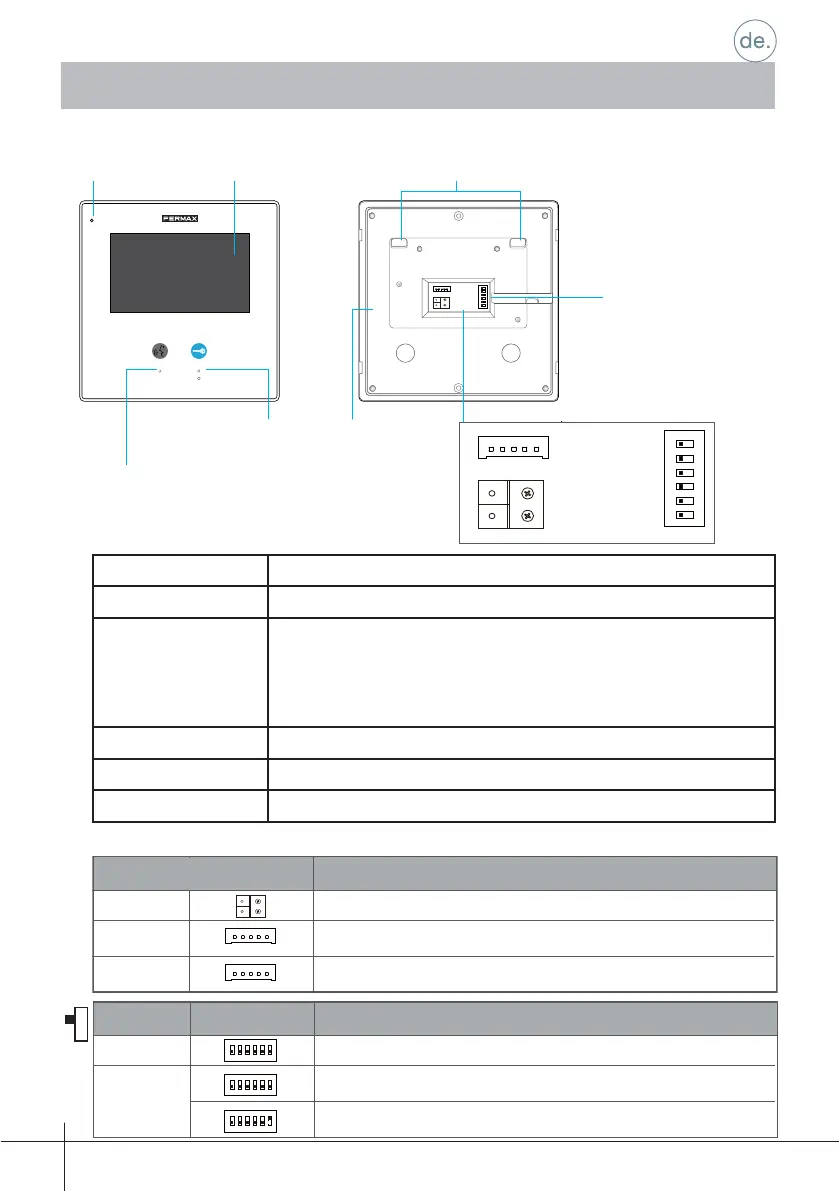
LCD-Bildschirm Zeigt das Videobild der Kamera an der Türstation.
Türöffnungstaste Zur Türöffnung drücken.
Taste
EIGENSTART
Drücken, um eine Verbindung im Freisprechbetrieb mit dem
Besucher herzustellen.
Falls sich der Monitor im Bereitschaftsmodus befi ndet, drücken,
um einen Eigenstart der Kamera an der Türstation durchzuführen.
Mikrofon Empfang der Benutzerstimme.
Anschlüsse Busanschlüsse, Türklingelton und DIP-Schalter.
Verstärker Audiokanal Monitor - Türstation.
1.2 Funktionen
1.3 Beschreibung der Anschlüsse
1. Monitor
12
sw+sw-RINGGNDNC
3
ON
BUS
DIP
456
LCD-Bildschirm BefestigungspunkteMikrofon
Eigenstartaste
Türöffnungstaste
Anschlüsse
Verstärker
12
3
ON
Bit
DIP1&2
Reserved. left to default.
Set to OFF. When the monitor is in the middle of the line in daisy chain connection.
Bit State Description
DIP3
12
3
ON
12
3
ON
Set to ON. When the montior is at the end of the line or connected to a DBC4S.
Monitor-Adresse. Position belassen, die standardmäßig eingestellt ist.
Position EIN. Der Monitor ist am Ende der Anlage installiert (zuletzt).
Position AUS. In mittlerer Position installierter Monitor.
12
3
ON
Bit
DIP1&2
Reserved. left to default.
Set to OFF. When the monitor is in the middle of the line in daisy chain connection.
Bit State Description
DIP3
12
3
ON
12
3
ON
Set to ON. When the montior is at the end of the line or connected to a DBC4S.
sw+sw-RINGGNDNC
sw+sw-RINGGNDNC
BUS
Anschluss des BUS.
Anschlussschnittstelle für die Klingeltaste der Tür.
Nicht verfügbar.
BUS
SW+, SW-
RING,GNC,NC
DIP1&5
DIP6
123
ON DIP
456
123
ON DIP
456
123
ON DIP
456
12
SW+SW-RINGGNDNC
3
ON
BUS
DIP
456
1.1 Tasten
Anschlüsse
Konfi guration
Beschreibung
Beschreibung
Konfi guration
DIP-Schalter











 To Next Page