-6-
7. Screen and Volume Adjustment
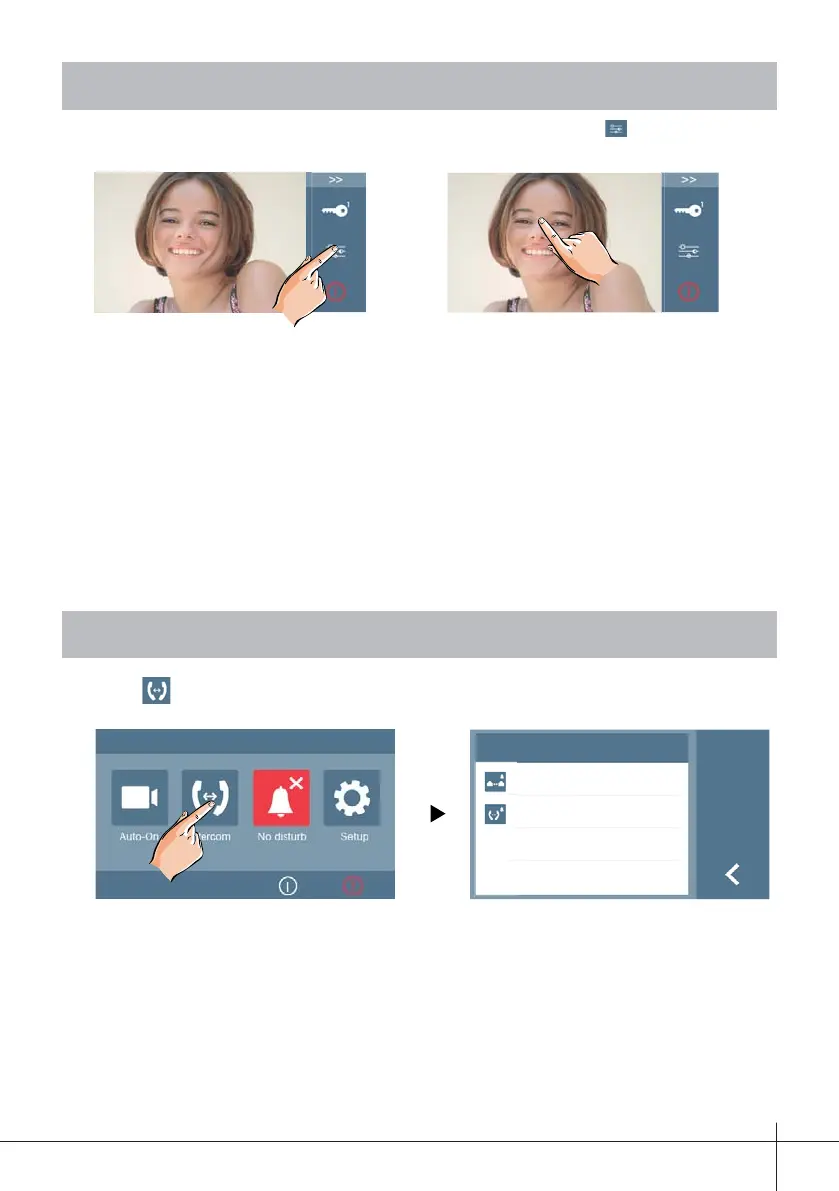
During a call or when the panel is communicating, press the icon to view the
screen and adjust the video and volume.
Screen Adjustment
Contrast: Adjust the contrast of the screen,the range is 0~9. Touch - or + to change
the level.
Brightness: Adjust the brightness of the screen ,the range is 0~9. Touch - or + to
change the level.
Color: Adjust the color of the screen,the range is 0~9. Touch - or + to change the
level.
Adjusting the speaker volume
Adjust street panel audio volume.
Adjusting range: 0 - 9.
00:10
Contrast:
Brightness:
Color:
Volumen:
6
4
4
2
Door
8. Intercom Function
Touch Intercom icon on main menu to get into the intercom mode, 2 options:
Inner Call and External Call.
Intercom
External Call
Inner Call
a) External Call: To do an external call to the other apartment in 2 way kits. When
selecting this option, apartment 1 can call apartment 2, and viceversa.
b) Internal call: If there are two monitors installed in the same residence, upon se-
lecting this option from any of them a call is made to the other monitor. Upon an-
swering, the latter establishes communications between both. The call ends after
30 seconds if the monitor does not answer.
Note: The maximum intercommunication time is 90 seconds.
Any call from the street panel will always have priority over the intercommunication.











 To Next Page