-7-
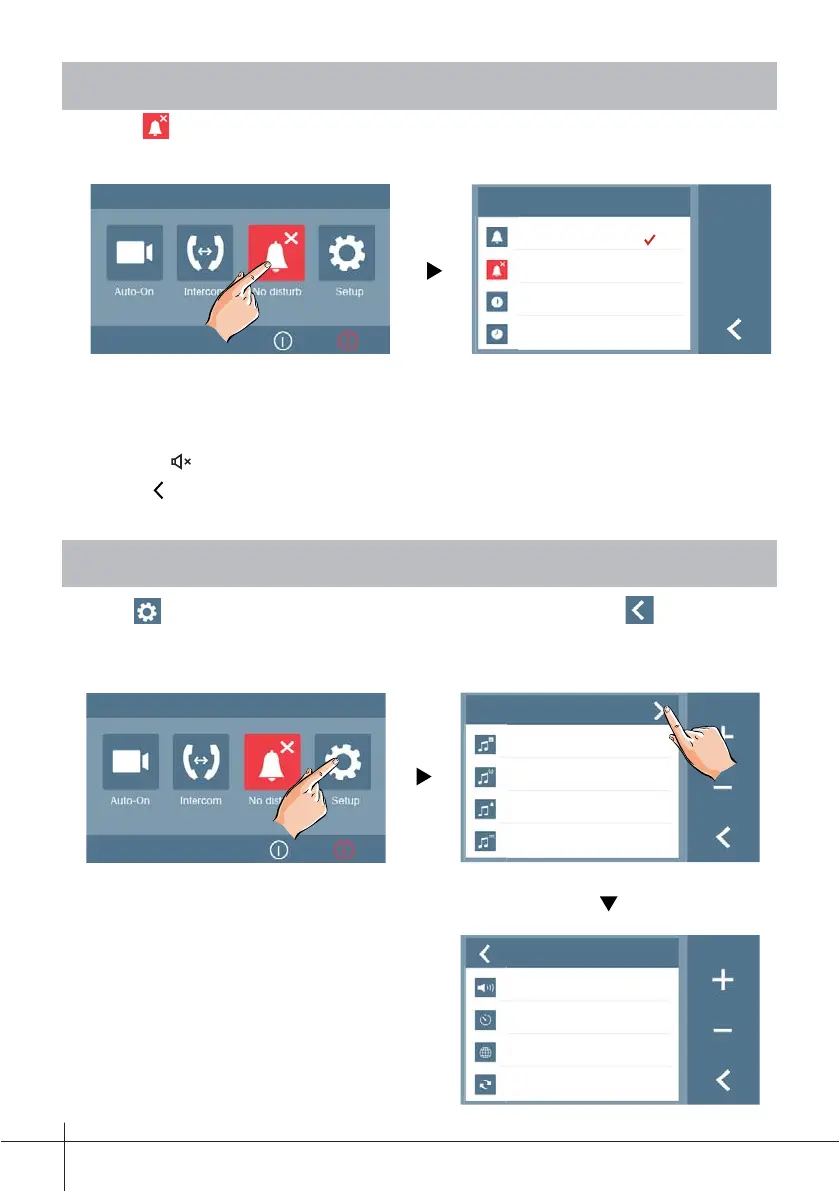
9. Not Disturb Function
Touch Do Not Disturb icon on main menu to get into the don't disturb mode,
you have 4 item to select: Normal, for 1 Hour, for 8 Hours and Always. You can
select the appropriate item according to your needs.
No Disturb
Normal
Always
In 1H
In 8H
Note:
- This function will perform immediately if selected,and the status bar on main menu page
will show"
" icon.
- Touch
icon on the screen to exit.
10. Setup Function
Touch icon on main menu pageto enter the settings page. Touch to exit the
setting and return main menu page).
Setup
Setup
Ring 01
Intercom 09
Bell 06
Touch ON
Volume
01
Auto-on Time
10min
Language
Restore











 To Next Page