-8-
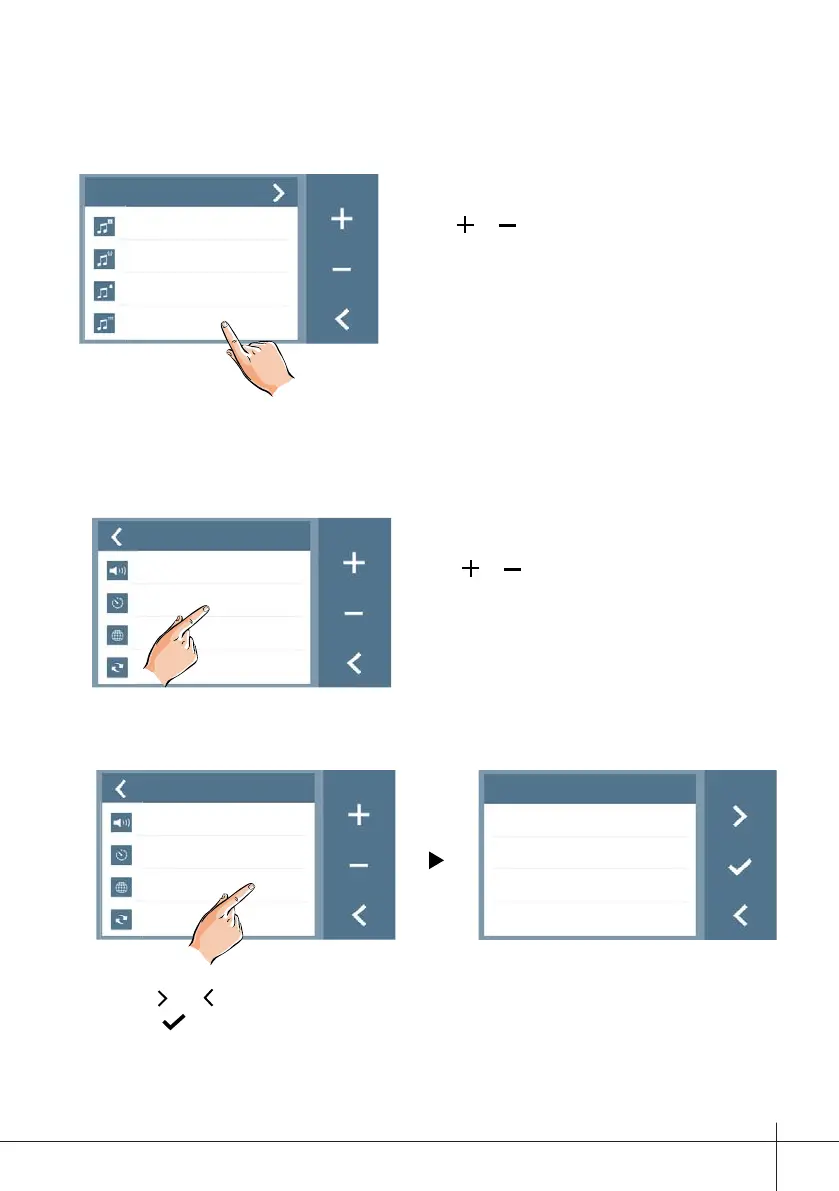
10.1 Enabling/Disabling the operation sound
Activate/Deactivate the screen push-button sound.
Setup
Ring 01
Intercom 09
Bell 06
Touch
ON
Note:
Touch
or icon on the screen to adjust.
10.2 Setting monitoring time
Adjust the “on time” upon activating the street panel manually from the monitor.
Possible values: 30, 40, 50 seconds or from 1 to 10 minutes.
Setup
Volume 01
Auto-on Time
10min
Language
Restore
Note:
Touch
or icon on the screen to adjust
the levels. Settings will perform immediately.
10.3 Select language
This allows you to change the monitor’s language.
Setup
Volumen 01
Auto-on Time
10min
Language
Restore
Idioma
English
Italian
Spanish
Portuguese
Note:
- Touch
and icon on the screen to scroll pages.
- Touch icon on the screen to confi rm.
- 14 languages available: english, italian, spanish, portuguese, french, dutch, german,
polish, czech, fi nnish, hindi, norwegian, arab and turkish.











 To Next Page