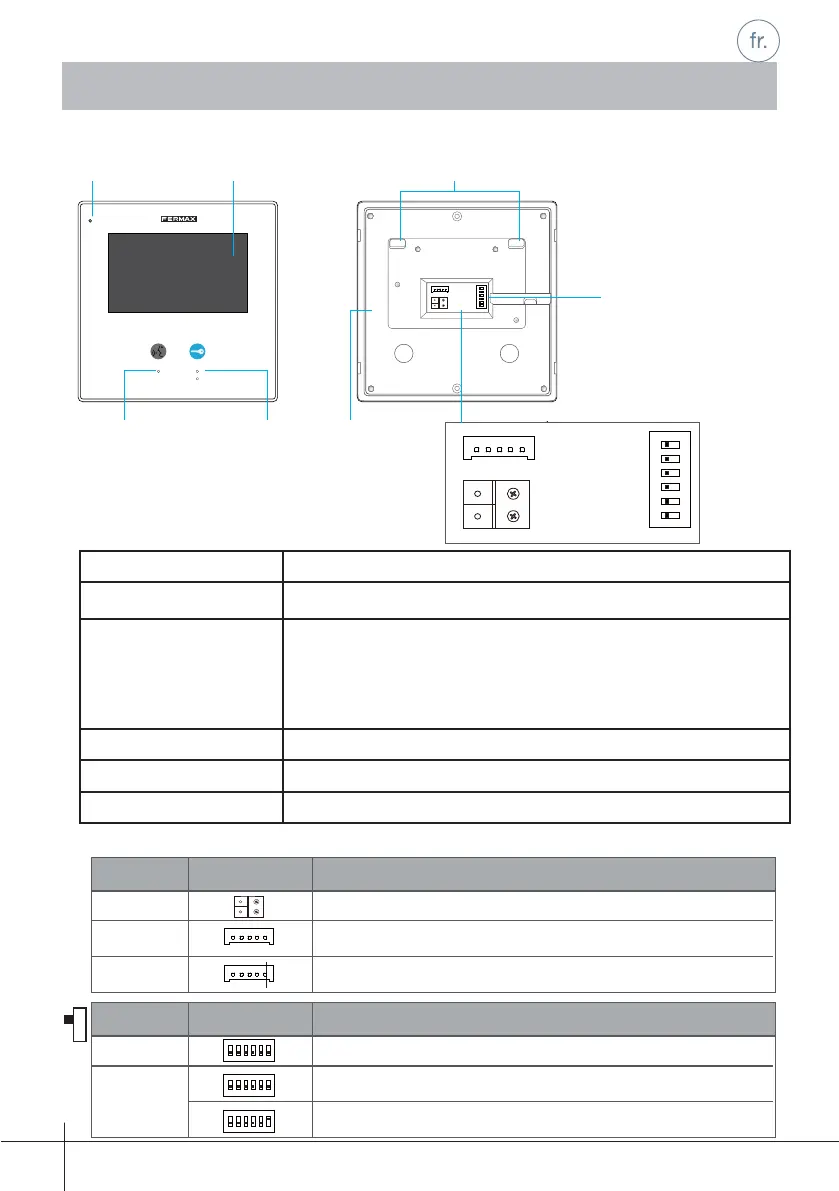
Écran LCD Présente l'image vidéo de la caméra de la platine.
Bouton gâche électrique Appuyer dessus pour ouvrir la porte.
Bouton
AUTO-INSERTION
Appuyer dessus pour établir une communication main-libres avec
le visiteur.
Moniteur en veille, appuyer dessus pour effectuer une insertion
automatique (auto-allumage) de la caméra de la platine de rue.
Microphone Reçoit le son de la voix de l'utilisateur.
Connecteurs Terminaux du bus, sonnettes et commutateurs DIP.
Haut-parleur Canal du son moniteur-platine.
1.2 Fonctions
-1-
1.3 Description des terminaux
1. Moniteur
COD. 970022b V01_17
12
sw+sw-RINGGNDNC
3
ON
BUS
DIP
456
Écran LCD Points d'ancrageMicrophone
Bouton
AUTO
INSERTION
Bouton gâche
électrique
Connecteurs
Haut-
parleur
12
3
ON
Bit
DIP1&2
Reserved. left to default.
Set to OFF. When the monitor is in the middle of the line in daisy chain connection.
Bit State Description
DIP3
12
3
ON
12
3
ON
Set to ON. When the montior is at the end of the line or connected to a DBC4S.
Adresse du moniteur. Laisser sur la position par défaut.
Position ON. Moniteur installé en fi n d’installation (dernier).
Position OFF. Moniteur installé en position intermédiaire.
12
3
ON
Bit
DIP1&2
Reserved. left to default.
Set to OFF. When the monitor is in the middle of the line in daisy chain connection.
Bit State Description
DIP3
12
3
ON
12
3
ON
Set to ON. When the montior is at the end of the line or connected to a DBC4S.
sw+sw-RINGGNDNC
sw+sw-RINGGNDNC
BUS
Raccordement du bus
Port de connexion du bouton-poussoir d’appel de la porte.
Non disponible.
BUS
SW+, SW-
RING,GNC,NC
DIP1&5
DIP6
123
ON DIP
456
123
ON DIP
456
123
ON DIP
456
12
SW+SW-RINGGNDNC
3
ON
BUS
DIP
456
1.1 Boutons
Connecteurs
Confi guration
Description
Description
Confi guration
Commutateurs
DIP











 To Next Page