Twinflex V3 Control Panel Engineering and Commissioning Manual
22
Access Level 2 (User) Operation Instructions – 8 Zone Panel
SOUNDER
FAULT
SYSTEM
FAULT
EARTH
FAULT
POWER
FAULT
POWER
BUZZER
SILENCED
ALARMS
SILENCED
ALARMS
DISABLED
CONTROLS
ENABLED
DETECTOR ALARM
CALL POINT ALARM
FAULT / DISABLE / TEST
TEST ZONE
5
8
ACCESS
ALT/6
LAMP TEST
SILENCE
ALARMS
RESET
SYSTEM
SOUND
ALARMS
SILENCE
BUZZER
DISABLE
REMOTE FIRE
DISABLE
ALARMS
DISABLE
ZONE
1
2
3
4
7
FAULT DISABLE TEST
FIRE
1 2 3 4 5 6 7 8
ZONE
ACTIVE
REMOTE ALARM
REMOTE FIRE OUTPUT
FAULT / DISABLE
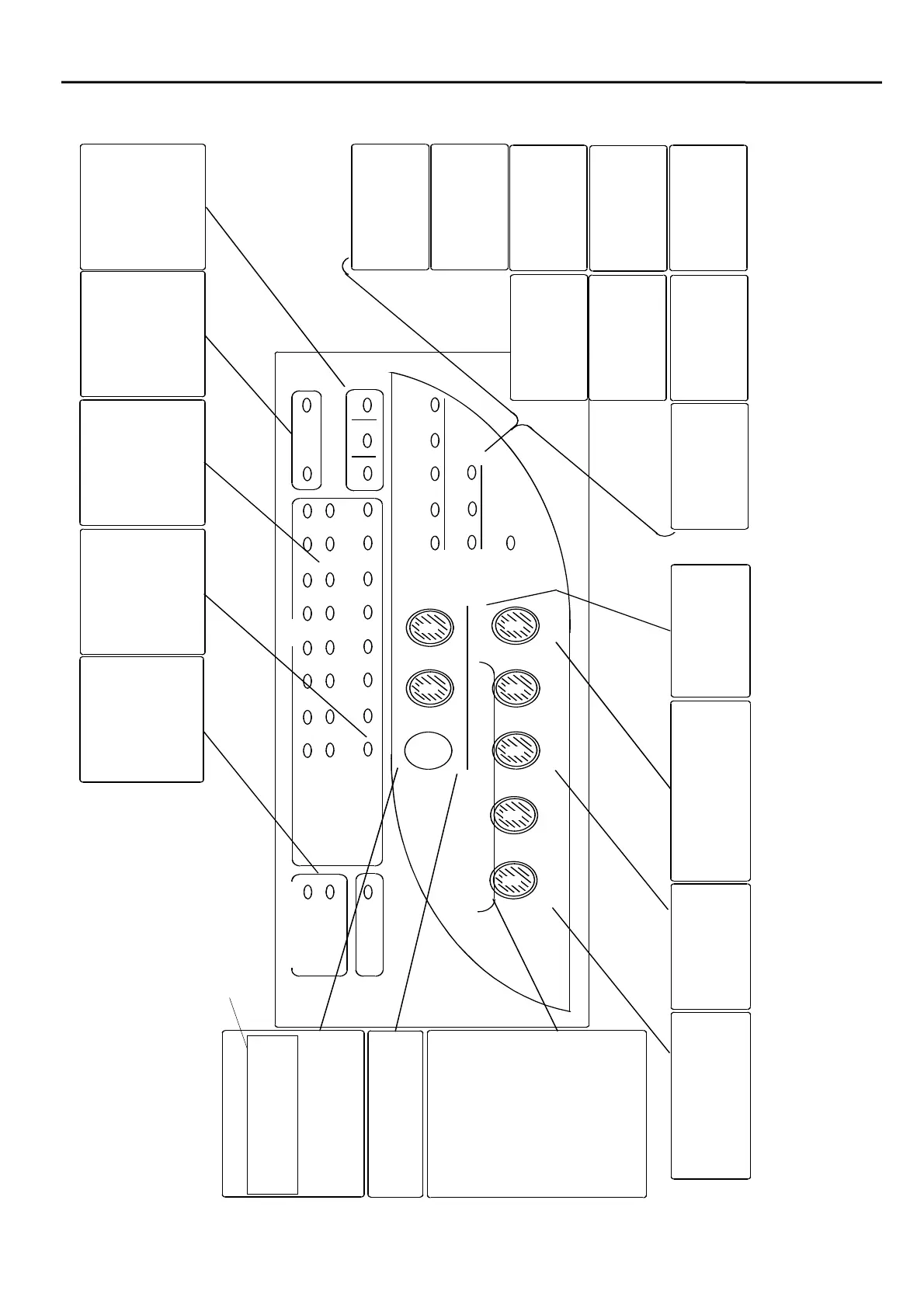
ZONE FAULT/DISABLE/TEST
In normal conditions this LED is off.
If a fault is present on the zone the
LED pulses.
If a zone is disabled, or on test, the
LED is on.
ZONE ALARM
A ‘DETECTOR ALARM’ LED
indicates the presence of a
detector alarm on the zone.
A ‘BREAK GLASS ALARM’ LED
indicates the presence of a break
glass alarm on the zone.
FIRE
These LEDs are illuminated when:
1. A device alarm is detected.
2. The SOUND ALARMS button is
pressed.
3. The repeater evacuate input is
active.
They are extinguished when the
system is reset.
ALARMS DISABLED
This LED is illuminated when the
alarm sounders are disabled and
goes off when the alarms are
enabled.
CONTROLS ENABLED
This LED illuminates to indicate
that the controls are on, ie, at
Access Level 2 (User). It flashes in
the Access Level 3 (Engineer).
SYSTEM FAULT
This indicates a CPU reset or a
processor error.
SOUNDER FAULT
This indicates a fault on the
conventional sounder circuit
EARTH FAULT
This LED indicates that an earth
fault has been detected
POWER FAULT
This LED flashes to indicate a
mains supply fault and is steady
for a battery or charger fault
POWER
This LED when the panel is
supplied with power from either
the batteries or the mains supply.
BUZZER SILENCED
This indicates that the buzzer has
been silenced. It will switch off if
the buzzer restarts and when the
panel is operating normally.
ALARMS SILENCED
This LED is illuminated when the
alarm sounders are silenced and
goes off when the system is reset.
DISABLE ALARMS
If button 3 is pressed at Access
Level 2 (User) whilst holding ‘ALT’
the alarm sounders are disabled.
Repeat to enable
.
DISABLE ZONE
If button 5 is pressed at Access Level 2 (User)
whilst holding ‘ALT’, the operator may then specify
a zone to be disabled. The detection is disabled but
the sounders are still operational. Repeat to enable
.
REMOTE FIRE INPUT & OUTPUT
These LEDs indicate the status of
the Remote Fire Input and the
Remote Fire Output.
FAULT/DISABLE/TEST
These LEDs indicate the precise
status of both the zonal, and the
remote fire, FAULT/DISABLE/
TEST LEDs
TEST ZONE
If button 5 is pressed at Access Level
2 (User), the operator may then
specify a zone to put into test mode.
Repeat to remove
.
DISABLE REMOTE FIRE
If button 1 is pressed at Access Level 2 (User)
whilst holding ‘ALT’ the ‘Remote Fire Output’ is
disabled. Repeat to enable
.
LAMP TEST
If button 6 is pressed at Access Level 2 (User)
for 5s, all LEDs are illuminated.
SILENCE ALARMS / RESET SYSTEM /
SOUND ALARMS / SILENCE BUZZER
These are the main user functions, and are
active at Access Level 2 (User).
Pressing the button labelled SILENCE
ALARMS will cause the sounders to silence if
they are sounding.
Pressing the button labelled SOUND ALARMS
will cause the sounders to operate if they are
sounding.
Pressing the button labelled RESET SYSTEM
will cause the system to reset as long as all
causes of alarm have been removed.
Pressing the button labelled SILENCE BUZZER
will cause the control panel buzzer to silence if it
is sounding.
ACCESS
Pressing ‘ACCESS’ and then your 3 digit code
will take the system from Access Level 1
(Normal) to Access Level 2 (User). Repeating
this will revert to the Normal Level.
Pressing ‘ACCESS’ and then your engineer
code will take the system from Access Level 2
(User) to Access Level 2 (Engineer). Pressing
‘ACCESS’ will revert to User Level.
‘CALL POINT ALARM’
‘DETECTOR ALARM’
NOTE: It is best to use the keyswitch instead.



 To Next Page