9
To power the appliance, use only the battery supplied in the package
or by a specialised technician.
OTHER BATTERY TYPES CANNOT BE USED.
The appliance is powered by a lithium-ion battery. The battery
compartment can accommodate a single battery slot at 25.55V.
ATTENTION: for the maintenance and disposal of the battery,
refer to the document supplied by the battery manufacturer.
BATTERY TYPE
The battery must be charged prior to the rst use, and when it doesn't
provide enough power for tasks that could formerly be performed
without difculty. To recharge the battery, proceed as follows:
1. Take the appliance to the dedicated battery recharging area.
ATTENTION: the room where the batteries are recharged
must be adequately ventilated to prevent the accumulation of
gases that leak from batteries.
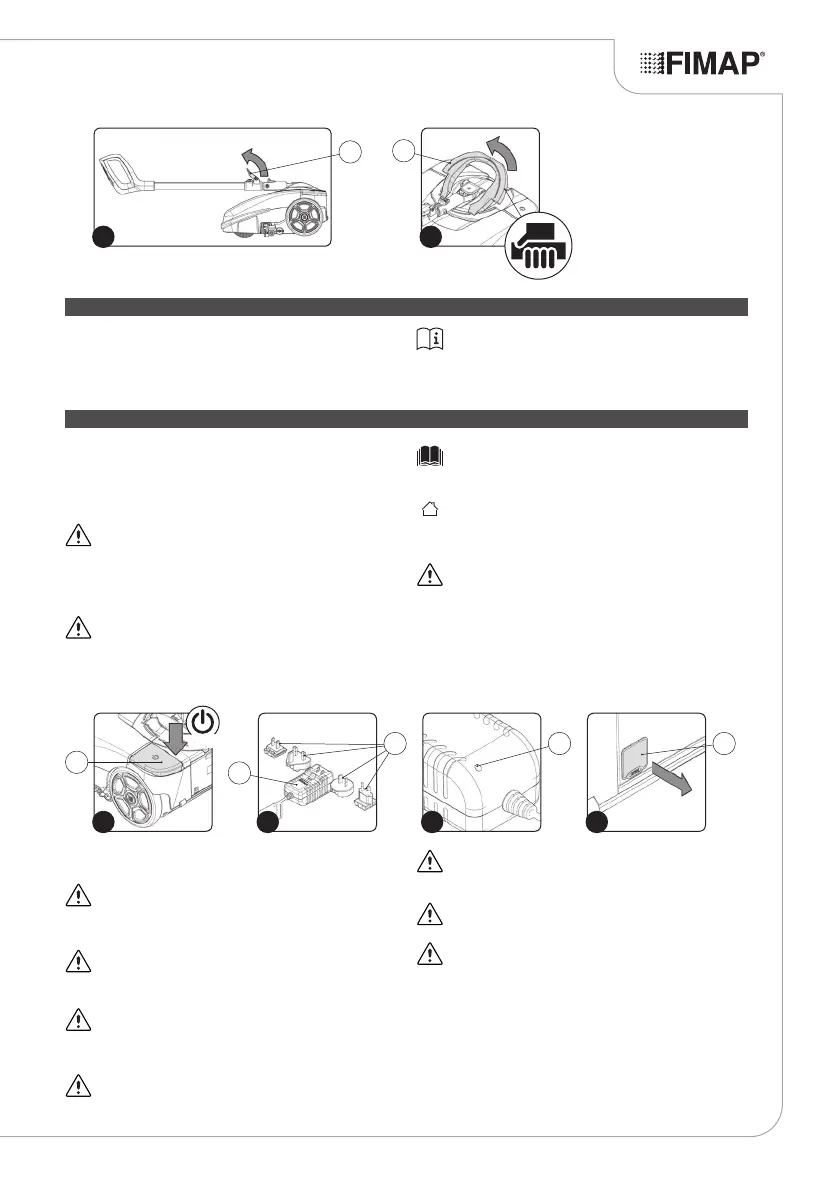
2. If the appliance is working, turn it off via the main switch (1) (Fig. 1).
3. Block the handlebar in the vertical position.
ATTENTION: during this operation, do not rest your foot on
the appliance.
4. Read the battery charger manual (supplied with the device)
before inserting the power plug (2) in the power supply unit (3)
(Fig.2).
RECHARGING THE BATTERY
ATTENTION: before connecting the battery charger to the
socket, make sure the characteristics of the mains supply
correspond to those of the battery charger.
ATTENTION: the battery charger must only be used in a
covered place.
5. Connect the power plug (2) to the mains supply.
ATTENTION: make sure the green LED (4) on the battery
charger lights up when you enable the battery charger base
circuit (Fig.3). This LED indicates that the battery charger
circuit is correctly powered.
6. Remove the cap (5) covering the battery power socket (Fig.4).
7. Insert the battery charger power cable plug (6) in the socket (7)
on the battery (Fig.5).
ATTENTION: make sure the green LED (4) on the battery
charger lights up when you enable the charger (Fig.3). This
LED indicates that the battery charger circuit is correctly
powered.
ATTENTION: before inserting the plug (6) in the socket (7),
make sure the battery charger housing compartment is not
dirty (dust, condensation or other types of liquid).
ATTENTION: make sure the red LED (4) on the battery
charger lights up when you insert the plug (6) in the socket (7).
This LED indicates that the battery is recharging.
8. Perform a complete battery charging cycle.
ATTENTION: the red LED (4) remains ON until the battery is
fully charged. When the recharging cycle has ended, the red
LED goes off and the green LED comes on.
ATTENTION: the charger and the battery can be left
connected to the power socket. The red LED (4) lights up
when the charger occasionally tops up the battery.
ATTENTION: the red charge status LED (4) does not provide
any indication of the battery charge level.
ATTENTION: during the charging phase, the battery may
overheat. This is normal and does not mean there is any
problem with the battery.
7
4
6
8
1
1
OFF
4
3
5
3 42
2



 To Next Page