14
ATTENTION: during this operation, do not rest your foot on
the appliance.
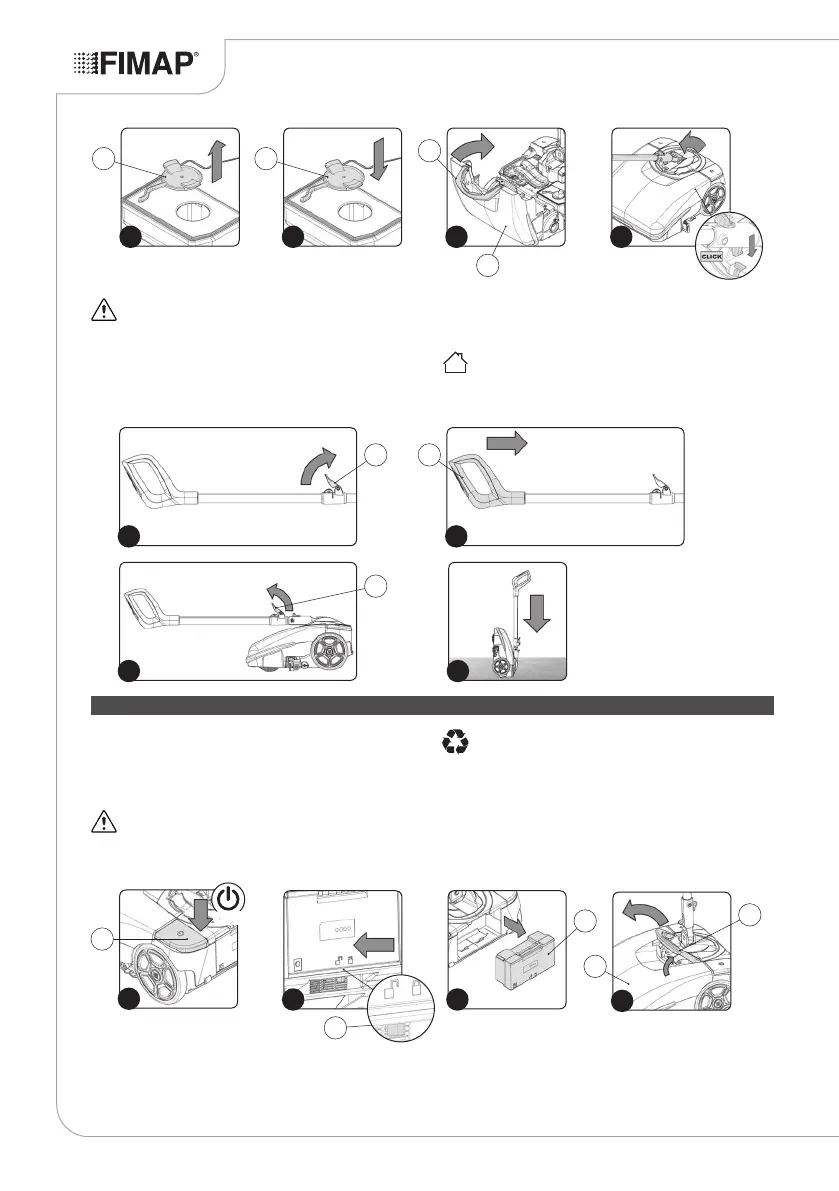
22. Rotate the stop lever of the command handlebar (13) in the
direction of the arrow (Fig.13).
23. Close the command handlebar, pushing the handle (14) towards
the main part of the appliance (Fig.14).
24. Rotate the stop lever of the command handlebar (13) in the
direction of the arrow (Fig.15).
25. Take the appliance to the designated storage area.
26. Position the appliance with its rear part in contact with the oor
(Fig.16).
ATTENTION: Park the appliance in an enclosed place, on a
at surface; near the appliance there must be no objects that
could either damage it, or be damaged through contact with it.
MAINTENANCE
At the end of the work, and before carrying out any type of
maintenance, perform the following operations:
1. Deactivate the appliance using the main switch (1) (Fig.1).
2. Rotate the handlebar so it is vertical.
ATTENTION: during this operation, do not rest your foot on
the appliance.
3. Take the device to the dedicated maintenance area.
ATTENTION: the place given over to this operation must
comply with current environmental protection regulations.
4. Remove the power battery (2) from the appliance. To free the
battery, shift the stop lever (3) in the direction of the arrow (Fig.2).
5. Remove the battery from the appliance using the handle moulded
on it (Fig.3).
6. Rotate the front carter (4) as far as it will go - do this with the aid
of the handle (5) (Fig.4).
16
13
15
14
13
13
14
5
4
4
1
1
OFF
3
2
2 3
6
5
11
12 12
9 10 12


 To Next Page