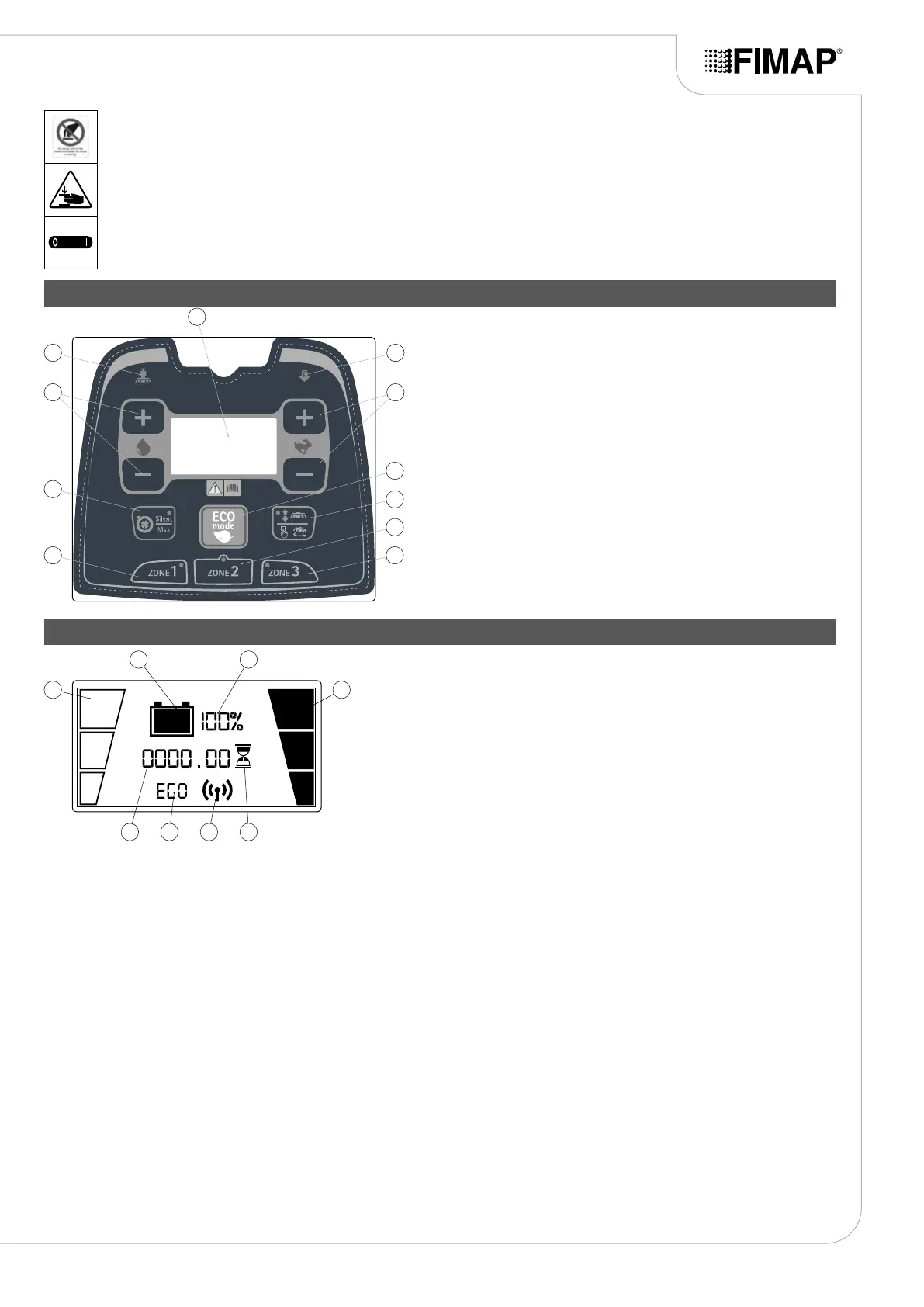
Moving brush hazard label:
Used on the machine to warn the operator not to place his/her hands near the moving brush.
Label warning about the risk of crushed hands:
Indicates danger to hands due to crushing between two surfaces.
Main switch symbol:
Located near the control panel, to indicate the main key switch.
SYMBOLS ON THE CONTROL PANEL
1. Reverse activation symbol.
2. Buttons for movement speed adjustment.
3. “ECO MODE” control button.
4. Brush head control button.
5. “AREA 2” program activation button.
6. “AREA 3” program activation button.
7. “AREA 1” program activation button.
8. “FNC” function activation-deactivation button.
9. Buttons for detergent solution adjustment.
10. Symbol for extra brush head pressure activation.
11. Control display.
10
11
1
8
7 6
5
4
3
9 2
SYMBOLS ON THE CONTROL DISPLAY
1. Detergent cleaning solution level indicator in the machine water circuit.
2. Indicator of the machine movement speed.
3. Indicator of the battery charge level.
4. Percentage value of the battery charge level.
5. Symbol indicating the hour meter is active.
6. Approximate hour meter value.
7. ECO-MODE active symbol.
8. Symbol indicating connection to the FFM system.
1
3
6
4
587
2
11


 To Next Page