EasyManua.ls Logo

Fimet F1 - User Manual

Default Icon
59 pages
Print Icon
To Next Page IconTo Next Page
Loading...
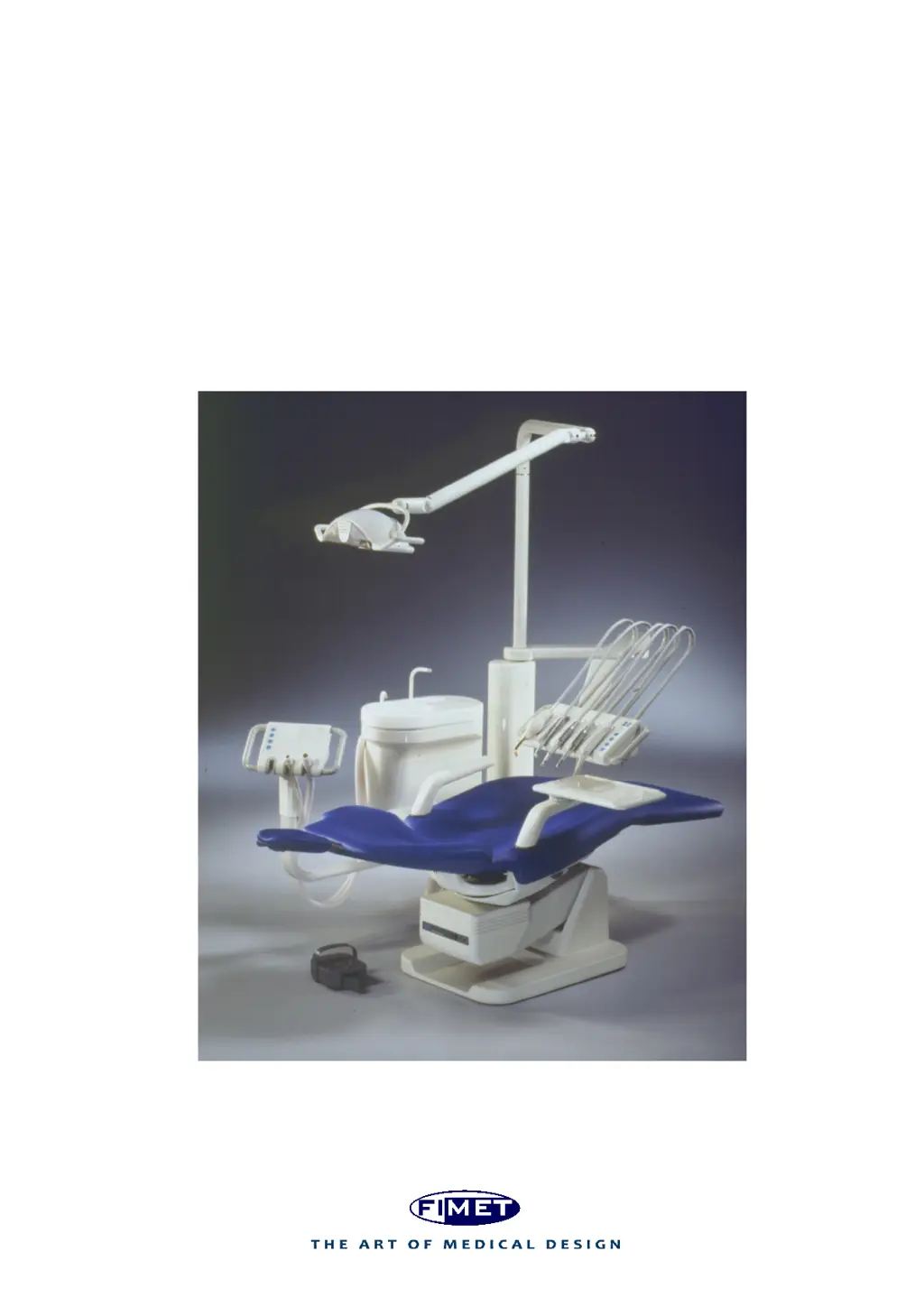
Fimet F1
®
User Guide
Version 1.1
1.6.2016

Table of Contents

Other manuals for Fimet F1

Questions and Answers

Summary

1 Introduction

1.1 Manufacturer

Provides contact details and location of the manufacturer.

1.2 Models Covered by this User Guide

Lists all Fimet F1 dental treatment system models covered.

1.3 Directives and Standards

Lists CE marking and relevant standards for compliance.

1.3.1 Quality Standards

Details the company's quality management system certifications.

1.4 Terms and Abbreviations

Defines key terms and abbreviations used in the guide.

1.5 Symbols and Markings

Explains important symbols and their meanings.

1.6 Referred Documents

Lists documents referred to in the user guide.

2 Product Description and Operation

2.1 Differences between various F1 Models

Compares features and specifications across different F1 models.

2.2 System Overview

Provides a general overview of the F1 dental treatment system components.

2.3 Connectable Parts and Devices

Details external devices that can be connected to the system.

2.4 Instrument Bridge

Used to hold instruments conveniently for access during dental procedures.

2.4.1 Swivel Arms

Describes the function and range of movement of swivel arms.

2.4.2 Instrument Bridge User Interface

Explains the controls and functions of the instrument bridge interface.

2.4.3 Instrument Bridge Display

Details the information shown on the instrument bridge display.

2.4.4 Silicone Covers

Describes the purpose and maintenance of silicone covers.

2.5 Instruments and Hoses

Overview of instruments and hoses that connect to the dental unit.

2.5.1 Micro Motors

Explains the operation and speed control of micro motors.

2.5.2 Curing Light and Laser

Provides safety instructions for curing light and laser usage.

2.5.3 Ultrasonic Scaler

Explains the operation and power adjustment of the ultrasonic scaler.

2.5.4 Ultrasonic Scaler Water Switch (optional)

Describes the function of the optional scaler water control lever.

2.6 Suction Head

Holds suction hoses, evacuator tips, and syringes for easy access.

2.6.1 Suction Head User Interface

Details the controls and functions of the suction head interface.

2.6.2 Positioning the Suction Head

Explains how to adjust and lock the suction head position.

2.7 Trays

Used for placing hand instruments and utensils, with a weight limit.

2.8 Dental Unit

Details the main components and specifications of the dental unit.

2.8.1 Cuspidor

Describes the components and functions of the cuspidor, including flushing and suction.

2.8.2 Filling the Cup and Rinsing the Bowl

Explains how to fill the cup and rinse the bowl using the faucet controls.

2.8.3 Water Heater (optional)

Details the optional water heater and its temperature regulation.

2.8.4 Clean Water Bottle

Explains the function and usage of the clean water bottle.

2.8.5 Disinfecting the Water System

Provides instructions for disinfecting the water system and tubing.

2.8.6 Daily Use of Mild Disinfecting Solutions

Advises on using mild disinfecting solutions for daily maintenance.

2.9 Connection Box

Houses power supply and connections for drainage, air, and water.

2.9.1 Switching the Devices Power on and off

Explains how to turn the system power on and off using the main switch.

2.10 Display & Operating Light

Covers the functionality and safety precautions for the display and operating light.

2.11 Dental Chair

Details the components, features, and operation of the F1 dental chair.

2.11.1 Motors and Electronics

Details the motors and electronic components of the dental chair.

2.11.2 Positioning the Chair

Explains how to operate and position the dental chair using various controls.

2.11.3 Using Pre-set Positions

Describes how to use and recall pre-set chair positions.

2.11.4 Programming Pre-set Positions

Guides on programming custom pre-set chair positions.

2.11.5 Selecting the User

Explains how to select between different user profiles for chair settings.

2.11.6 Extending the Backrest

Details how to adjust the length of the backrest.

2.11.7 Tilting the Seat and Trendelenburg; Shock Position

Explains how to tilt the seat and legrest for specific positions.

2.11.8 Headrest

Describes the adjustment and locking of the headrest.

2.11.9 Legrest

Explains legrest extension and knee break angle adjustment.

2.11.10 Joysticks

Describes the function and use of joysticks for chair control.

2.11.11 Armrests

Explains how to turn and detach armrests for patient access.

2.12 Remote Foot Control

Introduces the remote foot control for chair and instrument operation.

2.12.1 Recharging the Batteries

Details how to recharge the batteries in the remote foot control.

2.13 Pneumatic Foot Control

Details the operation and controls of the pneumatic foot control.

2.14 3 rd Party Devices

Lists and provides warnings for connecting third-party devices.

2.15 Control Relays for External Devices

Explains the use of control relays for external device management.

3 Maintenance and Service

3.1 Cleaning, Disinfecting and Sterilisation

Outlines procedures for cleaning, disinfecting, and sterilising equipment.

3.1.1 Instrument Disinfecting and Sterilisation

Specific guidance for disinfecting and sterilising dental instruments.

3.1.2 Prior to Treatment

Steps to take before commencing patient treatment.

3.1.3 Daily

Daily maintenance tasks for the dental system.

3.1.4 Weekly

Weekly maintenance procedures for the dental system.

Surface Cleaning and Maintenance

Covers cleaning procedures for displays, lights, surfaces, and waxing.

3.1.11 Flushing of All Instruments

Details the procedure for flushing all instruments.

3.2 Servicing and Replacing Filters

Covers the servicing and replacement of system filters.

3.3 Replacing Fuses

Provides instructions and warnings for replacing fuses.

3.4 Remote Foot Control

Details operation, pairing, and maintenance of the remote foot control.

3.4.1 Pairing the Foot Control with Instrument Bridge or Patient Chair

Steps for pairing the foot control with the instrument bridge or chair.

3.4.2 Pairing the Foot Control with Instrument Bridge and Patient Chair

Detailed steps for pairing the foot control with specific components.

3.4.3 Calibration of the Foot Control Lever

Procedure for calibrating the foot control lever.

3.4.4 Replacing the Batteries

Instructions for replacing rechargeable batteries in the foot control.

3.5 Amalgam Separators, Instruments, Suction Motors, Compressors, and other 3 rd Party Devices

Follow manufacturer's instructions for maintenance of third-party devices.

Battery and Bottle Maintenance

Covers replacing clock card battery and changing clean water bottle.

3.8 Tightening the Headrest Lock Mechanism

Explains how to adjust the tightness of the headrest lock mechanism.

3.9 Annual Service Operations

Refers to the F1 Technical Manual for annual service procedures.

4 Product Information and Safety

4.1 Device Label

Explains the information found on the device label.

4.2 Intended Use, Service Life, and Limitations

Covers system purpose, expected life, and usage restrictions.

4.3 Manufacturers Guarantee

Details the terms and conditions of the manufacturer's guarantee.

4.4 Installation and Service

Covers requirements for installation and service to maintain warranty.

4.5 Maintenance

Refers to Section 3 for comprehensive maintenance procedures.

4.6 Classifications and Ratings

Lists the classifications and ratings of the dental treatment system.

4.7 Information about Electromagnetic Compatibility

Covers compatibility with electromagnetic fields and emissions.

Guidance and manufacturers declaration - electromagnetic emissions

Provides guidance on electromagnetic emissions and compliance.

Guidance and manufacturers declaration - electromagnetic immunity

Provides guidance on electromagnetic immunity and compliance.

4.8 Environmental Specifications

Details environmental conditions for storage, transport, and use.

4.9 Connections to Networks

Specifies requirements for water, air, electricity, and other network connections.

4.10 Error, Warning and Information Displays

Explains how the system displays errors, warnings, and information.

Error Codes During Start-up

Lists and explains error codes displayed during system start-up.

Error Codes During Use

Lists and explains error codes displayed during system operation.

General Warnings

Provides general safety warnings related to connecting devices.

Fuses

Refers to Section 3.3 for details on replacing fuses.

4.13 Safety Devices

Describes safety mechanisms like limit switches and safety switches.

4.14 Temperature Limiters

Explains temperature limiters for motors and transformers.

4.15 Programmed Safety Limits

Details programmed safety limits that prevent device damage.

4.16 Limit Switches

Explains fixed limit switches that prevent seat and backrest damage.

4.17 Waste Handling

Outlines requirements for recycling and safe disposal of waste.

4.18 Disposal of the Device

Provides guidance on the proper disposal of the device and its components.

5 Troubleshooting

1 Appendix A - Dimensions and space requirements

1.1 Dimensions - F1

Provides dimensional drawings and specifications for the F1 model.

1.2 Dimensions - F1 Cab

Shows dimensional drawings and specifications for the F1 Cab model.

1.3 Dimensions - F1 Cart

Provides dimensional drawings and specifications for the F1 Cart model.

1.4 Dimensions - F1 Prime

Details dimensional drawings and specifications for the F1 Prime model.

1.5 Dimensions - F1 Side

Shows dimensional drawings and specifications for the F1 Side model.

Fimet F1 Specifications

General IconGeneral
BrandFimet
ModelF1
CategoryMedical Equipment
LanguageEnglish