User Guide • 15
can be selected and activated simply by lifting it from its resting place. Only one instru-
ment can be operated at a time, except for the syringe, which can be used simultaneously
with any other instrument.
2.4.1 Swivel Arms
The instrument bridge is located at the end of the swivel arms. The swivel arms enable
the wide movement range of the instrument bridge, which in turn enables wide variety of
working positions. No extra weight is intended to be placed on the swivel arms.
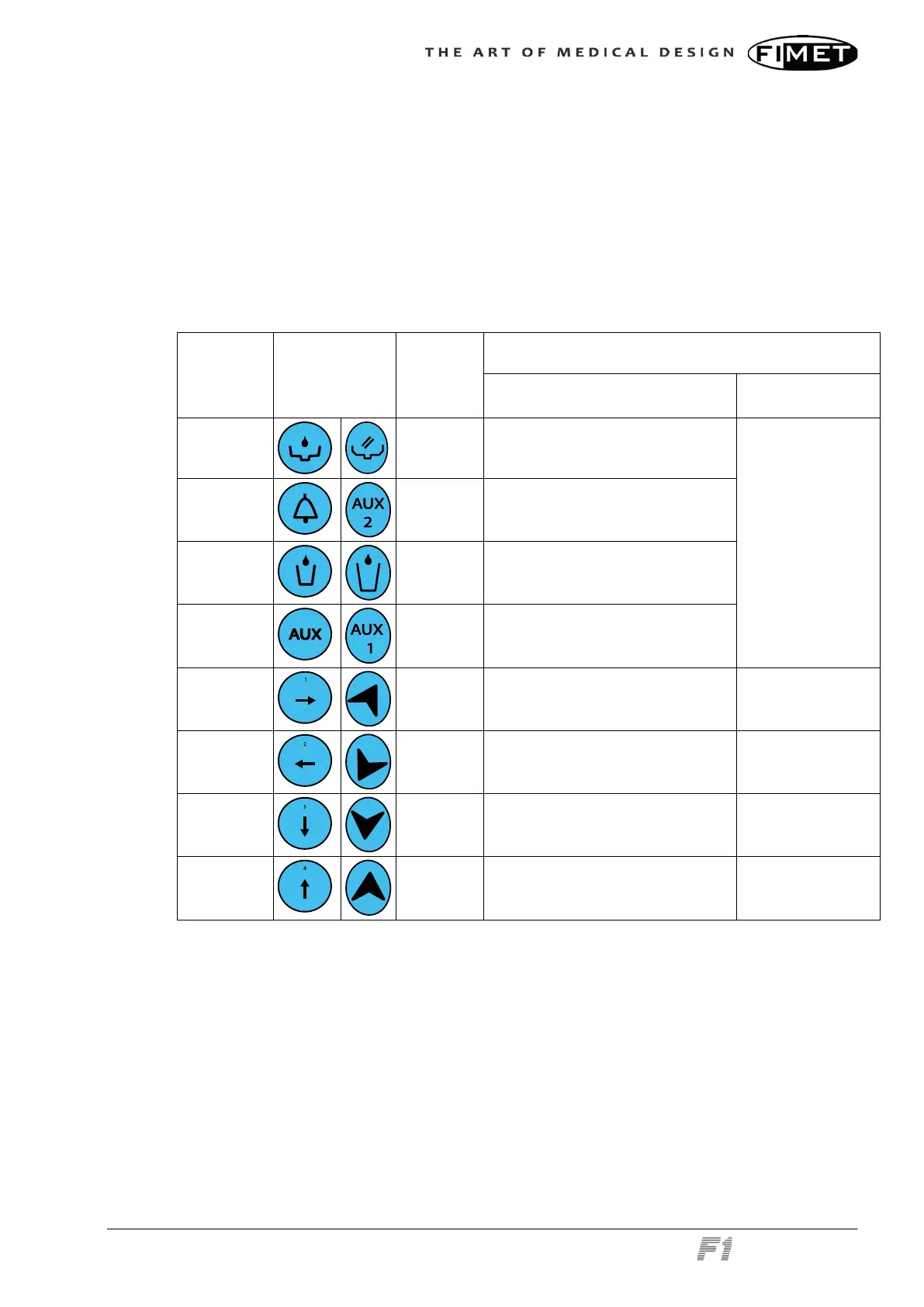
2.4.2 Instrument Bridge User Interface
Key Symbols
Memory
slot
Function
Press briefly action Press and hold
Bowl rinse
Rinse bowl for pre-set duration
Doorbell
Open door, activate relay
Cup fill
Fill cup for pre-set duration
AUX
Activate relay
Backrest up
1 Chair to exit position Raise backrest
Backrest
down
2 Chair to working position Lower backrest
Chair down
3
Chair to spitting position / Return to
previous position
Lower chair
Chair up
4
Chair to alternative working posi-
tion
Raise chair
2.4.3 Instrument Bridge Display
When the system is in idle state, time and date are shown (the 7-segment display is an
option). The number displayed in the top left corner displays the active instrument module.
The display will react to instrument selection and show appropriate views accordingly.



 To Next Page