8.3 General Maintenance
1. After every 1,000 hours of printing, please perform maintenance on key components: Wipe the
X, Y, and Z-axis linear shafts clean with a dust-free cloth or paper.
2. After cleaning the Z-axis lead screw, please apply the provided or a suitable lubricant evenly.
3. To prevent filament from absorbing moisture, breaking, or causing issues with the guide tube,
please unload the filament from the printer and store it in a sealed, moisture-proof container if
the printer will be idle for more than two days.
4. Please promptly clear any filament or foreign objects from the lead screw.
For detailed maintenance instructions, please refer to Flashforge Wiki.
Q1. What to do if the nozzle is clogged?
Troubleshooting Step 1: Manually press the handle at the extruder, cut off the filament, then
remove the guide tube and check if the filament tip is flat. If not, trim it to be flat, reinsert the guide
tube and filament into the extruder, and then click for loading to check.
Troubleshooting Step 2: Remove the extruder and check if the filament is blocked inside it.
9. Q&A
If there's filament inside the nozzle, please unload it first or manually cut it off.
Then follow these steps:
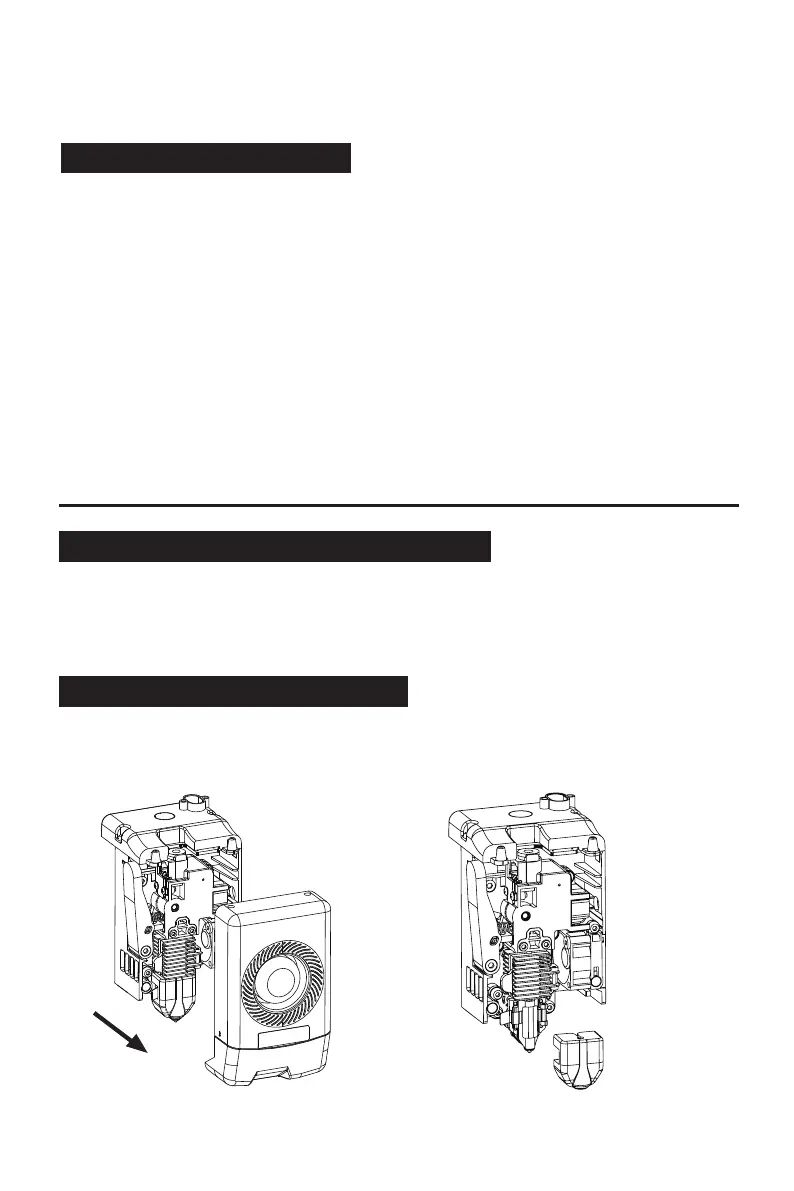
Q2. How to replace the nozzle?
1. Remove the front cover of the extruder. 2. Remove the silicone sleeve.
22















 To Next Page