FT-112(D) Panel Weighing Indicator, Technical Manual, Rev.1.0.0, May 2019 Page 79 of 170
10 STANDARD APPLICATIONS
Classifying
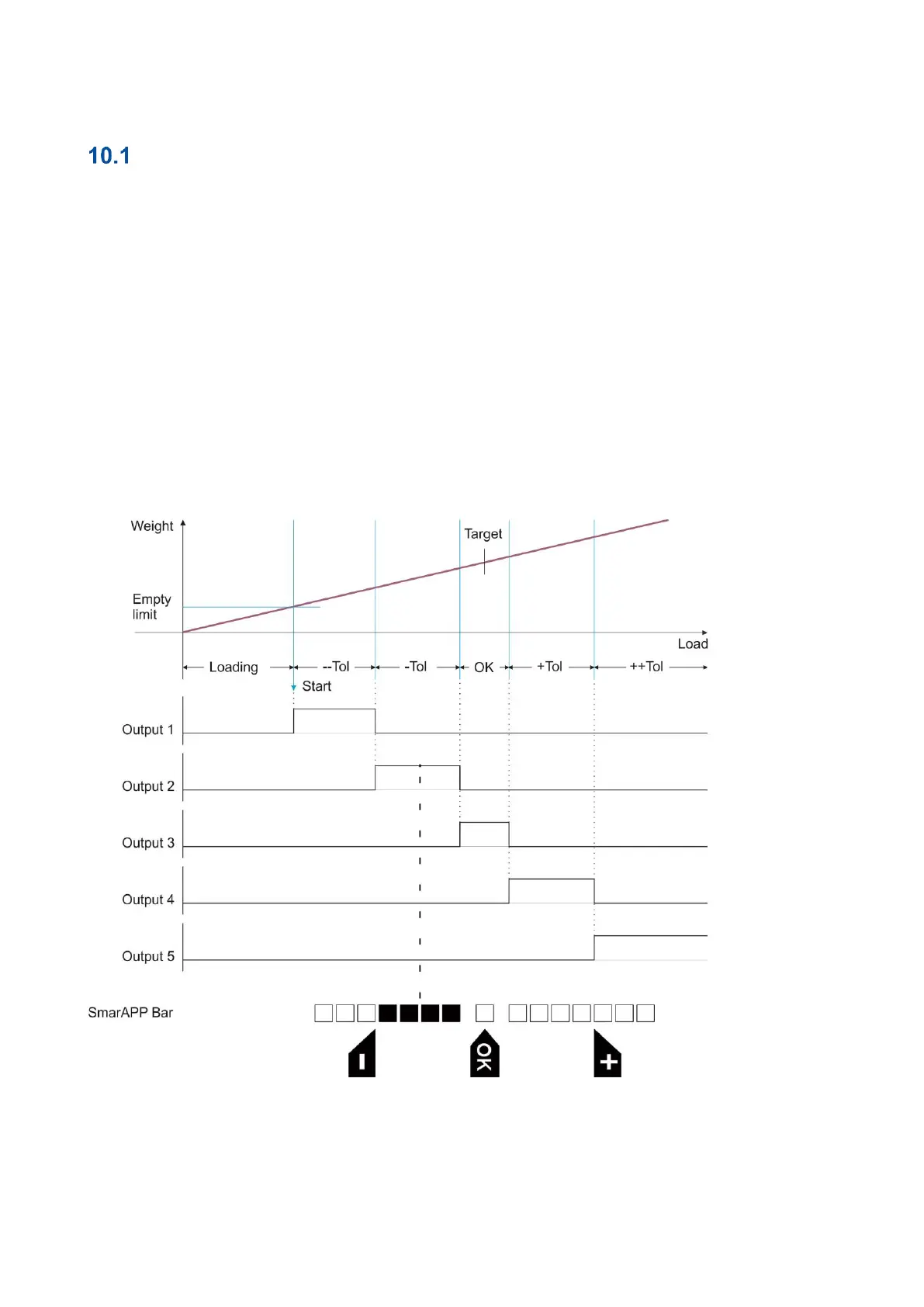
APPLICATION: To evaluate test samples with 5 limits as too light, light, okay, heavy or too heavy, based
on a target weight and specified limit values. The weight display indicates the weight value.
IMPORTANT NOTE: If you need 3 limits instead of 5 limits, enter the same values into two higher limits and
into two lower limits as minimum and maximum limits sequentially.
RELATED PARAMETERS: Sub-blocks 31- and 32-. Parameters 241, 242 or 243.
Classifying is used for sorting products into 6 ranges. Classifying can be programmed to start the operation
automatically or on demand. The on-demand operation starts by pressing the key or by digital input. Automatic
operation starts if the load is heavier than empty range. The scale is unloaded if the weight is in the Empty
range.
The classifying can be used at automatic sorting machines for classifying up to 5 ranges, if automatic start or
start input features are used.
Figure 10.1 - Timing diagram of automatic classifying operation.



 To Next Page