11
Pre s s t h e UP or DOWM k e y t o s e lect
the M O D U LAT scre e n .
Und e r t h e s tate of t h e i n i tial
pic t u r e,pres s M E N U k ey for lon g ,
acc e s s t he main me n u .
Pre s s U P /DOWN ke y c h o o se MODEL S E L E
men u , p ress MENU key f or s h ort i nto
nex t s u b menu.
Pre s s M E NU key for s h o r t t o keep
res u l t a nd retur n l a s t m enu.
pre s s E X IT key for s h o r t t o not kee p
and r e t u rn last me n u .
Pre s s t h e UP or DOWM k e y t o s e lect
the S Y S T EM SETTI N G s c r een.
Und e r t h e state of t h e i n i tial
pic t u r e,pres s M E N U k ey forlo n g ,
acc e s s t he main me n u .
Pre s s U P / D OWN key for short and
cho o s e SY S T E M SE T T I NG m e n u , press
MEN U k e y f or short i n t o n e xt subm e n u .
Pre s s M E NU key for s h o r t i nto next
sub m e n u.
Pre s s E X IT Key ret u r n l a st menu.
STEPS:
STEPS:
7.1 MODEL SELE
MODEL SELECT:
This function select s w h i c h o f t h e 8 model memories
in the transmitter to set up or fl y . F o r clarity
the model's na m e an d an image or it s type are
indicated after its mumber. ( E a c h mo d e l me m ory
may be of a different mode l ty p e fr om t he o ther
memories.)
Press the UP o r DOWM key to sele c t t h e M O D E L
SEL screen.
Press the UP o r DOWM key to sele c t t h e S Y S T EM
SETTING screen.
Press the MENU k e y t o save and return last
menu.
Press the MENU k e y i nto next menu.
Press the EXIT k e y t o not keep and re-turn las t
menu.
Press the EXIT k e y to return last menu.
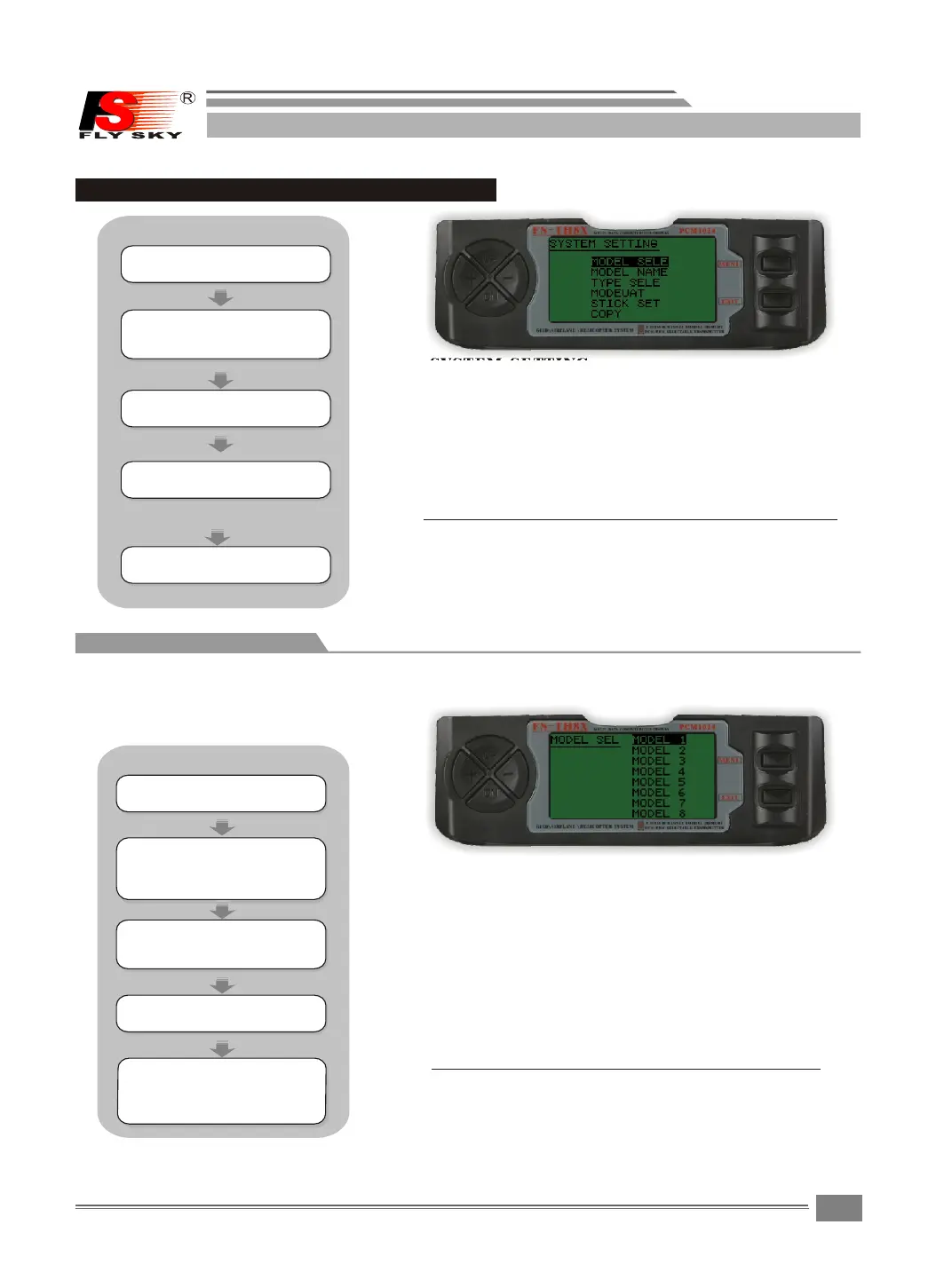
7 SYSTEM SETTING
SYSTEM SETTING
SYSTEM SETTING:
COPY:Model copy
STICK SET : Stick mode 1 - 4 s e l e c ts
MODEUAT : PPM&PCM se l e c t s .
TYPE SELE : Model type s e l e c t s .
MODEL NAM E : User name e d i t
MODEL SELE:This func t i o n s e l e cts which of the
8 model me mories i n the tran s m i t t e r to s e t up
or fly.
Pre s s U P /DOWN ke y s e l e ct the SYS T E M
SET T I N G m enus,a n d p r e s s M ENU key
for s h o r t into nex t s u b m enu.
FS-TH9X


 To Next Page