13
Pre s s t h e UP or DOWM k e y t o s e lect
the H E L I s creen.
Pre s s U P /DOWN ke y f o r s h ort and
sel e c t H ELI menu , a n d p ress MEN U
key f o r s h ort into n e x t m e nu.
Press the UP o r DOWM key to sele c t t h e T Y P E
screen.
Press the MENU k e y t o save and return last
menu.
Press the EXIT k e y t o not keep and re-turn la s t
menu.
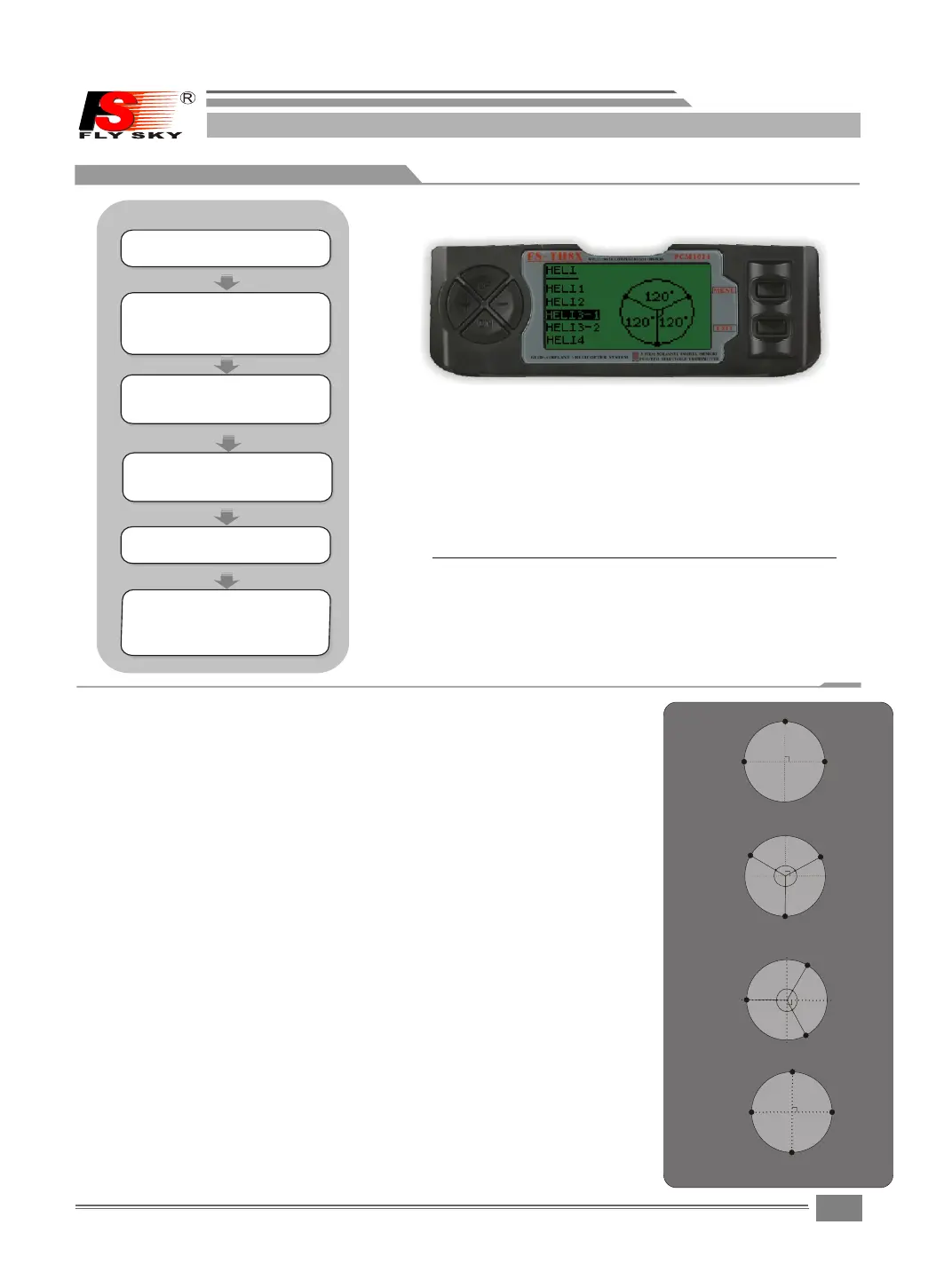
HELI:
The FS-TH9X super radi o s s u p p o r t 5basic swashplate
setups,including " s i n g l e s e rvo"(SW1-most hel i c o p -
ters us e thi s type)and 4types of CCPM(cycand coll-
ective pitch mixing) .
HELI1:Independen t a i l e r o n ,pitch and elevator s e r v o s l i n ked to
swashplate.Most ki t s a r e H E L I 1 type.
HELI2:Pushrods positioned as shown.Ele v a t o r operates with a
mechanical linkage.With Aileron inputs,the aileron and pi t ch se r v o s
tilt the swashplate le f t a n d r i g h t;with pitch inputs, t h e a i l e r on and
pitch servos raise the s w a s h p l a te up and down.
HELI3-1 : Pushrods p o s i t i oned as shown. W i t h A ileron inputs,t h e
aileron and pitch serv o s t i l t t h e s washplate left and rig h t ; w i t h
Elevator inputs,the three servos tilt the swashpl a t e fo r e and
aft;with Pi t c h i n puts,all th r ee s e rvos ra i s e the swashplate
up and down.
HELI3-2 : Pushrods positioned as shown.With Ai l eron inpu t s , t h e
three servos tilt the sw a s h p l a t e left and right;with E l e v a t o r i nputs,
the ele v a t o r and p i t c h servo s tilt t h e swashplate fore a n d aft;with
Pitch inputs,all thr e e s e r v o s r aise the swashplate u p a n d d o w n .
HELI4:Pushrods posit i o n e d as sh o w n . With A i leron i nputs,the
aileron an d pitch se r vos t i lt t h e swashpla t e left an d right;wit h
Elevator inputs,th e s e r v o s t i lt the swashplate fore a n d a f t ; w i th
Pitch inputs,all fou r s e r v o s r a ise the swashplate up an d d o w n .
Aileron
Aileron
Aileron
(Aileron)
(Aileron)
Aileron
Pitch
Pitch
Pitch
(Pitch)
(Pitch)
Pitch
Elevator
Elevator1
Elevator2
Elevator
120
120
120
120
120
120
(Ch8)
STEPS:
Und e r t h e state of t h e i n i tial
pic t u r e,pres s M E N U k ey forlo n g ,
acc e s s t he main me n u .
Pre s s U P /DOWN ke y s e l e ct the SYS T E M
SET T I N G m enus,a n d p r e s s M ENU key
for s h o r t into nex t s u b m enu.
Pre s s M E NU key for s h o r t t o keep
res u l t a nd retur n l a s t m enu.
pre s s E X IT key for s h o r t t o not
kee p a n d t reurn to l a s t m e nu.
Pre s s U P /DOWN ke y t o s e l ect the
TYP E m e n u ,and pres s M E N U k e y
for s h o r t into nex t s u b m enu.
FS-TH9X
SYSTEM SETTING
7.3.0 HILI TYPE SELECT


 To Next Page