FS-TH9X
21
Und e r t h e state of t h e i n i tial
pic t u r e,pres s M E N U k ey forlo n g ,
acc e s s t he main me n u .
Und e r t h e state of t h e i n i tial
pic t u r e,pres s M E N U k ey forlo n g ,
acc e s s t he main me n u .
Pre s s U P / DOWN key c h o o s e TRIM m enu,
pre s s M E NU key for s h o r t a nd ente r t h e
pag e t o e s tablis h .
Pre s s U P /DOWN ke y c h o o se REVO CU R V E m enu,
pre s s M E N U k e y f o r s h o rt a nd e nter the
pag e t o e s tablis h .
Pre s s M E NU key for s h o r t t o keep
res u l t and retu r n l a s t menu.P r e s s
EXI T k e y g o not keep a n d r e t urn
las t m e n u.
Pre s s M E NU key for s h o r t t o keep
res u l t and retu r n l a s t menu.P r e s s
EXI T k e y g o not keep a n d r e t urn
las t m e n u.
Pre s s U P /DOWN ke y t o c h o ose the T R I M s c reen.
Pre s s U P /DOWN ke y t o c h o ose the R E V O C U RVE scre e n .
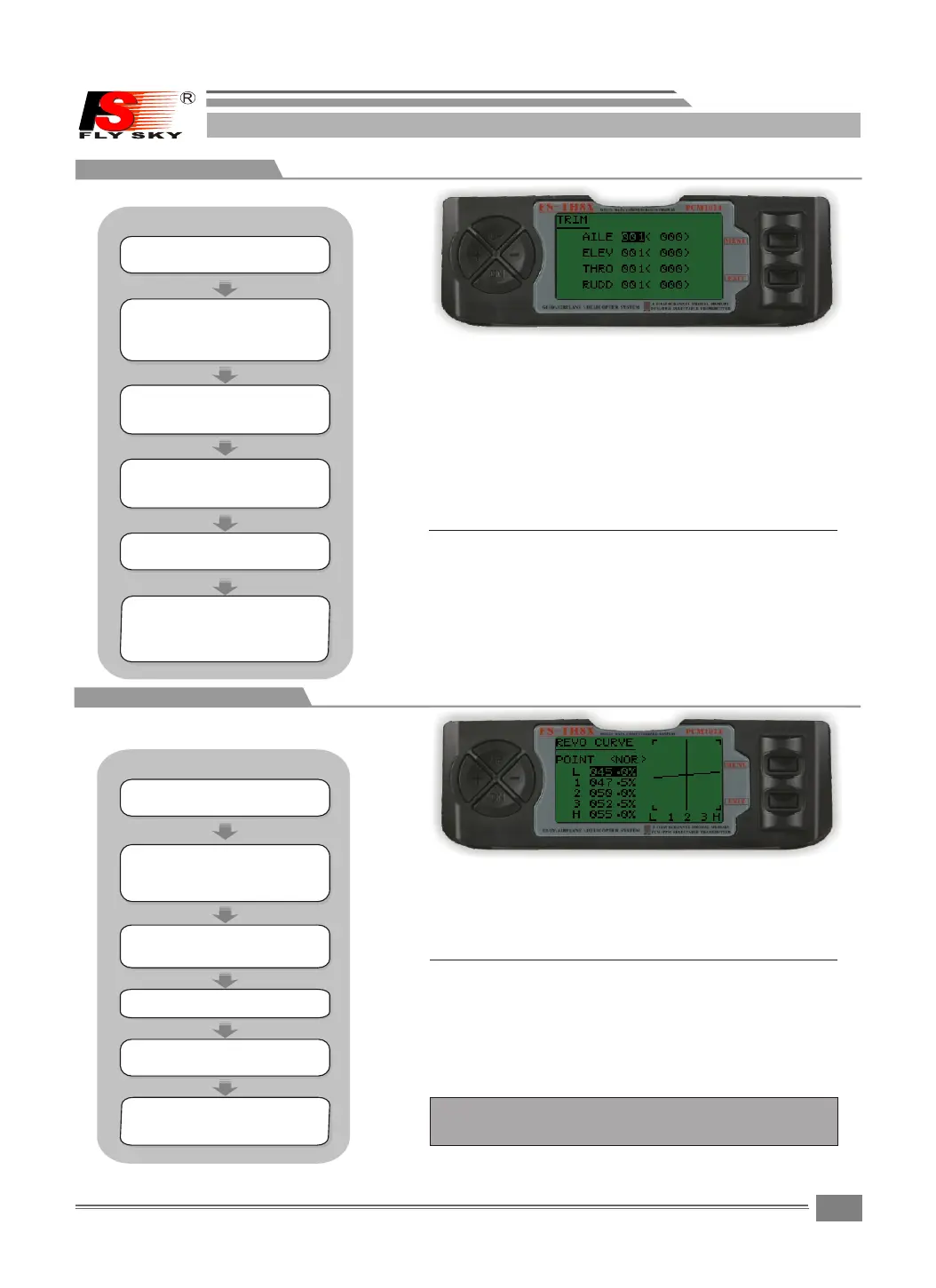
8.10TRIM
TRIM:
Press "+"or"- " key to ch a n g e t h e s e lected trim
value.
Press "+"or"- " key to ch a n g e t h e s e lect REVO CURVE
volue.
Pre s s " + "or"-" k e y t o c h ange the
sel e c t ed TRIM va l u e .
Pre s s " + "or"-" k e y t o c h ange the
sel e c t v alue.
Press the UP o r DOWM key to sele c t t h e T R I M s c reen.
Press the UP o r DOWM key to sele c t t h e R E V O C URVE
screen.
Press the MENU k e y t o save and return last men u .
Press the MENU k e y t o save and return last me n u .
Press the EXIT k e y to not keep and return las t
menu.
Press the EXIT k e y t o not keep and return las t
menu
8.11REVO CURVE
The FS - T H9X su p er ha s di g i t a l tr i m s whic are
different f r o m co n ventional m e c h a n ical tri m
slders.Each trim lev e r i s a c t u a lly a two-direction
switch.Each t ime t h e trim l e v e r is p r essed,the
trim i s ch a nged a se l ected a mount.When you hold
the tri m lever,the tr im spee d increases.The
current trim p osition is g r a phically displayed
on the star t up scr e e n . T h e tr i m su b menu i n c l u d e s
two functions t h a t a re used to m a n a g e th e t r i m
options.
REVO CURVE:
This 5 - p o i n t curv e mix a d ds o p p o s i t e rudde r
input t o counte r a c t the changes i n t o r q u e when
the speed and collecti v e p i t c h o f t he blades is
changed.
Note:The REVO CURVE only u s e d w i t h n o n-heading
hold gyros helicopte r .
STEPS:
STEPS:
Pre s s U P /DOWN ke y s e l e ct the FUN C
SET T I N G menus , a n d press M E N U key
for s h o r t into nex t s u b m enu.
Pre s s U P /DOWN ke y s e l e ct the FUN C
SET T I N G menus , a n d press M E N U key
for s h o r t into nex t s u b m enu.
HELICOPTER
HELICOPTER



 To Next Page