Quick Start Plug and Play
5
Install the Firefly
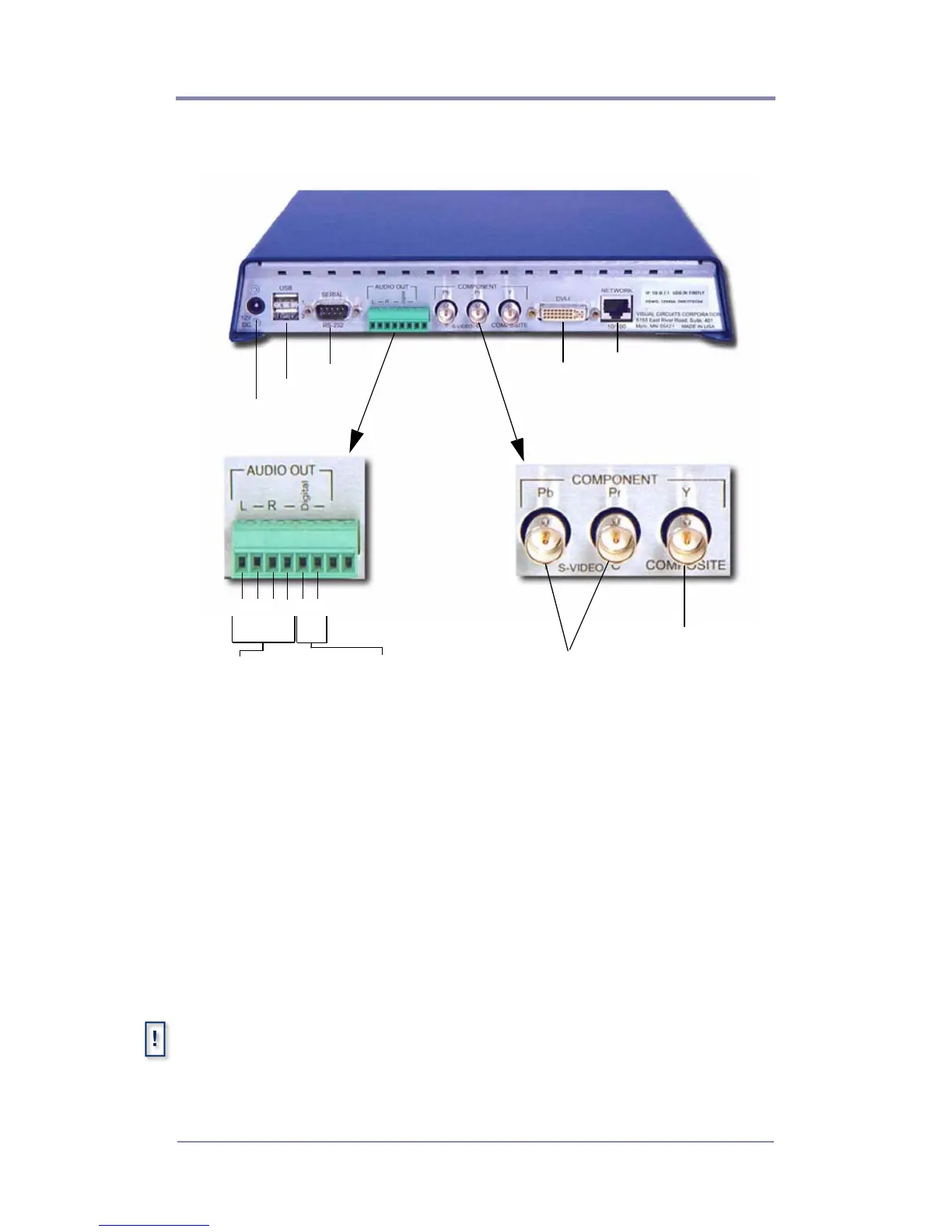
1. Attach the video cables to the Firefly.
❏ For Composite monitors: Connect a BNC-ended
composite cable (not included) to the composite connector
on the back of the Firefly.
❏ For S-Video monitors: Connect a BNC-ended Y s-video
cable (not included) to the corresponding chroma (C) and
luma (Y) connectors on the back of the Firefly.
❏ For Component monitors: Connect BNC-ended
component cables (not included) to the corresponding Pr, Y
and Pb connectors on the back of the Firefly.
MZ RGB and Component Output
For best quality video or to putput to an anology display device, it is
necessary to use the MZ’s DVI output anlog with a DVI to VGA adapter,
see for more details.
Power
12 VDC
USB
Serial
Network
10/100
DVI-I
1 2 3 4 5 6
+
-
+
-
+
-
Digital
S / PDIF
Unbalanced
(Left Right)
S-Video
Y C
Composite
Component
Pb Pr Y



 To Next Page