To Delete a User Code
1. Press 3 6 5, the
*
, followed by the Master Code, followed by ENTER. 5 chirps will be heard.
2. Enter the user ID to clear, followed by ENTER (3 chirps will be heard).
3. Press 3 3 5, # (3 chirps are heard) (335 = DEL).
4. Enter the user ID to clear, followed by ENTER (2 chirps will be heard).
5. Press 3 3 5, # (5 chirps are heard).
The code assigned to that user ID has been deleted. If an error is encountered, the control will beep
continuously for 3 seconds. The Master Code stored in user ID 99 cannot be deleted.
Example: To delete the user code in ID 15:
1. Press 3 6 5 # 1 2 3 4 5 6 [ENTER] (5 chirps will be heard).
2. Press 1 5 [ENTER] (3 chirps will be heard).
3. Press 3 3 5, # (3 chirps will be heard) (335 = DEL).
4. Press 1 5 [ENTER] (2 chirps will be heard).
5. Press 3 3 5, # (5 chirps will be heard).
Service
Door Gasket Replacement
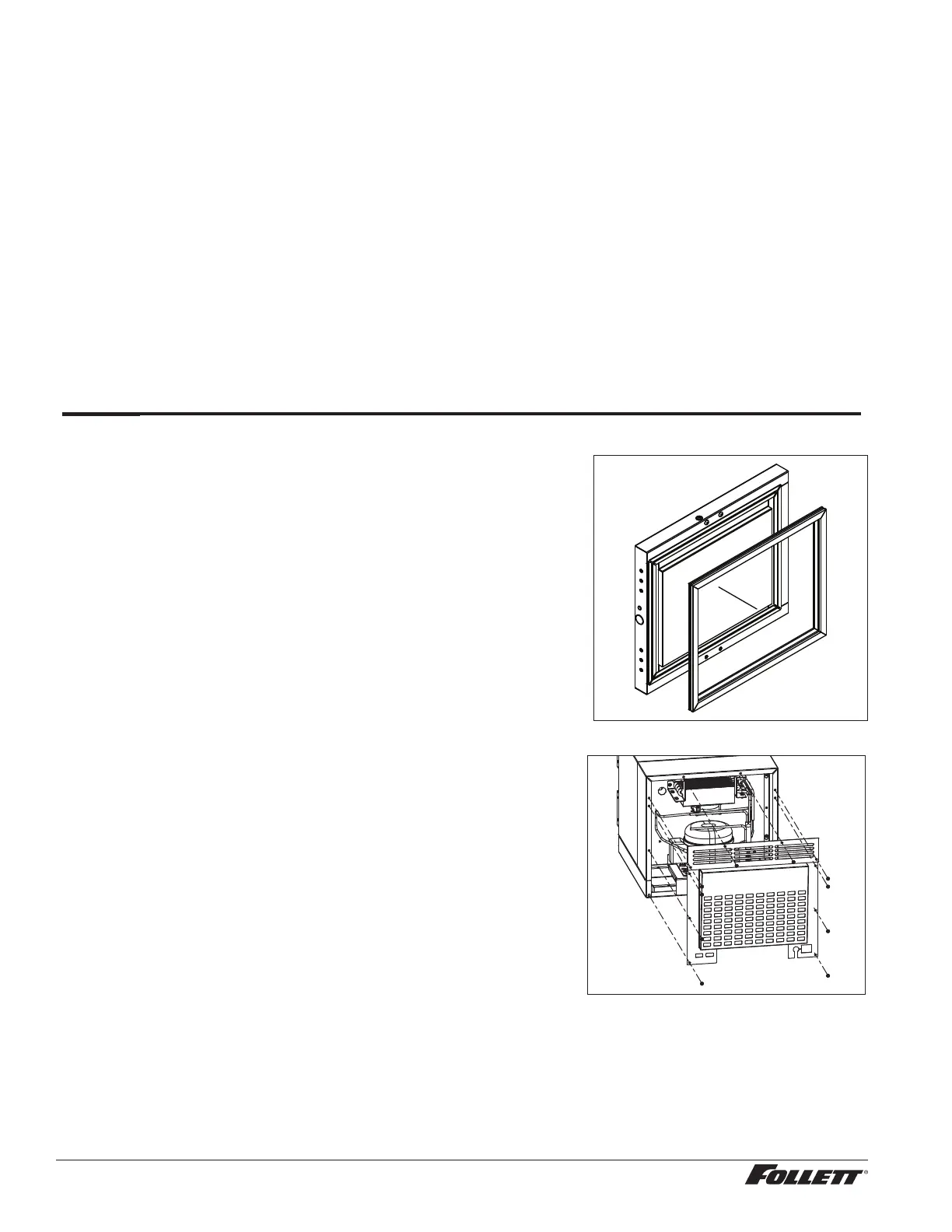
1. Remove existing gasket from mounting track (Fig. 22).
2. Verify mounting track is free of any remaining gasket material.
3. Align new gasket with mounting track and press rmly in place.
4. Open and close door, checking for proper gasket seal without
pinching against refrigerator.
Fig. 22
Access Compressor Compartment
Follett’s compressor compartment allows technicians to gain full
access to the condensing unit from the refrigerator back without cutting
refrigerant lines.
1. Remove rear panel (Fig. 23).
2. Remove two screws facing downward that secure the panel
assembly to the base plate.
Fig. 23
18 REF1/REF2 Compact Refrigerators




 To Next Page