Setting Preferences (cont’d.)
Setting Route Preferences (cont’d.)
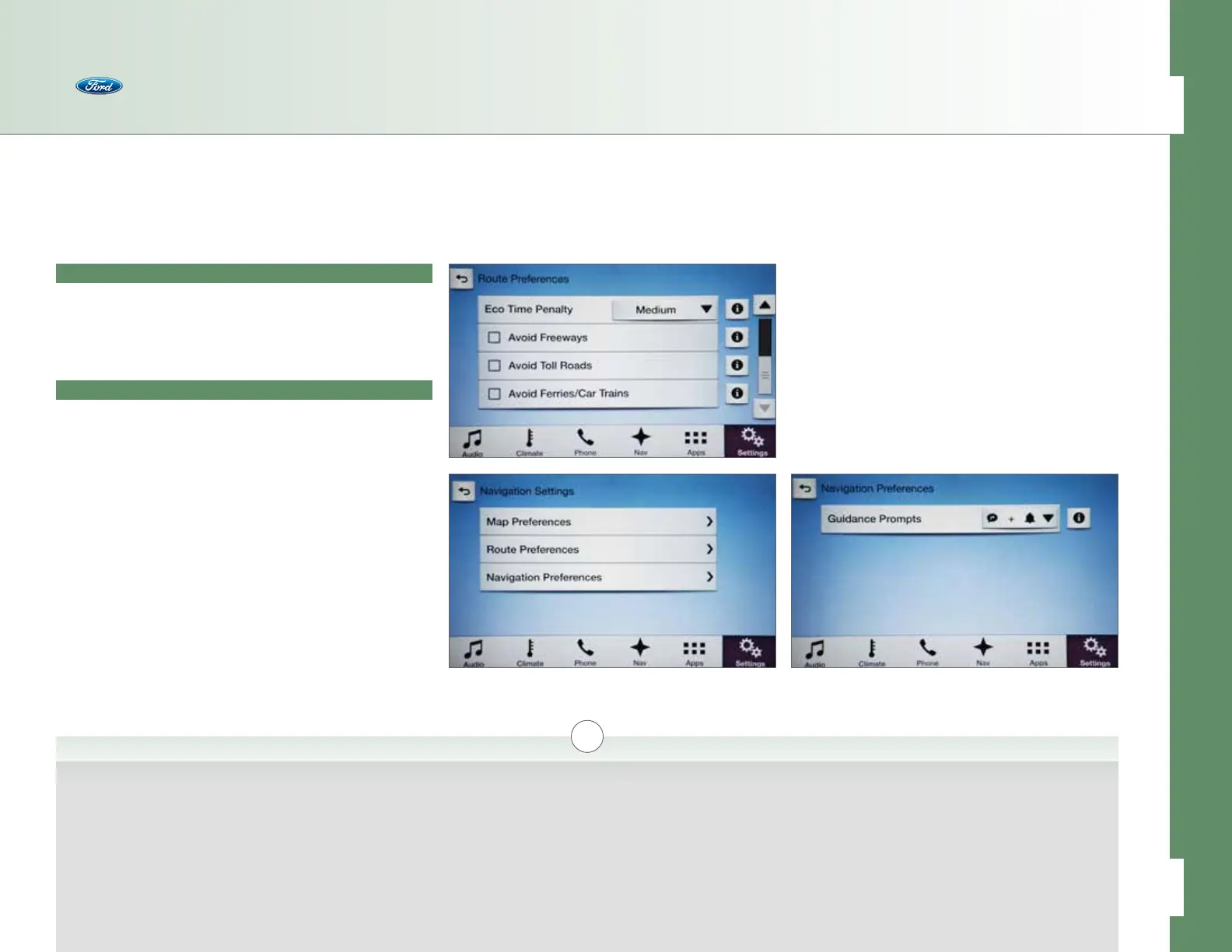
• Route Preferences (cont’d.)
– Avoid Freeways [i]
– Avoid Toll Roads [i]
– Avoid Ferries/Car Trains [i]
Setting Navigation Preferences
Press Nav > Menu > Navigation Settings to access:
• Navigation Preferences
– Guidance Prompts > Voice & Tones/Voice Only/Tones
Only [i]
Navigation
i
Avoid Freeways
If selected, SYNC will avoid
freeways when computing
a navigation route.
Avoid Toll Roads
If selected, SYNC will avoid
toll roads when computing
a navigation route.
Avoid Ferries/Car Trains
If selected, SYNC will avoid
ferries/car trains when
computing a navigation
route.
Guidance Prompts > Voice &
Tones/Voice Only/Tones Only
Allows you to choose how navi-
gation guidance is presented: via
voice instructions only, a tone
followed by a voice instruction
or just a tone.
47 of 76
SYNC
®
3 TECHNOLOGY INFORMATION BOOK



 To Next Page