Forma Scientific, Inc.
____________________________________________________________________________
4-13
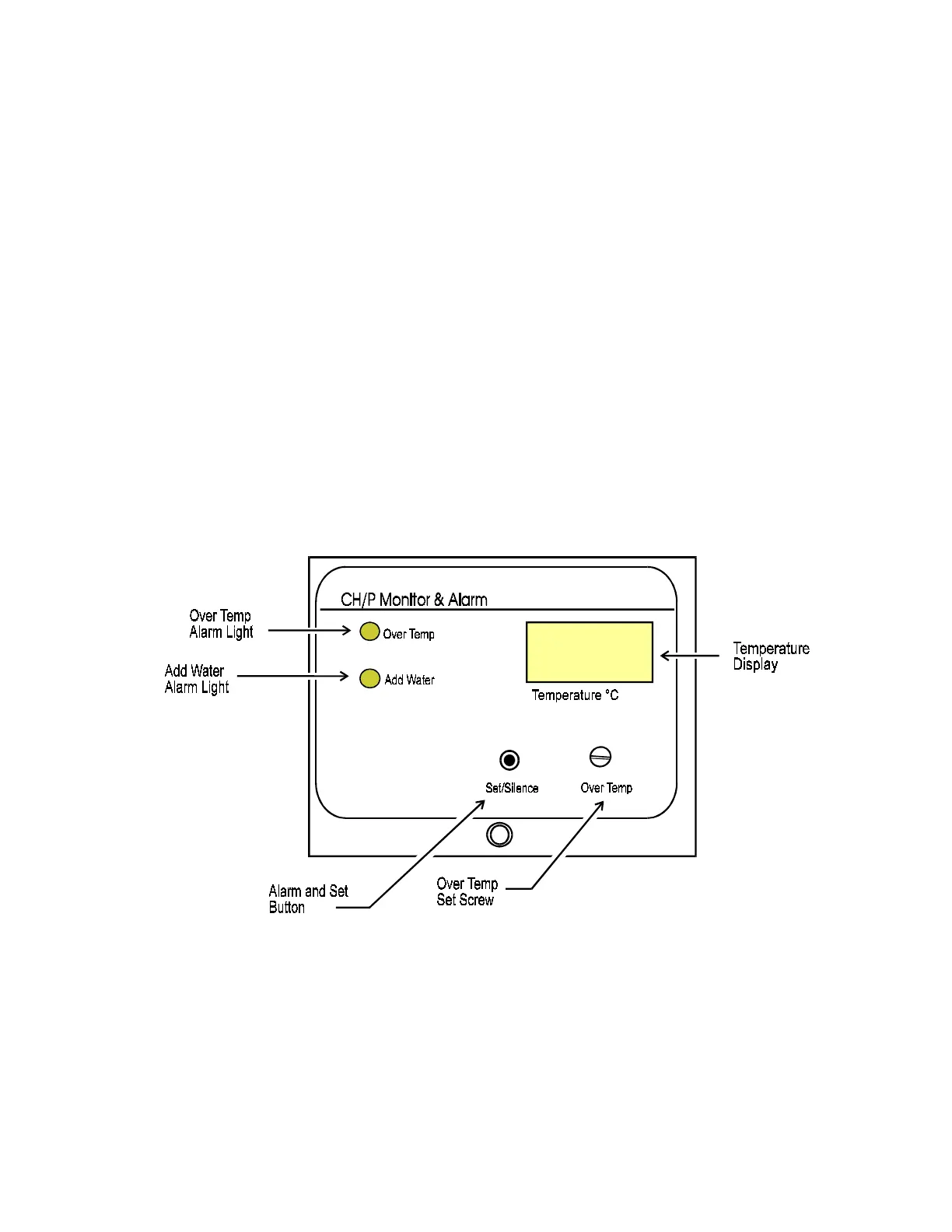
4.15 SETTING THE OVER TEMP SAFETY THERMOSTAT (See Figure 4-7)
Once the chamber temperature has stabilized (as indicated by the digital display), the
Over Temp Safety should be set as follows:
1. Push the SET/SILENCE button on the Alarm Monitor Module.
2. Using the screwdriver mounted on the control panel, turn the OVER TEMP set screw
until the desired over temp alarm point is shown on the digital display. The over temp
setpoint can be set within 0.1° of the operating setpoint, but it is recommended that it
not be set within 0.5 of setpoint.
Note: The Over Temp Safety should be checked quarterly to insure proper operation. To
check the over temp control, push the SET/SILENCE button on the Alarm Monitor
Module and turn the Set screw counterclockwise until the over temp safety light is lit.
Reset the Over Temp Safety after the test.
Temperature and Alarm Monitor Module, Figure 4-7


 To Next Page