Forma Scientific, Inc.
____________________________________________________________________________
4-15
2. Check the CO
2
level with a FYRITE until two consecutive readings agree. If the
FYRITE and display are not within plus or minus 1.0%, consult the factory.
Note: After proper zeroing, the CO
2
display will be more accurate than the FYRITE because
the zero adjustment was accomplished using absolute.
4.17 SETTING THE CO
2
CONTENT
The following conditions must be satisfied before the CO
2
percentage can be set:
Allow the temperature and humidity in the chamber to stabilize. For initial settings of
CO
2
, it is recommended that temperature and humidity be allowed to stabilize for 24
hours.
Check the CO
2
control zero (See Section 4.15 for detailed instructions).
To set the CO
2
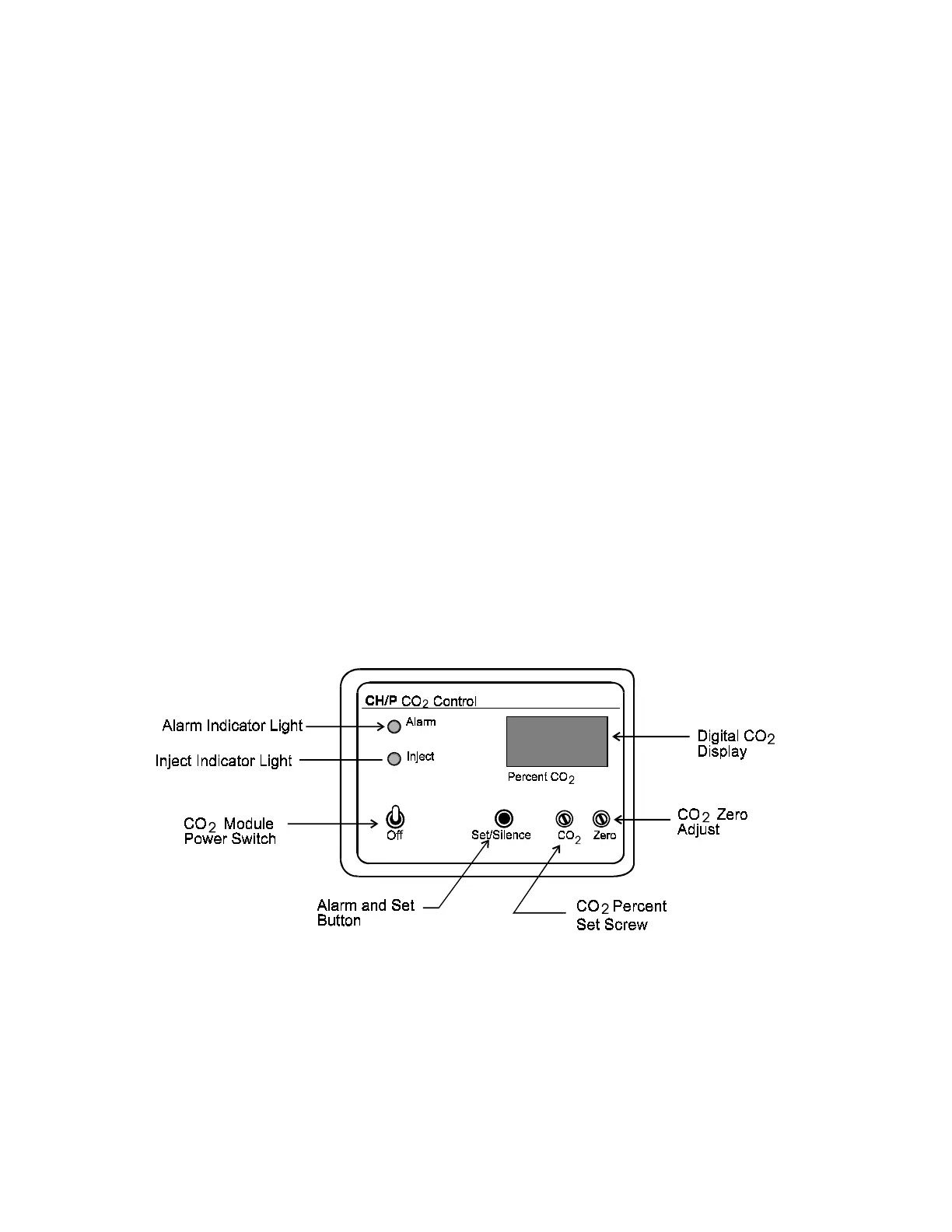
percentage, press the CO
2
SET/SILENCE button and rotate the CO
2
set screw until the desired percentage is indicated on the digital display.
Note: If the unit is in Over Temp and a CO
2
injection occurs, a brief, high CO
2
percentage
will appear on the digital display. This is due to the shut down of the internal fan
during Over Temp. The high CO
2
percentage occurs only at the sensor. CO
2
throughout the chamber will remain normal.
CO
2
Control Module
Figure 4-8


 To Next Page