21
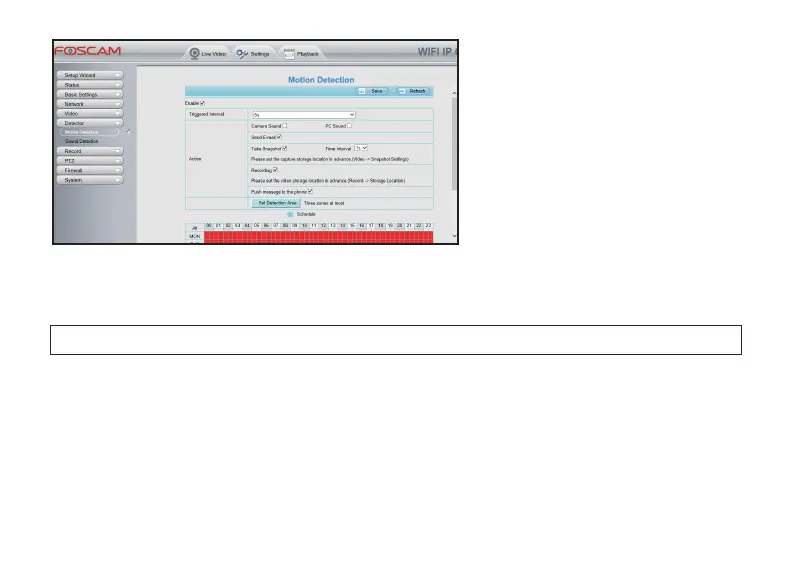
● Access to your camera from a Web
Browser, and go to Sengs > Detector >
Moon Detecon. Check the Enable; aer
compleng the sengs, click Save buon
to enable Moon Detecon.
a). Trigger interval: The interval me between two moon detecon.
b). Alarm acons: The way that you want to be nofied when a moon is detected:
Sound: Please select Camera Sound or PC Sound if you want the camera to alarm when it detects a moon;
NOTE: If you selected ‘PC Sound’, please make sure that your computer has connected with a speaker.
Send E-mail: If you want to receive an E-mail when the camera detects a moon, please select Send E-mail,
and you will need to set up your email informaon first otherwise camera will fail to send you the alarm
E-mail; Check page 20 in this User Manual for how to setup your E-mail;
Take Snapshot: If you select this acon, camera will take a snapshot automacally when it detects a moon;
Recording: If you want to record a video when your camera detects a moon, you will need to select this
acon; The alarm video will be stored at the storage locaon you set up for this camera (You can only store
the alarm video at your camera’s SD Card or your FTP, but if you acvate your cloud service, the alarm video
will be stored at Foscam Cloud server at the same me).



 To Next Page