22
NOTE: You will need to setup the storage locaon for alarm videos first, and your alarm videos can be only stored at
camera’s SD card, FTP and Foscam Cloud, please check page 17 to page 19 in this User Manual for how to setup a
storage locaon for your camera.
Push Message to your phone: You will need to download Foscam App to your smartphone, and add your
camera to Foscam App first, and then this acon can take effects.
c). Detect Area: Click Set Detecon Area to the detecon area sengs page, where you can set up the
Sensivity and the up-to-3 detecon areas. ( For P2, you can only set up 1 detecion area, and set up the
Sensivity on Sengs > Detector > Moon Detecon page. )
d). Alarm Schedule: Click All buon, and you will see all me range turn red, which means that when
something moving in the detecon area at anyme, the camera will alarm; Or you can click week day words
to set the schedule by days, and also you can click specific me block to set the schedule by a specific me.
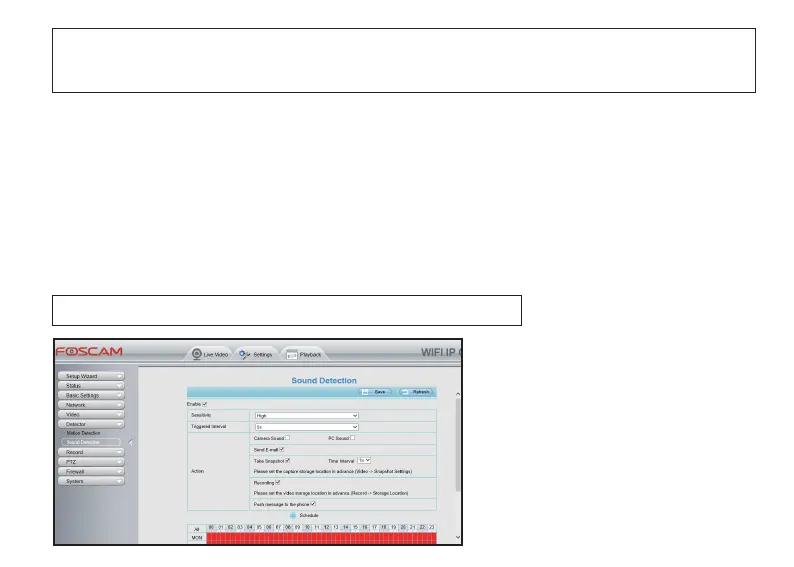
4.4.2 Sound Detecon
NOTE: You must set the detecon schedule, or else there is no alarm anyme.
Access to your camera from a Web
Browser, and go to Sengs > Detector >
Sound Detecon. Check the Enable; aer
compleng the sengs, click Save buon
to enable Sound Detecon.



 To Next Page