119
6. While the desired backup number/title is shown on the display,
press the [ENTER/YES] key.
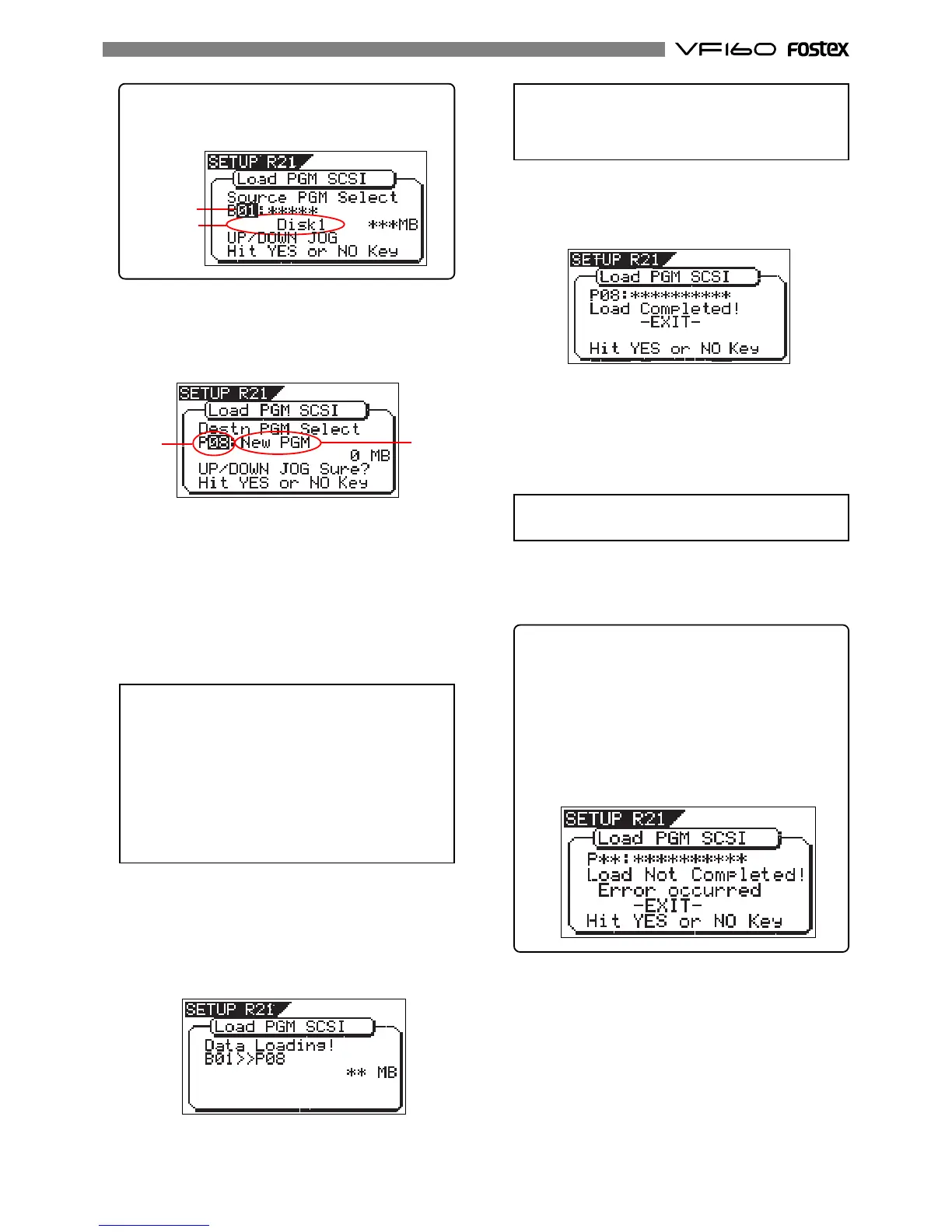
The display shows the screen for creating a new program
on the current drive, to which data will be loaded (“New
PGM” lights).
As described earlier, when loading data from a CD-RW
drive, the VF160 creates a new program on the current
drive, which is the load destination.
Therefore, “New PGM” is shown on the right of the flash-
ing program number.
The program number for the newly created destination
program is the next number to the highest existing pro-
gram number.
For example, if there are 8 existing programs (“P01”
through “P08”) on the current drive, the newly created
program is numbered “P09”.
<Note>
If you rotate the
[JOG]
dial while the above screen
(“
Destn PGM Select
”) is shown, you can select an exist-
ing program on the current drive as the destination.
However, as mentioned earlier, when loading data
using CD-RW you cannot actually load data to the ex-
isting program by overwriting the program data.
If you press the
[ENTER/YES]
key (see the next step)
while selecting an existing program as the destina-
tion, the display shows “
Void!
” and the VF160 ignores
the operation.
When you load song data which is saved to more
than one disc, the display also shows the disc num-
ber currently set. The example below shows DISC-1
is set.
7. While “New PGM” is shown, press the [ENTER/YES] key.
The VF160 starts the load operation. The recorded space
shown on the display is counted down while the load
operation progresses. It will take some time for loading
all data. The following display example shows that the
data of the backup number “B01” is being loaded to “P08”
which is newly created on the current drive.
Flashing
Lighting
Flashing
Lighting
When completing the load operation, “Load Completed!”
appears on the display (as shown below) and the VF160
stops access to the drive, while the disc in the CD-RW
drive is automatically ejected.
8. Press the [EXIT/NO] key (or the [STOP] key) to exit the Setup
mode.
<Note>
If there is not enough available space for loading on
the current drive, the display shows “
Disk Full!
” and
the display returns to the previous screen.
<Note>
You cannot abort the load operation before completed.
When loading data from more than one disc, the first
disc will be ejected immediately after all disc data has
been loaded, while “Insert Disk!” appears on the screen.
After inserting the second disc, the VF160 automatically
resumes the load operation.
After completing loading all the discs, the above screen
appears.
<About load error>
If an error occur for some reason during the load
operation, the error message as below appears.
If it appears, press the
[EXIT/NO]
key.
The display returns to the previous screen be-
fore performing the load operation.
Note that loaded data before the error message
appears is all invalid.
<Display example for loading>


 To Next Page