28
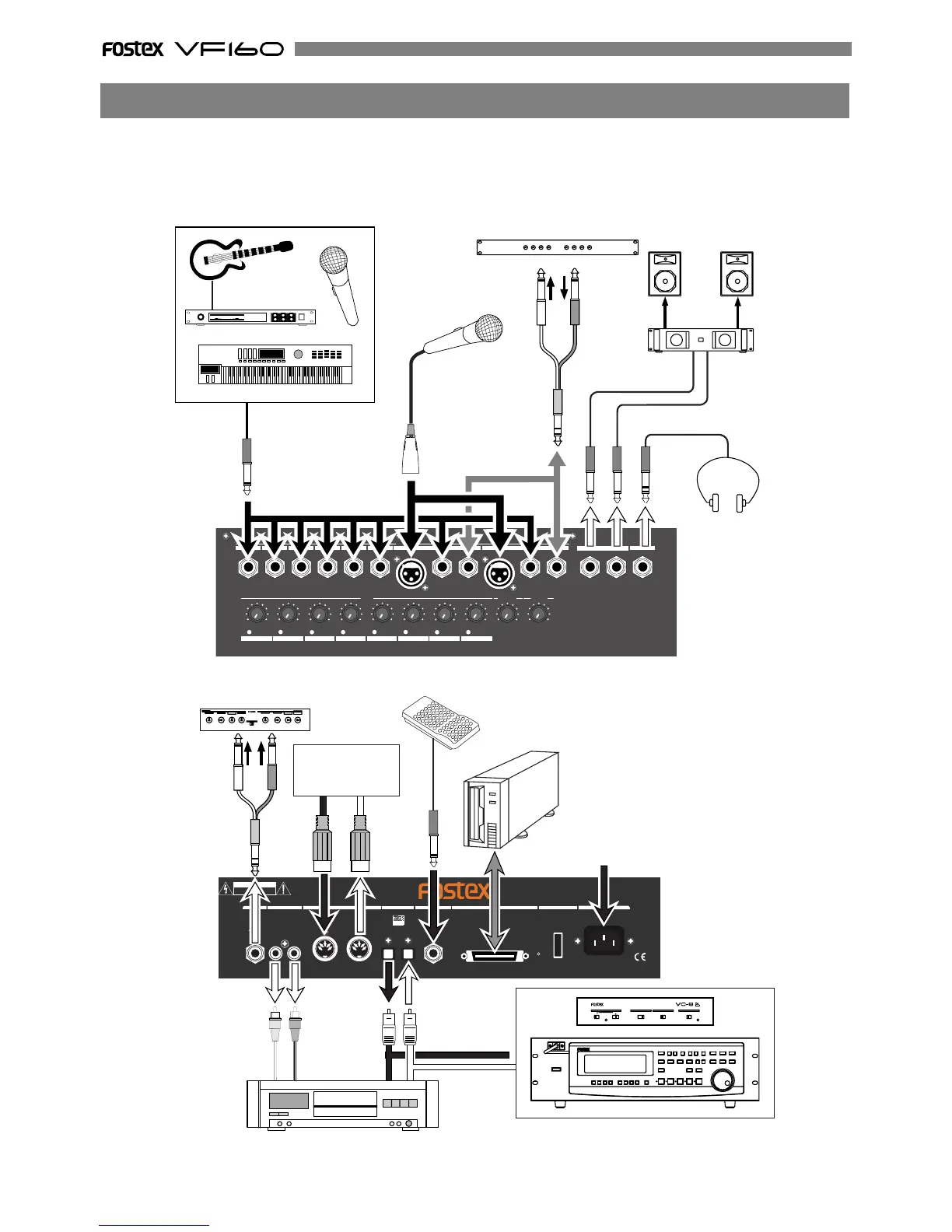
The VF160 is equipped with input/output jacks to connect the following sound sources and external
equipment.
Always turn the [MASTER] fader, [MON OUT] knob and [PHONES] knob to “0” when connecting the external
equipment to the input/output jacks.
1/9/A
2/10/B 3/11/C 4/12/D 5/13/E 6/14/F 7/15/G 8/16/H
PEAK
PEAKPEAKPEAKPEAKPEAKPEAKPEAK
LINE
MIC
LINE
MIC LINE
MIC
LINE
MIC
LINE
MIC
LINE
MIC LINE
MIC
LINE
MIC 0 10
010
PHONES
MON OUTTRIM
INPUT
6/14/F 7/15/G
5/13/E4/12/D
3/11/C2/10/B
1/9/A
INSERT
UNBAL
BAL
8/16/H
BAL
INSERT
UNBAL
R
L
PHONES
MON OUT
2
1
RL
IN OUT
IN OUT
AVIS:VIS:
OPTICAL
AC-IN
POWER
SCSI
FOOT SW
DIGITAL/DATA
MIDI
ST OUT
AUX SEND
CAUTION
RISK OF ELECTRIC SHOCK
DO NOT OPEN
RISQUE DE CHOC ELECTRIQUE NE PAS OUVRIR
WARNING:
TO REDUCE THE RISK OF FIRE OR ELECTRIC
SHOCK, DO NOT EXPOSE THIS EQUIPMENT
TO RAIN OR MOISTURE.
Monitor Amplifier
Monitor Speaker
Headphones
Microphone
Guitar & Processor
Keyboard
Microphone
Unbalanced output
Balanced output
Input Output
Compressor/Limitter
Foot Switch
Single processor etc.
AC 100V
Master Recorder etc.
Analog input
Digital In/Out
(S/P DIF)
adat digital input
adat digital output
Sequencer
PC w/sequence
software etc.
MIDI OUT
MIDI IN
SCSI devices
(Save/Load)
adat digital equipment
75
OFFON
ANALOG INPUT MODECLOCK DIGITAL MODE
ADAT/ANALOG CONVERTER
POWER
WORD
1-4 1-81-2 ONSTBYINT(44.1k)OPTICAL
LOCKED
S/P DIFADAT
OPTICAL
Connections of Peripheral Equipment



 To Next Page