125
Chapter 7 SETUP mode
The SETUP mode of the VF160 offers the “Changing the initial settings” menus, which configure the operating environment
of the VF160, a “Check” menu that enables you to check the number of events for each track, and an “Execution” menu
that executes certain operations, such as save and load and disk formatting. The “Changing the initial settings” menu
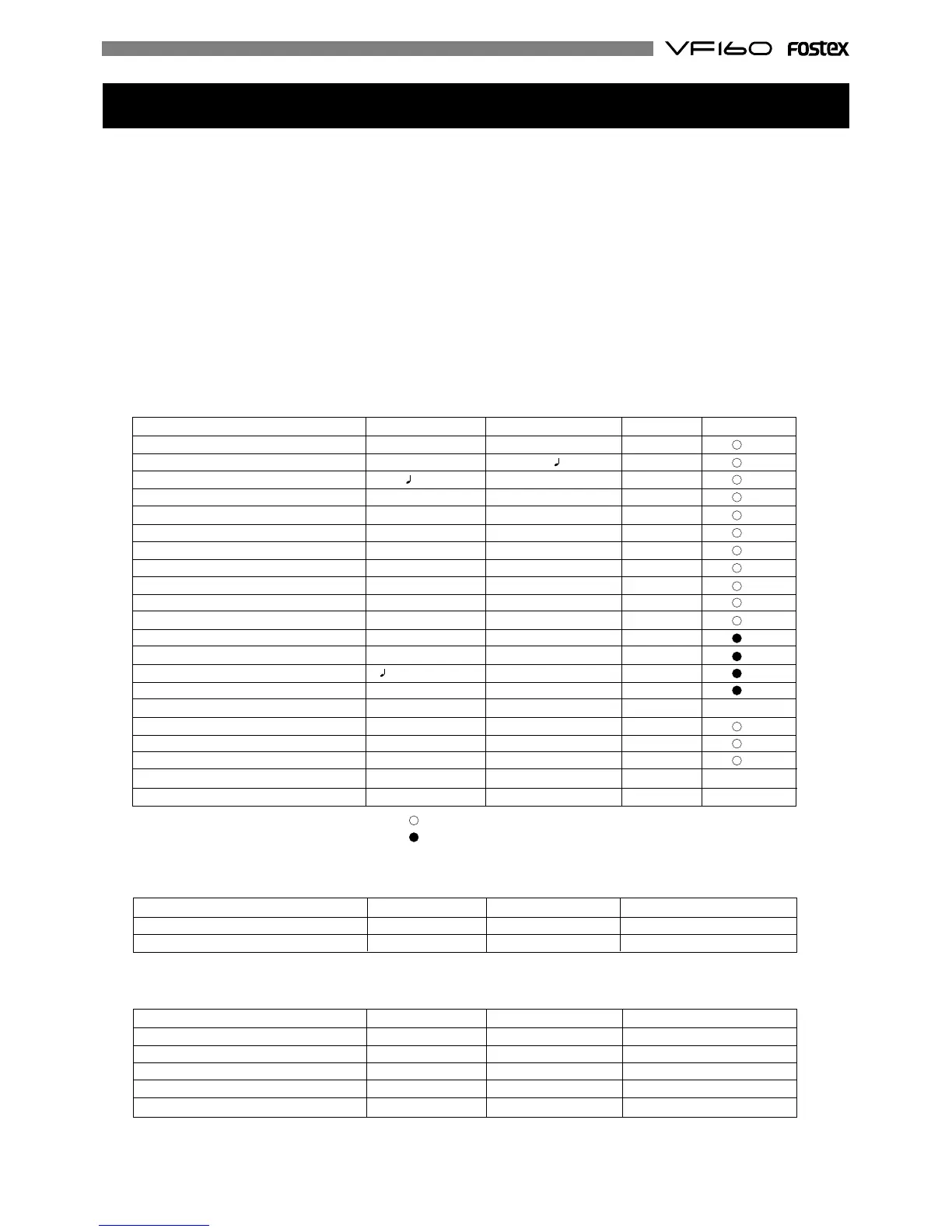
include 21 parameters as shown in <Table-1> below. These parameters were set before the VF160 was shipped from
the factory and these values are called the “initial settings.” Modifying these settings allows you to change the operating
environment of the VF160. The “Check” menu provides two parameters “Checking the number of events” as shown in
<Table-2> - “Checking the number of events” and “Checking the current drive information.”
Also, as shown in <Table-3>, the “Execution” menus include five items: Title Edit, Delete PGM, Load PGM, Save PGM,
and Disk Format, which you can execute by selecting the corresponding SETUP menu. This chapter explains how to use
the “Changing the initial settings” menus shown in <Table-1> and the “Check” menu shown in <Table-2>.
For more information on the “Execution” menus, refer to the corresponding pages in the “Reference page” column in
<Table-3>.
: Modes applicable program by program. They can be saved/loaded.
: Modes applicable to all program. They cannot be saved/loaded.
<Table-1> “Changing the initial settings” menu
Parameters Display Default setting Refer page Community
Setting a time signature Signature Set 001BAR 4/4 126
Setting a tempo Tempo Set 001BAR 1 120 128
Setting the metronome function Click Off 129
Setting a preroll time Preroll Time 00s 130
Setting MIDI sync output signal Midi Sync Out CLK 130
Setting an MTC frame rate Frame Rate 25 frame 131
Setting an MTC offset value Mtc Offset 00h 59m 57s 00f 00sf 131
Setting the offset mode Offset Mode ABS 132
Setting the slave mode Slave Mode Off 132
Setting the slave type Slave Type Vari 133
Setting the record protect function Rec Protect Off 133
Setting digital input Digital In Analog 134
Setting digital output Digital Out SPDIF 135
Setting BAR/BEAT resolution mode Resolution Off 135
Setting the MIDI device ID number Device ID 00 136
Setting the drive Drive Select IDE 137 -
Setting the fader fix mode Fader Fix Off 138
Setting the fader recall mode Fader Recall Off 138
Setting the pair fader Pair Fader Set Off 139
Setting the phantom power Phantom Power Off 140 -
Setting the compressor channel Comp. Channel Off 141 -
<Table-2> “Check” menu
Check item Display Refer page Community
Check of the event number on the track Number Of Event 136 -
Check of the current drive information Drive Information 137 -
<Table-3> “Execution” menu
Execution item Display Refer page Community
Editing a program title Title Edit 71 -
Deleting a program Delete 71 -
Saving song data to an external device Load PGM 98 -
Loading song data from an external device Save PGM 98 -
Formatting an current drive disk Disk Format 23 -


 To Next Page