124
6. If you agree to the message contents, press the [ENTER/
YES] key.
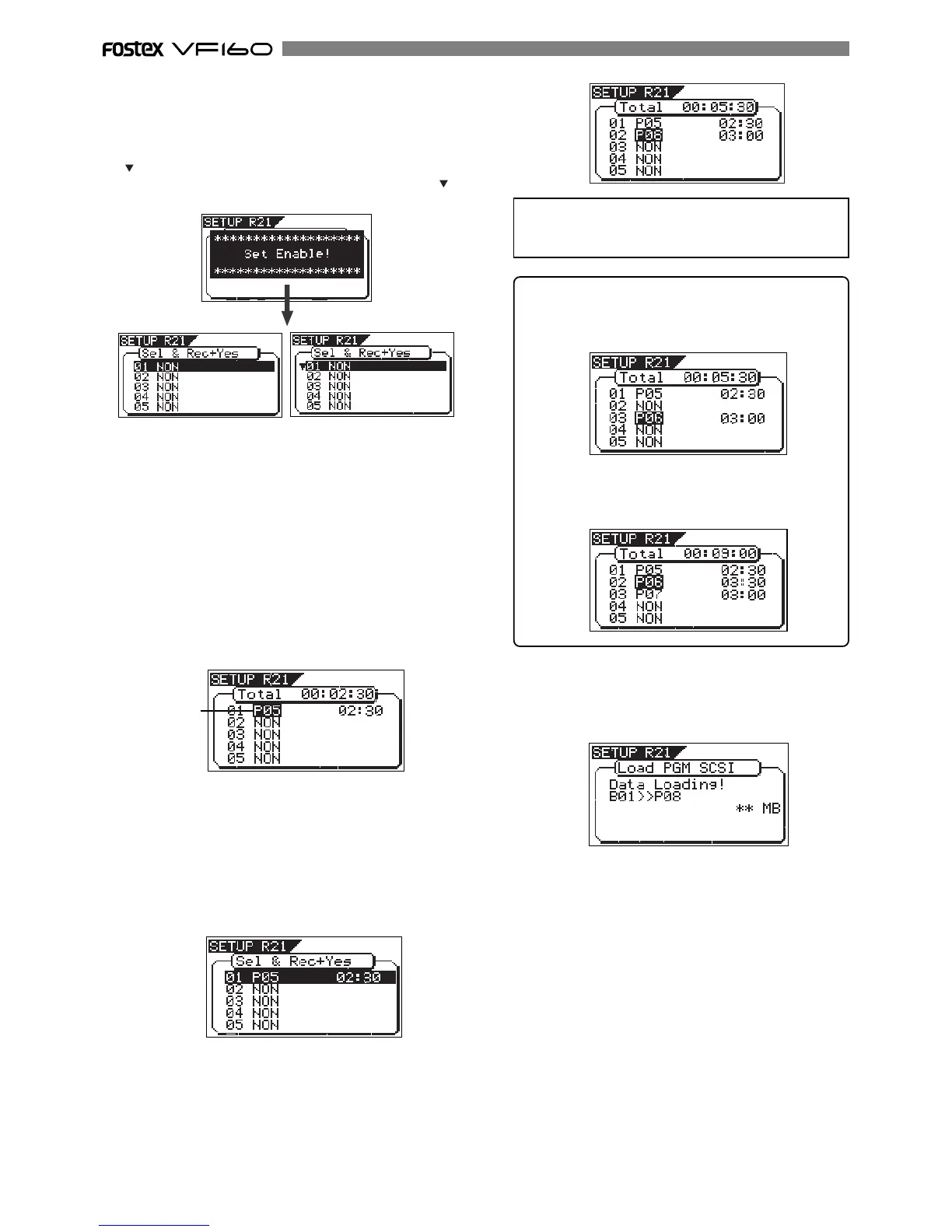
After showing “Set Enable!”, the display shows the screen
for selecting the song(s) to be loaded.
If there is more than one track recorded on the audio CD,
“ ” flashes, showing that you can select a desired track.
If there is only one track recorded on the audio CD, “ ”
is not shown on the screen.
7. Use the [JOG] dial to select a track number to be loaded and
press the [ENTER/YES] key.
The destination program number starts flashing, which is
one greater than the highest program number among those
available on the current drive. This means a track is going
to be loaded to a new program.
For example, if there are 4 programs available on the current
drive, the destination program number is "P05".
If there are already 99 programs on the current drive, "Disk
Full!" appears and no destination program number is shown.
In such a case, delete the unnecessary program(s) on the
current drive and then perform step 7 above again.
<Hint>
If you are going to load tracks 1 and 3 in the example
above, instead of tracks 1 and 2, track 3 will be loaded
to program 06 (see the screen example below).
However, if you select track 2 after selecting tracks 1
and 3, the unit automatically reassigns track 2 to pro-
gram 06 and track 3 to program 07 (see the screen
example below).
9. After specifying track(s) to be loaded, press the
[ENTER/YES] key while holding down the [RECORD] key.
The VF160 starts loading tracks to the current drive.
The following screen example shows that track 1 is now
being loaded to program 08 on the current drive.
10. Press the [EXIT/NO] key to quit the Setup mode.
The display returns to the Normal display that was shown
last time before entering the Setup mode.
<When only one track is recorded>
<When more than one track is recorded>
<Note>
When loading from an audio CD, no title is shown when
selecting the track.
8. While the program number is flashing, press the [ENTER/
YES] key.
The flashing program number changes to light solidly,
showing that the first track is ready to be loaded to the
program.
Flashing
By rotating the [JOG] dial, you can select "NON", as well as
a "Program". When performing the load operation, tracks
that are set to "NON" are not loaded.
To load more than one track, repeat steps 7 through 8
above.
The following screen example shows that tracks 1 and 2
will be loaded to program 05 and 06 respectively.
The track title and track time are also shown to the left
of each program number.
When the loading ends, “Load Completed!” appears on the
screen, while the disc is automatically ejected from the
CD-RW drive.


 To Next Page