118
2. Press the [SETUP] key to enter the setup mode.
The display shows the screen for selecting the setup menu.
3. Use the [JOG] dial to select (highlight) “Load PGM” and press
the [ENTER/YES] key.
The display shows the screen for selecting a load device,
where “IDE” is flashing.
In the following procedure, we assume that a CD-RW
drive is connected to the VF160 SCSI port and a CD-
RW/CD-R disc to which data has been saved is pre-
pared.
Loading backup data from a CD-RW drive
<Note>
Do not carry out any VF160 key operation until the ac-
cess process to the CD-RW/CD-R disc is completed.
<Note>
If you load song data which is saved to more than one
disc, set
DISC-1
first.
If you set the other disc and go on the following proce-
dure, the VF160 automatically recognized that the disc
order is not correct and the display shows
“Wrong Disk”
,
followed by
“Illegal No!”
momentarily, and the disc is
automatically ejected.
1. After turning on both the VF160 and the CD-RW drive
connected, insert the disc to the CD-RW drive.
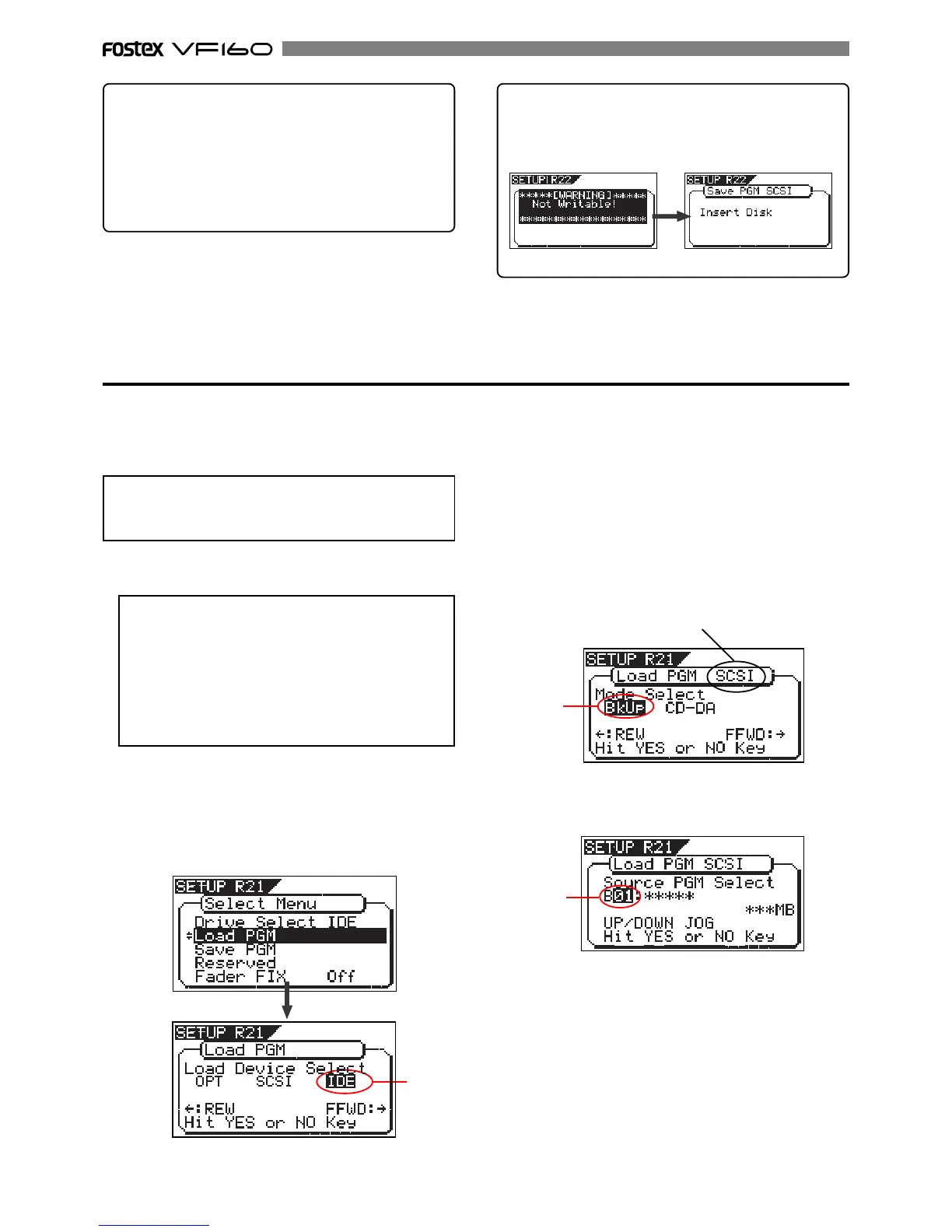
<Hint 2>
If you try to save data to a recorded CD-R disc, the
display shows a warning message saying “Not Writable”,
followed by a message saying “Insert Disk” as below.
• To eject the disc
Use the [JOG] dial to highlight “Eject” (flashing) and press
the [ENTER/YES] key.
The disc is ejected while the display shows “Insert Disk!”.
By inserting a disc, you can start the save operation
again from the beginning.
5. While “BkUp” is flashing, press the [ENTER/YES] key.
The display shows the backup number and title, as well
as recorded space.
Flashing
Flashing
4. Press the [REWIND] key/ [F FWD] key to select "IDE" or
"SCSI" and press the [ENTER/YES] key.
Select "SCSI" if a SCSI-type CD-RW drive is used. Select
"IDE" if the optional CD-RW drive is used.
Press the [ENTER/YES] key to display the CD-RW drive
name, and then changes to the load mode select screen
where "Bkup" (Backup) flashes.
To load saved data, select "BkUp". To load data from an
audio CD, select "CD-DA".
Let's select "Bkup" here and go on to the following
procedure.
See "loading from an audio CD" described later for details
about how to use audio CD (CD-DA) discs.
By rotating the [JOG] dial, you can select a desired pro-
gram number/title from among available programs in the
VF160 current drive. You can also select “Eject”.
If you select “Eject” and press the [ENTER/YES] key, the
disc is ejected
Flashing
"SCSI" or "IDE" is shown according to the drive used.


 To Next Page