55
1
2
3
4
5
Flashing
6
7
8
9
<Hints>
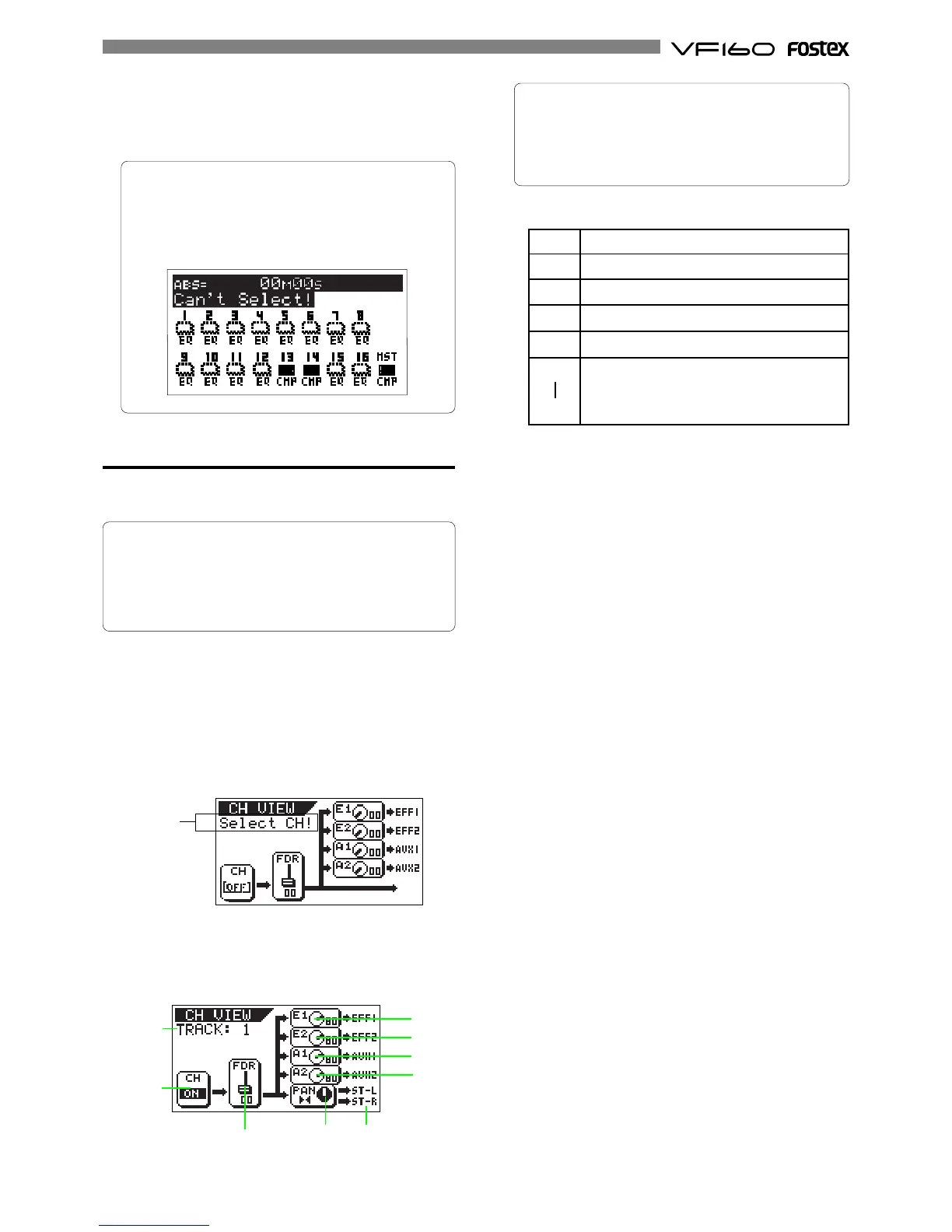
If you try to select a channel to which the compressor
cannot be applied, a warning message ("Can't select!")
will flash and the operation will be cancelled.
The following screen shows that you can apply the com-
pressor to channels 13-14 and the master channel.
Channel view
You can see the current setting information for chan-
nels 1 through 16 via the Channel view screen.
1) Channel on/off
2) Fader levels
3) Send levels and pre/post selections for EFF1, EFF2, AUX1
and AUX2.
4) Pan positions
5) Signal destination (stereo busses or Rec busses)
1. Press the [LO-G] key while holding down the [SHIFT] key.
The channel view screen appears.
The first time you bring up the channel parameter edit
screen, the message prompting to select a channel ("Select
CH!") flashes, as well as all the CH STATUS/CH SEL indica-
tors on the panel flash.
From the second time on, the screen shows the status in-
formation of the previously selected channel when bring-
ing up the screen (as shown in the drawing of step 2 be-
low).
2. Press the [CH STATUS/CH SEL] key of the desired channel.
The current setting information is shown, together with the
channel name.
4. After completing the parameter setting, press the [EXIT/NO]
key.
The VF160 exits the channel edit mode and the display
returns to the Normal display.
1
2
3
4
5
6
9
The screen example above shows the following status.
3. To turn off the channel view screen, press the [EXIT/NO] key.
The VF160 exits the channel edit mode and the display
returns to the Normal display.
Channel 1 is currently selected.
The channel is on.
The channel fader is set to "00" (-∞).
The pan is in the center position.
The signal is fed to ST OUT (L/R).
The post-fader signal of the selected
channel is fed to EFF1, EFF2, AUX1 and
AUX2 at level 80.
If two adjacent channels are fader-paired, when press-
ing the [CH STATUS/CH SEL] key for the even channel, the
fader icon in the figure shown in step 3 above is shown
in dotted line.
See page 138 for details about how to pair faders of ad-
jacent two channels.



 To Next Page