145
1
<Notes on installing the CD-RW drive>
• The CD-RW drive is made of precision parts.
Do not apply a mechanical shock or use excessive force when installing it.
• Before installing the drive, make sure that the power of the VF160 is off and the power cord is discon-
nected.
• Install the drive correctly according to this manual.
Note that damage to the drive caused by inappropriate installation is not covered by the guarantee.
How to install the CD-1A
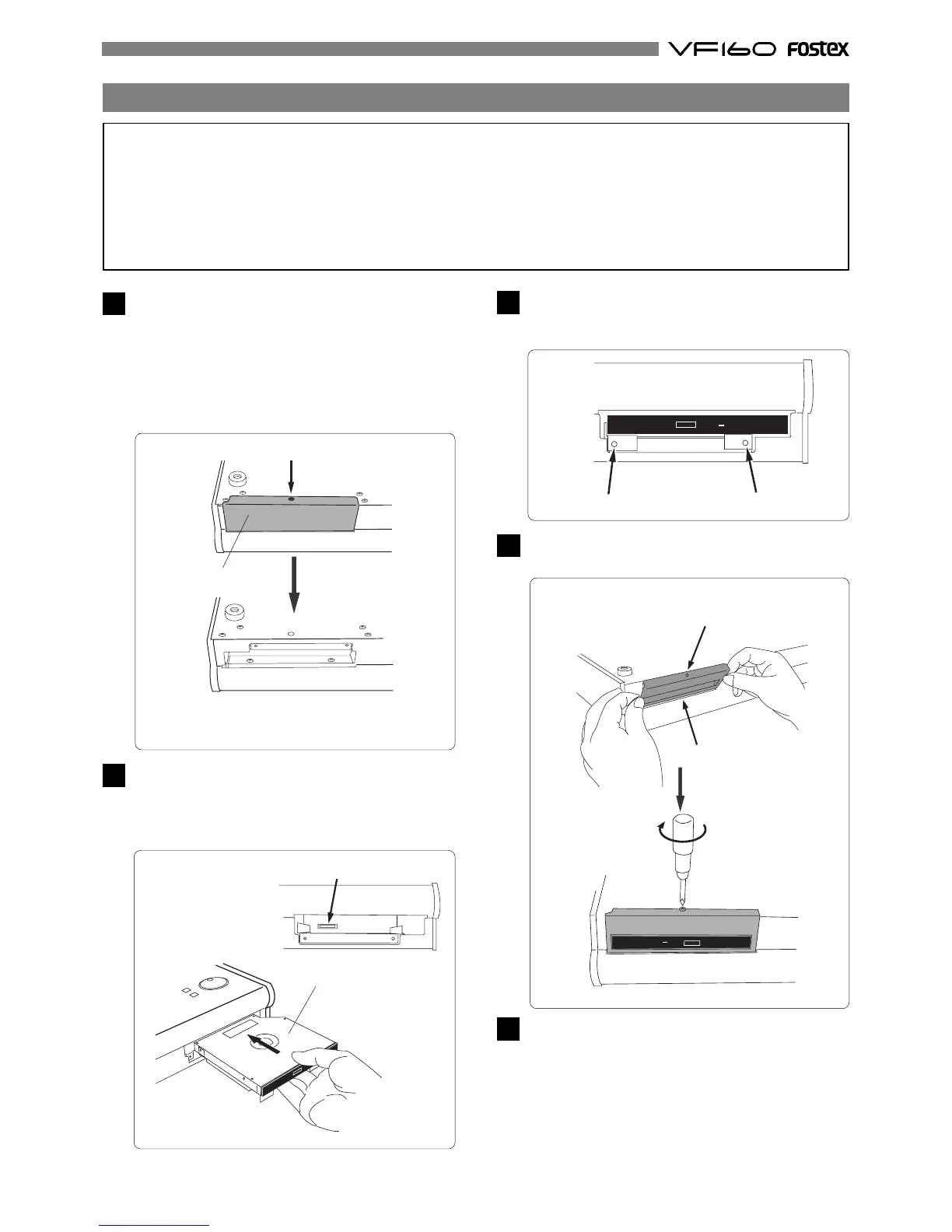
Place the VF160 upside down on a material such as a soft
cloth, and unscrew the screw that fixes the blank panel.
Be careful not to drop the VF160 or give a strong shock
to the VF160, which may damage the hard-disk drive
built into it.
Keep the blank panel for future use in case you
unmount the CD-1A.
Keep the screwmentioned above, which will be used
in step 4 below after installing the CD-RW drive.
2
Turn the VF160 over and insert the CD-1A into the slot on
the front panel.
Push the CD-1A firmly, without forcing, so that the
connector of the CD-1A fits into its companion in the
slot.
Blank panel
Unfasten the screw that fixes the blank panel.
Remove the blank
panel.
CD-1A
connector
3
Use two screws supplied with the CD-1A to fix the CD-1A
to the VF160 from the front panel.
Tighten the screws with a screwdriver.
screw position
screw position
4
Use the screw you removed in step 1 to fix the blank panel
supplied with the CD-1A to the front panel.
Slant the panel slightly when inserting the
panel inside the unit.
Use the screw you re-
moved in step 1 to fix
the blank panel.
Connect the power cord of the VF160 and turn on the
power.
Make sure that the VF160 starts up, and the LED indi-
cator on the front panel of the CD-1A blinks for a few
seconds then turns off.
Wait until the VF160 display changes to the Normal
display from the start-up display, and then you are
ready to operate the CD-1A.
5



 To Next Page