90
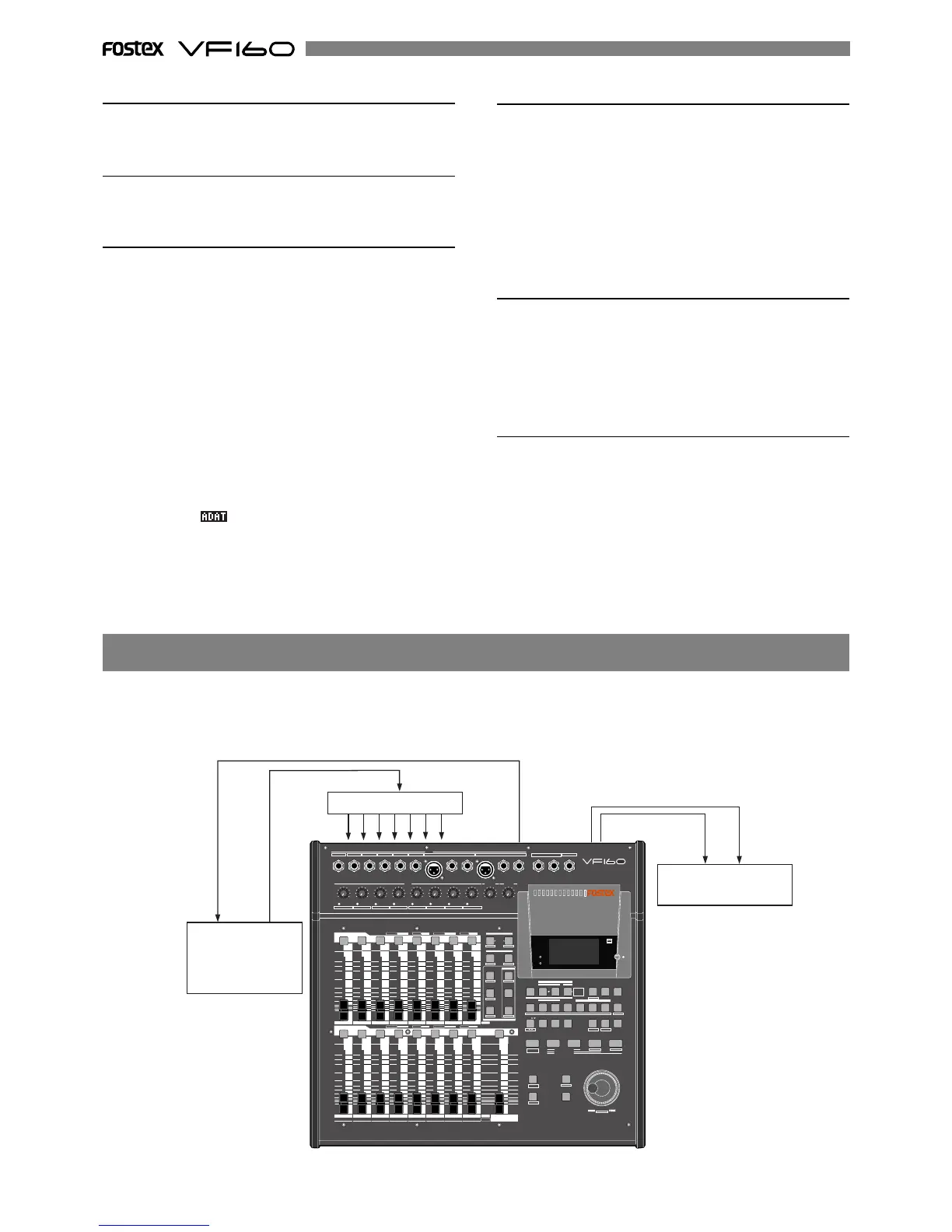
By setting any desired meter at any desired point of the programmable tempo map contained in the VF160, and by
output of a MIDI clock and song position pointer according to the setting, a hardware type MIDI sequencer can be
synchronized as a MIDI clock slave. Consequently, in this system, the VF160 will be the master and the MIDI sequencer
the slave.
Check adat signal and adjust monitor
1. Press the [RECORD] key.
All tracks go to the input monitor status.
If signals are input from the VC-8 (or VM88) in this state,
the input level appears on the level meters 1-8.
To monitor the adat signals, turn the ch1-ch8 channel fader
up to "0", and then turn up the [MON OUT] knob or [PHONES]
knob.
There is no need to adjust the REC level on the VF160.
The channel fader procedures only adjust the monitor
sound.
Setting the analog input signal setting
1. Set the channel fader of ch9-ch16 to "0".
2. Adjust the input level with the [TRIM] for which each sound
source is input.
Fine tune the input with the channel fader if necessary.
The monitor sound can also be heard at this time.
Starting to record
1. To start recording, press the [PLAY] key while the [RECORD]
key is depressed.
When recording starts, the adat digital signals from VC-8
(or VM88) are input along with the signal input of the analog
sound source.
This allows recording of 8 analog signals (8 channels) and
8 adat digital signals (8 channels) for recording on 16 tracks
at the same time.
Setting the VC-8 or VM88
1. Set the VC-8 or VM88 so it outputs adat digital signals.
For more details refer to the VC-8 or VM88 User's Manual.
Setting "Digital In" on the VF160
1. Set the "Digital In" menu in the SETUP mode to "adat".
For more details refer to the SETUP mode on page 134.
REC Track and Master Fader settings
1. Press the [INPUT SEL] key.
Check to see that ch9-ch16 are set to “TRK (Track)”.
If there is any channel that is set to “IN (Input)” switch it to
“TRK”.
2. Press the [DIRECT-REC TRK] key, so all tracks are READY.
The REC track selected will appear on the display.
3. Press the [CH STATUS/CH SEL] key of ch1-ch16 so all tracks
are READY.
Now the adat digital signals (ch1-ch8) from VC-8 (or VM88)
are recorded on tracks 1-8 and the input signals from [IN-
PUT] A to H are recorded on tracks 9-16.
4. Press the [EXIT/NO] key and return to the Normal Display.
If normal adat digital signals from VC-8 (or VM88) are input
into VF160, “ ” lights up on the Normal Display.
5. Set the master fader to "0".
MIDI Clock Sync System
ACCESS
PHANTOM
INPUT SEL SOURCE
REC ASSIGN
BUSS
DIRECT
REC TRK REC TRK
AUTO RTN
AUTO PUNCH
START IN
OUT
END
IN ALIGN SEL OUT
DISP SEL
PGM SEL
SETUP
INT
MIXDOWN
A RTN
A PLAY
SCENE SEQ.
TIME BASE
CLIPBOARD
MARK
1
2
3
4
5
6
7
HOLD/ STORE EDIT
UNDO
/REDO
VARI
PITCH LOCATE SCRUB
P.EDIT EVT MEM
F FWDREWINDPLAYSTOPRECORD
CLIPBOARD PLAY
LOCATE ABS 0
LOCATE REC END
PREV
NEXT
JOG
SHUTTLE
AUTO
PUNCH
EXIT/NO
EJECT
ENTER/YES
FADER
ADJUST
LEVEL
ADJUST
SHIFT
CH PARAM EDIT
CH VIEWFADER
TRACK
LO-GPAN
PRE/POST
MID-G/F/Q
AUX1/AUX2
COMPPRE/POST
EFF1/EFF2 HI-G/F/Q
EQ/COMP
MUTE MUTE
EFF1 EFF2
EFF EDIT
MAP
DIRECT RCL
CLEAR
STORE
RECALL
SCENE
MUTEOFFPLAYGREEN
RECRED
INPUT
ORANGE
CH STATUS
CH STATUS/CH SEL
1/9/A
2/10/B 3/11/C 4/12/D 5/13/E 6/14/F 7/15/G 8/16/H
PEAK
PEAKPEAKPEAKPEAKPEAKPEAKPEAK
LINE
MIC
LINE
MIC LINE
MIC
LINE
MIC
LINE
MIC
LINE
MIC LINE
MIC
LINE
MIC 0 10
010
PHONES
MON OUTTRIM
INPUT
6/14/F 7/15/G
5/13/E4/12/D
3/11/C2/10/B
1/9/A
INSERT
UNBAL
BAL
8/16/H
BAL
INSERT
UNBAL
R
L
PHONES
MON OUT
MUTE
OFFPLAYGREENREC
RED
INPUTORANGE
CH STATUS
CH STATUS/CH SEL
1
23
4
5
6
78
9
A
10
B
11
C
12
D
13
E
14
F
15
G
16
H
MASTER
TRACK
INPUT
-60
-50
-40
-30
-20
-10
0
+6
-60
-50
-40
-30
-20
-10
0
+6
-60
-50
-40
-30
-20
-10
0
+6
-60
-50
-40
-30
-20
-10
0
+6
-60
-50
-40
-30
-20
-10
0
+6
-∞
-∞
-∞
-∞ -∞
ACCESS
PHANTOM
OPTICAL
ST OUT L, R
MIDI IN
MIDI OUT
MIDI IN
MIDI Sound Source
MIDI Sequencer
MIDI OUT
Master Recorder
MIDI clock & song position ponter



 To Next Page