23
Premier Diagnostic Platform i70Pro User's Manual V1.01
3.4.3 Diagnostic Menu
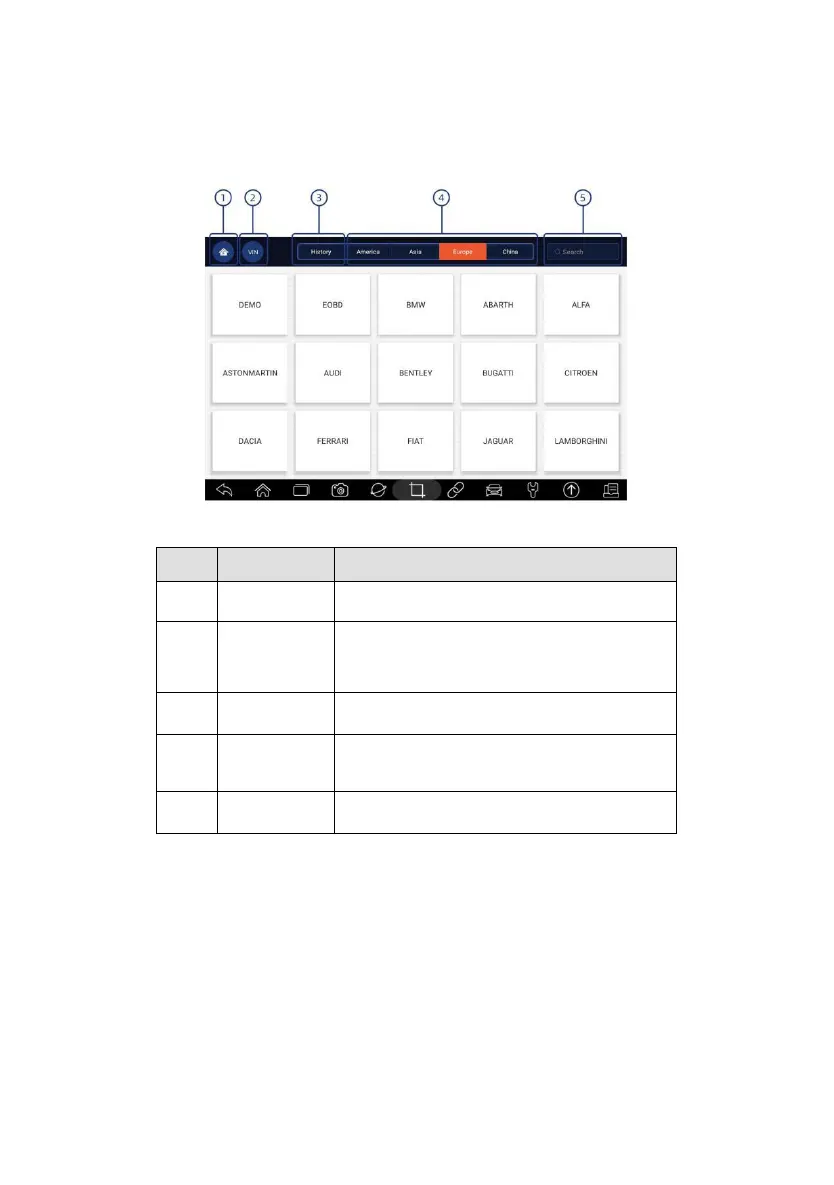
Touch Diagnostic at the i70Pro application menu, and the Diagnostic menu
will display. The operations of the buttons on Diagnostic menu are described
in the below table.
Figure 3-9 Sample Diagnostic Menu Screen
Back to the Application Menu.
Shortcut for VIN reading menu, which
typically includes Automatic Read, Scan VIN
and Manual Entry.
Displays the tested vehicle records.
Displays car makes from different origins like
America, Asia, Europe and Chinese.
Lets you search a vehicle make quickly.
Table 3-2 Diagnostic Menu Title Bar
4 Vehicle Identification
This section illustrates how to use the scanner to identify the specifications of
the vehicle under test.
The vehicle identification information presented is provided by the ECM of
the vehicle being tested. Therefore, certain attributes of the test vehicle must
be entered into the scan tool to ensure the data displays correctly. The
vehicle identification sequence is menu driven. Simply follow the screen














 To Next Page