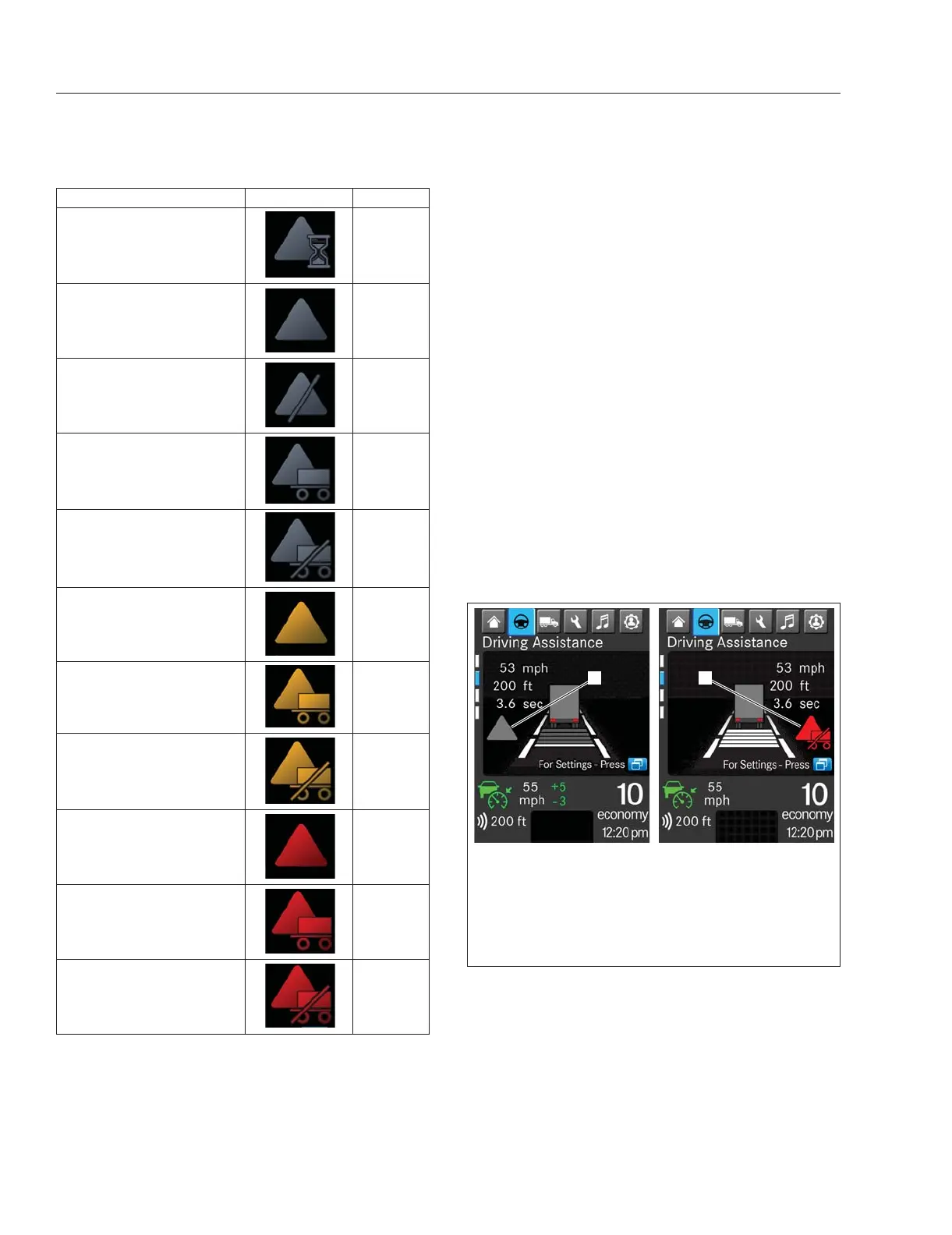
Name Telltale Color
Side Guard Assist
Initializing
Grey
Side Guard Assist Active
Grey
Side Guard Assist Error or
Deactivation
Grey
Side Guard Assist Trailer
Monitoring Active
Grey
Side Guard Assist Trailer
Monitoring Deactivated
Grey
Caution, Side Guard Assist
Amber
Caution, Side Guard Assist
Trailer
Amber
Caution, Side Guard Assist
Trailer Monitoring
Deactivated
Amber
Warning, Side Guard Assist
Red
Warning, Side Guard Assist
Trailer
Red
Warning, Side Guard Assist
Trailer Monitoring
Deactivated
Red
Table 6.3, Side Guard Assist Telltales
Activating or Deactivating the Side
Guard Assist
SGA becomes active when the ignition is turned on.
An SGA initializing telltale, the first telltale in
Table 6.3, appears on the driver display during
startup.
After startup, if a trailer is not attached to the tractor,
a grey triangle appears on the driver display screen
as shown in
Fig. 6.17. If a trailer is attached, a grey
triangle with trailer appears.
If SGA monitoring experiences an error or is
deactivated without a trailer attached, a grey triangle
with a slash appears.
If SGA monitoring is deactivated with a trailer
attached, a triangle with a trailer and a slash
appears.
NOTE: When the transmission is shifted to
reverse the SGA deactivated telltale is displayed
in the instrument cluster until the transmission is
shifted back to Neutral (N) or forward gears.
The M2 Plus vehicle has an optional SGA OFF
physical switch, used to support specific operations
where SGA could have false positives. See
Fig. 6.18. The driver can turn the SGA function off at
any time and it will remain off until the driver
deactivates the switch, or until a complete key cycle
turns the SGA feature on. When the SGA OFF switch
f61209607/21/2022
1
2
In a left-hand drive vehicle, the SGA activation state
(grey) telltale appears to the left of center on the driver
display driving assistance screen; the amber (not shown)
and red warning telltales appear to right of center.
1. Location of SGA Activation State (Grey) Telltale
2. Location of SGA Warning Telltales
Fig. 6.17, SGA Telltale Locations, ICUC
Detroit Assurance 5.0
6.15














 To Next Page