FRICK
QUANTUM™ COMPRESSOR CONTROL PANEL S90-010 M
MAINTENANCE Page 27
ADDITIONAL SERVICE RELATED SCREENS
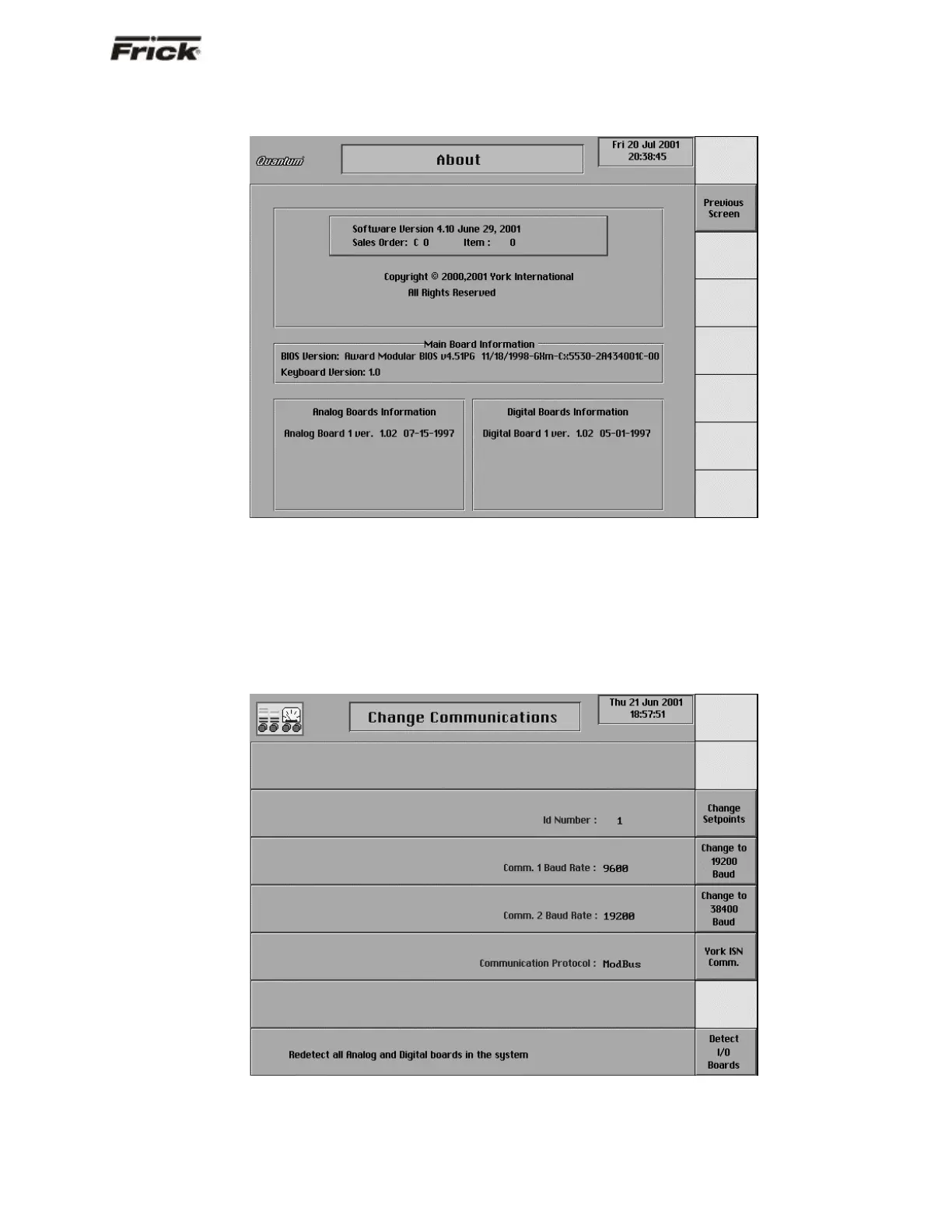
“About” Screen
The “About” screen shows the Analog and Digital boards
that have been detected. If a board has lost
communications, a shutdown will be issued. All outputs
are turned off on a Digital Board that has lost
communications. All inputs will get set to their minimum
value range on an Analog Board that has lost
communications. A loss of communications to an analog
board will probably result in sensor fault shutdown
messages that are associated with the sensors on that
board.
If the RX LED on the I/O board is blinking but the board
was not detected on the “About” screen, or an I/O Comm
failure occurs, check the address of the board.
To access the “About” screen from the “Operating Status”
screen, press the [MENU] key, then the [ABOUT …] key.
“Change Communications” Screen
This screen is shown here to indicate where the “Detect
I/O Boards” key is located. This selection provides a
method to detect all connected Analog and Digital boards.
If a board has been removed, a communication error
shutdown will be issued until this key is selected. You may
view the “About” screen to see what has been detected.
To access the “Change Communications” screen from the
“Operating Status” screen, press the [MENU] key, then
the [Panel Setup] key, the [Change Comms] key.



 To Next Page